


Support our independent tech coverage. Chrome Unboxed is written by real people, for real people—not search algorithms. Join Chrome Unboxed Plus for just $2 a month to get an ad-free experience, access to our private Discord, and more. Learn more about membership here.
START FREE TRIAL (MONTHLY)START FREE TRIAL (ANNUAL)
It hasn’t been but three months since the Youtube team began to test showing Google Shopping advertisements in its video platform and similarly, in the Discover feed. Google and Alphabet CEO, Sundar Pichai, stated on an earning’s call around that time that “Youtube’s massive store house of “unboxing” videos could be turned into a shopping opportunity”, and has been well known to be excited about the potential of monetizing Google Services. He’s not wrong in saying that since Youtube is the world’s second largest search engine, it makes sense to explore the idea, but it doesn’t exactly have content creators excited. Some have shown concerns of Google stealing revenue out from under its users with this new feature, and now, it’s finally begun to appear in some Youtube videos.
According to the Youtube Experiments Help page that is kept up to date by Team Youtube, the testing of automatically listing products detected in videos started this past week, and seeks to use AI and Machine learning or perhaps just text detection to pick up on what products are being “unboxed” in a creator’s video reviews. The user will then see a list of these products – say, the Pixel 5, for example – in between the recommended videos section and the video player. Google states that the goal is to help people explore more videos and information about these products on Youtube. It’s currently only available as a feature in the U.S. though.
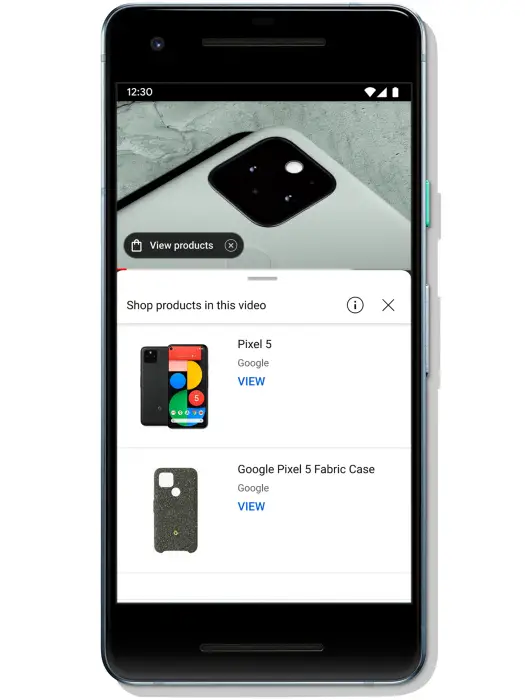
I did encounter this module on the web version of Youtube using my Chromebook, but was unable to capture it before leaving the video and really didn’t think twice about it until now. I’m sure that Google’s goal is to tie this directly in to Google Shopping including via the new tab page modules and Chrome Cart feature we’ve recently seen appear and ultimately, into Assistant Memory for later recall.
Recently, a new Shopping microsite popped up called the ‘Best Things for Everything guide’, and was created to help users find the perfect gift for that special someone by combining the 1,000 most popular products searched on Google into one super nice, fluidly animated artboard-style layout. On its about page, it encouraged shoppers to take advantage of its new price tracking and insights tools as well, and the Shopping Gift Guide website which launched prior to the microsite was updated prior to Valentine’s Day with suggestions themed around the lover’s holiday.
Anything the company can do to boost sales of its products and put them in front of you is the mission, I imagine, based on everything we’ve seen so far. Google Shopping has become Google’s golden child in wake of its need to end its dependence on ad revenue over the next few years. The only question is how can it do so without further frustrating its user base with its tactics? As with everything, time reveals all things.
SUBSCRIBE TO UPSTREAM
Get Chrome Unboxed delivered straight to your inbox
Upstream is our flagship, curated newsletter with the top stories, most click-worthy deals, giveaways, and trending articles from Chrome Unboxed sent directly to your inbox a few times a week. Join 31,000+ subscribers.

