
• Skip to main content
  • Skip to primary sidebar
  • Deals
  • Features
  • Guides
  • Chromebooks
  • Videos
  • Podcast
  • More +
    • Reviews
    • Unboxing
    • Upcoming Devices
    • Chromebook Plus
    • Chrome
    • ChromeOS
    • Chrome OS Flex
  • Search
  • Sign Up
  • Log In
Chrome Unboxed – The Latest Chrome OS News

Chrome Unboxed - The Latest Chrome OS News

A Space for All Things Chrome, Google, and More!

  • Deals
  • Features
  • Guides
  • Chromebooks
  • Videos
  • Podcast
  • More +
    • Reviews
    • Unboxing
    • Upcoming Devices
    • Chromebook Plus
    • Chrome
    • ChromeOS
    • Chrome OS Flex
  • Search
  • Sign Up
  • Log In

You can now star your important Google Tasks and sort them by importance

June 9, 2022 By Johanna Romero View Comments

Support our independent tech coverage. Chrome Unboxed is written by real people, for real people—not search algorithms. Join Chrome Unboxed Plus for just $2 a month to get an ad-free experience, access to our private Discord, and more. Learn more about membership here.
START FREE TRIAL (MONTHLY)START FREE TRIAL (ANNUAL)

Let’s be honest: as a productivity app, Google Tasks hasn’t quite been the number one choice for most people when it comes to productivity. Its feature set is good-enough, allowing you to schedule and check off simple tasks, but its options are not considered “Pro” or even consistent throughout all the platforms where you can access it. However, it’s starting to feel like Google wants to change that perception and is finally starting to give Tasks the attention it deserves.

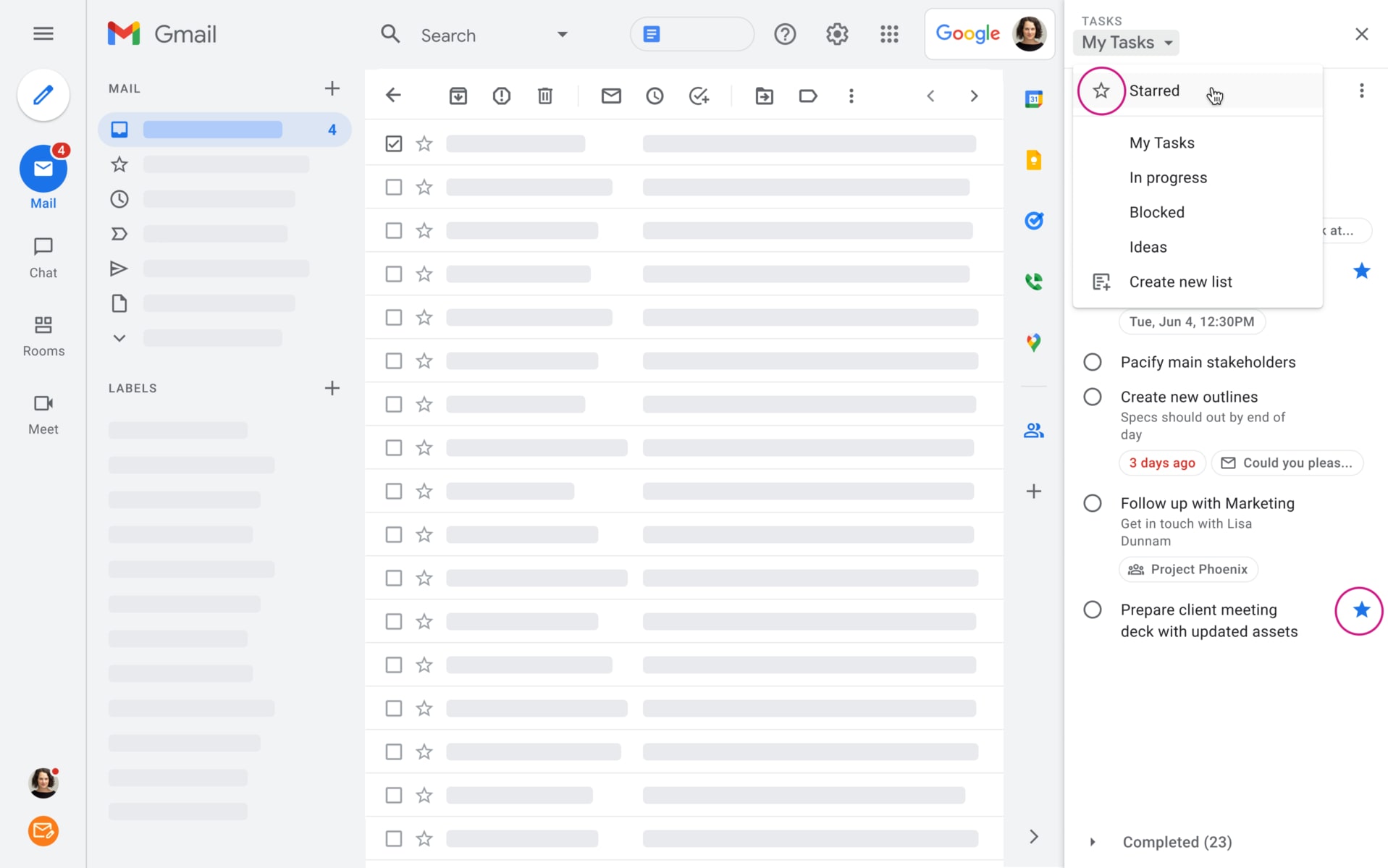
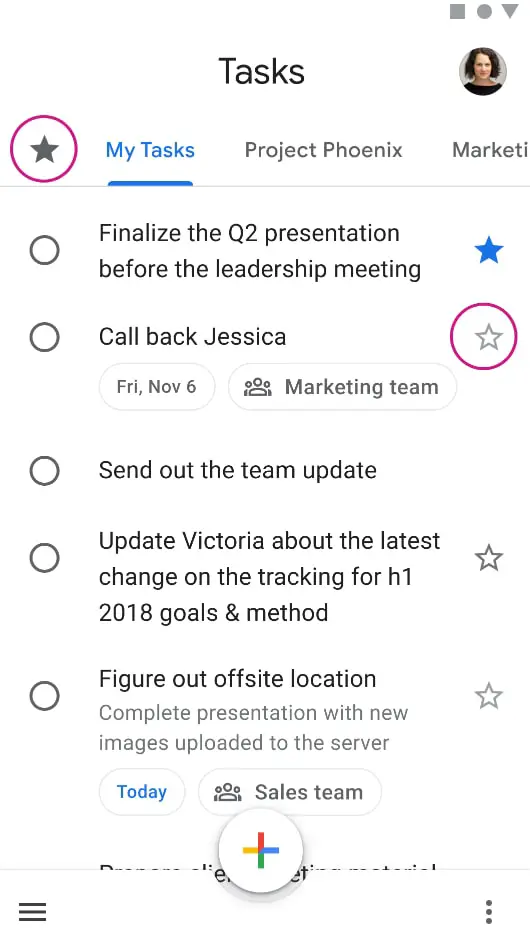
Following a recent update adding the ability to set end dates directly on recurring Google Tasks, Google has announced that you will now be able to mark important tasks with a star. In addition, with the new “starred” view, you will be able to view and sort your starred items in all your task lists. Check out the images below for a look at how this feature will look on both the Web and Mobile:
Xremove ads
Google Tasks starring on Web
Google Tasks starring on Mobile

This update began its two-week rollout yesterday to all Google Workspace customers, legacy G Suite Basic and Business customers. There will be no admin control for this feature as it will automatically show up for end-users.

I am very happy to see Tasks getting some much-needed love. Updates like these encourage people like me to give Tasks a second look and incorporate it into their daily workflow. Of course, now we just need a standalone Google Tasks page so we can have our tasks in a new tab or window. Fingers crossed that option gets some consideration down the line.

Featured Videos

Xremove ads

Filed Under: Apps, New & Upcoming Features, Workspace Tagged With: google tasks, google workspace, starred tasks, workspace

Primary Sidebar

Googlebook

Googlebook OS is getting keyboard shortcuts for play/pause and previous/next in media

By Robby Payne
November 28, 2026

Flagships, tablets, or budget laptops: why the Googlebook launch was always going to be a gamble

By Robby Payne
November 25, 2026

Googlebook ‘Pelion’ borrows its battery from one of my favorite Acer Chromebooks

By Robby Payne
November 25, 2026

Entry-level Googlebooks might finally be coming with Snapdragon C silicon

By Robby Payne
November 24, 2026

When I need to get technical work done, I still reach for a Chromebook over a Googlebook

By Robby Payne
November 24, 2026

More Googlebook

Xremove ads

Deals

The best Black Friday Googlebook and Chromebook deals

By Robby Payne
November 27, 2026

The first Googlebook deals are here, slashing up to $300 off two 3K OLED models

By Robby Payne
November 20, 2026

My favorite convertible Chromebook is $150 off right now and primed for Googlebook OS

By Robby Payne
September 29, 2026

Google Pixel Buds 2a in Hazel bundled with a new Googlebook laptop at Best Buy

Score a free $129 pair of Pixel Buds 2a with any Googlebook pre-order at Best Buy

By Robby Payne
September 28, 2026

The best Chromebook ever made is $350 off at Best Buy right now

By Robby Payne
August 21, 2026

More Deals

Xremove ads

Reviews

My brutally honest thoughts on Googlebook after one month [VIDEO]

By Robby Payne
November 2, 2026

Acer Chromebook Plus Spin 514 Review: the best convertible you can buy [VIDEO]

By Robby Payne
July 1, 2026

Lenovo Chromebook Plus 2-in-1 Review: pretty great in a vacuum

By Robby Payne
April 23, 2026

My review after 6 weeks with the Lenovo Chromebook Plus 14 [VIDEO]

By Robby Payne
August 11, 2025

One week with the best small Android tablet you can buy, and I’m sold

By Robby Payne
May 9, 2025

More Reviews

Xremove ads

TWITTER · FACEBOOK · INSTAGRAM · YOUTUBE · EMAIL · ABOUT

Copyright © 2026 · Chrome Unboxed · Chrome is a registered trademark of Google Inc.
We are participants in various affiliate advertising programs designed to provide a means for us to earn fees by linking to affiliated sites.

PRIVACY POLICY