

Support our independent tech coverage. Chrome Unboxed is written by real people, for real people—not search algorithms. Join Chrome Unboxed Plus for just $2 a month to get an ad-free experience, access to our private Discord, and more. Learn more about membership here.
START FREE TRIAL (MONTHLY)START FREE TRIAL (ANNUAL)
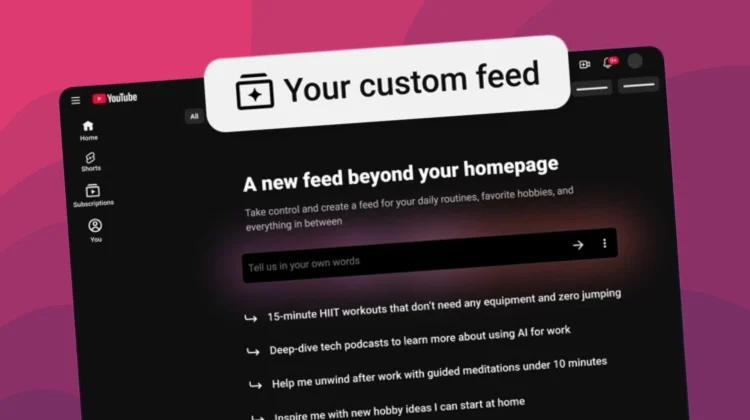
YouTube is officially rolling out a new update that might change how you discover content on the platform. Moving beyond the standard, algorithm-driven recommendations, this new feature allows you to design a personalized content feed dedicated to your specific interests, moods, or favorite topics. This new discovery experience can then be pinned as a saved button directly to the top of your Home page for quick and seamless access.
To initiate this new experience, users will need to locate and tap the “Your custom feed” chip (the small, pill-shaped buttons) situated at the top of the YouTube Home page. From there, you are presented with a text box to enter a custom prompt describing exactly what type of content you are looking for. For example, you could type a highly specific request like “help me unwind after work with guided meditations under 10 minutes” or simply ask the system to “give me something different beyond my usual feed.” YouTube will then process that request and generate a new, constantly refreshing feed based entirely on those parameters.
If your interests change or you simply want to shift the vibe of your viewing session, the system remains entirely flexible. You can edit your initial prompt at any time by accessing the text box at the top of your custom feed. Entering a new prompt will instantly generate a brand-new space tailored to that updated request.
Because generative features are rarely perfect out of the gate, YouTube has also included a direct feedback mechanism. If you notice that the newly generated feed did not fully understand your prompt or completely missed the mark, you can click the three-dot menu and select “Something wrong?” to report the issue directly to the development team.
It is important to note that this functionality relies heavily on your existing platform data to generate accurate recommendations. In order for the custom feed chip to actually appear on your Home page, your YouTube search and watch history must be actively turned on in your account settings. If you have those privacy settings locked down, you will need to enable them to take advantage of this new discovery tool.
This new custom feed feature is currently rolling out to signed-in viewers located in the U.S., and it is available on both the YouTube mobile app and the desktop web interface in English.
SUBSCRIBE TO UPSTREAM
Get Chrome Unboxed delivered straight to your inbox
Upstream is our flagship, curated newsletter with the top stories, most click-worthy deals, giveaways, and trending articles from Chrome Unboxed sent directly to your inbox a few times a week. Join 31,000+ subscribers.

