


Support our independent tech coverage. Chrome Unboxed is written by real people, for real people—not search algorithms. Join Chrome Unboxed Plus for just $2 a month to get an ad-free experience, access to our private Discord, and more. Learn more about membership here.
START FREE TRIAL (MONTHLY)START FREE TRIAL (ANNUAL)
Today, Valve made a huge announcement. The company announced Steam Deck, a portable game console powered by Linux and a Windows game compatibility program called Proton. Imagine a Nintendo Switch that can play over 50,000 PC games from the popular Steam library. That is the Steam Deck in a nutshell. It features an AMD processor with integrated graphics that have “enough performance to run the latest AAA games”, 16 GB RAM, up to 512 GB NVMe SSD storage, a microSD card slot for storage expansion, and a unique controller layout including two mouse touchpads. There’s a lot in this small little package! Prices start at $US 399.00 and it’ll be shipping this December.
This is a very cool device! But what impact does this have on the Chrome OS ecosystem and the upcoming Steam support via Borealis? Spoiler alert: nothing but good things!
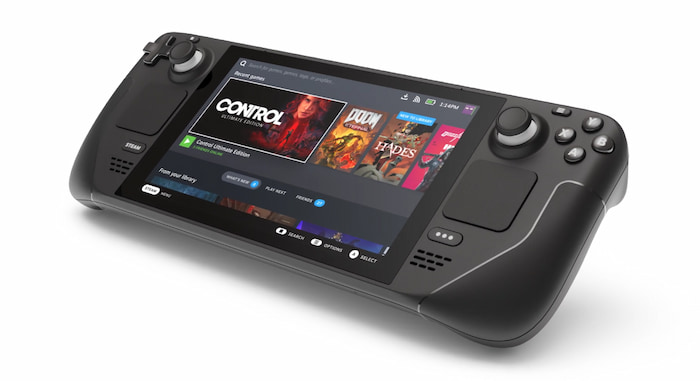
A Valve representative mentioned that “our goal is for every game to work by the time we ship Steam Deck.” That means that Proton is about to get a lot better. If the Steam Deck can play every game on Steam then Borealis can also play every game on Steam. Right now, 81% of reported Steam games on ProtonDB work on Linux. That’s ambitious of them to get it up even higher! With everything Valve has in the works, I can confidently say that they actually will get close to their 100% goal. Let me explain.
Along with the Steam Deck announcement, Valve said that Proton will soon support anti-cheat software. This is the number one reason why a Windows game wouldn’t work on Linux today. Many companies use anti-cheat software to prevent hackers and cheaters from getting an unfair advantage in online multiplayer games. By the end of this year, popular games like Player Unknown’s Battle Grounds (PUBG) will finally work on Linux!
Valve has also recently been testing new and improved audio and video support in Proton. One of their developers has mentioned that vastly improved media support will be working in Proton soon. No more missing or scrambled audio. No more video test bars. Games will look and sound exactly the way they were meant to.
Historically speaking, the amount of Linux users on Steam, reported by the official monthly Steam surveys, has hovered around 1% for the longest time. In 2020, there were a reported 120 million active accounts on Steam. The means that over 1 million users are on Linux. That’s already a lot of people. Both Steam Deck and Borealis are going to make that number skyrocket. The more users on Linux, the more demand there is which leads to an increase in quality and the number of native games.
Similar to Steam Deck, Borealis is slated to release sometime later this year. The technology Borealis is in place already in Chromium OS but a dedicated QA team from Google is currently helping to improve the experience. Valve has its own QA team that tests Proton as well. With these two major players in the Linux gaming market, their contributions back into the open-source community will continue to make a huge impact.
The new Steam OS 3.0 that the Steam Deck is shipping with is now based on Arch Linux instead of Debian. This is a huge change. Arch Linux provides the most up-to-date software of any Linux distribution out there. That means that things like the latest enhancements for all of the graphics drivers land there first. We have reported on Ubuntu being the virtual machine for an early build of Borealis and I suspect that to change by the time Borealis launches.
Will you be getting a Steam Deck or holding out for a gaming Chromebook? Will there be one of those presents wrapped up for the winter holidays? Personally, as a long-time Linux gamer, I’ll be placing my pre-order for the Steam Deck soon to show my support for Valve’s work. Can’t wait for it to arrive!
SUBSCRIBE TO UPSTREAM
Get Chrome Unboxed delivered straight to your inbox
Upstream is our flagship, curated newsletter with the top stories, most click-worthy deals, giveaways, and trending articles from Chrome Unboxed sent directly to your inbox a few times a week. Join 31,000+ subscribers.
