

Support our independent tech coverage. Chrome Unboxed is written by real people, for real people—not search algorithms. Join Chrome Unboxed Plus for just $2 a month to get an ad-free experience, access to our private Discord, and more. Learn more about membership here.
START FREE TRIAL (MONTHLY)START FREE TRIAL (ANNUAL)
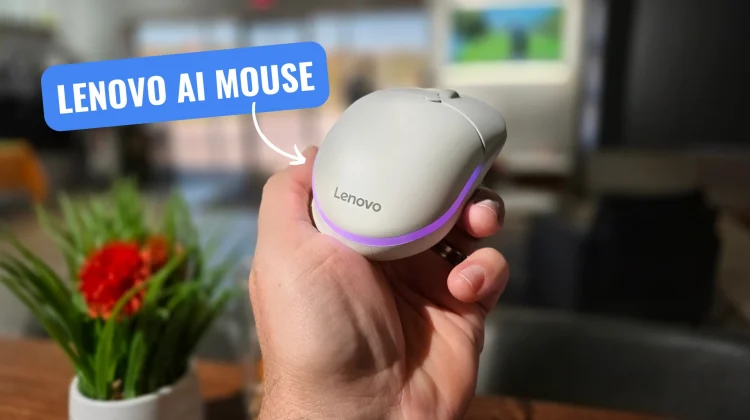
We first spotted the Lenovo AI Mouse in an early leak alongside the Lenovo Googlebook 15, and I’ve been eager to see how certified Googlebook peripherals would actually feel in day-to-day use. Now, we finally have the mouse in hand and after putting it to work for the last hour or so, it’s clear this is far more than a cheap pack-in accessory.
Designed specifically for the Googlebook experience, the Lenovo AI Mouse for Googlebook is currently listed on Lenovo’s website for $44.99 and marked as “Available Soon” and is now popping up directly on the Google Store for $45, too. Right out of the box, it feels exceptionally well-built, glides smoothly across the desk, and pairs effortlessly with any Googlebook we’ve tested it on.
Ergonomics, Magic Pointer, and a dedicated Gemini button
Weighing in at an ultra-light 59 grams, the mouse features an ergonomic right-handed shape with a comfortable soft-touch grip and durable switches rated for up to 80 million clicks. Along the left edge, you get tactile, easy-to-reach forward and back navigation buttons, while a physical AI Key sits right below the scroll wheel.
As I mentioned when we first discussed the Googlebook accessory ecosystem, friction kills adoption with desktop AI tools, and having a dedicated physical trigger makes a noticeable difference:
- One-Click & Voice Gemini Access: A quick click on the dedicated Gemini button immediately opens the Gemini app in a pop-up window, while a long press summons Gemini Live/Voice for hands-free assistance without touching your keyboard.
- Magic Pointer Integration: The mouse also integrates directly with Googlebook OS’s Magic Pointer feature, letting you long-press the forward button to turn your cursor into a contextual selection tool to ask questions, compare items, or pull information from anything on your screen.
- Multi-Device Pairing: It supports dual Bluetooth pairing alongside wired USB-C connectivity (complete with a USB-C to USB-C cable in the box), making it painless to bounce between multiple Googlebooks or desktop setups.
Customizing RGB and DPI in the Lenovo Vantage app
What really elevates this mouse over standard Bluetooth peripherals is its companion software integration. Using Lenovo’s Vantage app on Googlebook OS, you get granular control over how the mouse performs and looks on your desk.
Inside the app, you can customize the rear RGB lightbar effects to match your setup or mirror the signature Glowbar aesthetic. You can also dial in custom sensitivity profiles with an adjustable sensor range spanning from 800 all the way up to 12,000 DPI. Even with the customizable RGB lighting turned on, Lenovo rates the internal battery for roughly 40 hours of active working time per charge.
For around $45, Lenovo nailed the balance between build quality, everyday comfort, and genuinely useful Googlebook OS shortcuts. It’s in the bag now and I’ll be putting it through the paces and will report back on anything odd that might pop up over the coming weeks.
SUBSCRIBE TO UPSTREAM
Get Chrome Unboxed delivered straight to your inbox
Upstream is our flagship, curated newsletter with the top stories, most click-worthy deals, giveaways, and trending articles from Chrome Unboxed sent directly to your inbox a few times a week. Join 31,000+ subscribers.

