Support our independent tech coverage. Chrome Unboxed is written by real people, for real people—not search algorithms. Join Chrome Unboxed Plus for just $2 a month to get an ad-free experience, access to our private Discord, and more. Learn more about membership here.
START FREE TRIAL (MONTHLY)START FREE TRIAL (ANNUAL)
Welcome to the Workspace Sessions. Workspace Sessions brings you the latest from Google Workspace, the Google Admin Console, and all things related to Enterprise and Education from the world of Google.
Google Chat for the web is now a Progressive Web Application (PWA) and comes with significant design and functionality changes compared to its previous Chrome app counterpart. About this time last year, the faster, more reliable, and engaging version was introduced, and only recently became generally available. While most people are being automatically swapped over to it, a select handful of users will need to upgrade on their own by clicking a banner notification that appears at the top of the site for them.
You can read all about the improvements since we discussed them back in March during the initial announcement, but today, but the gist is that the upgrade makes the standalone version of Chat resemble its Gmail doppelganger more closely. For those who want to engage in conversations separate from their inbox, the change is a welcome and familiar one.
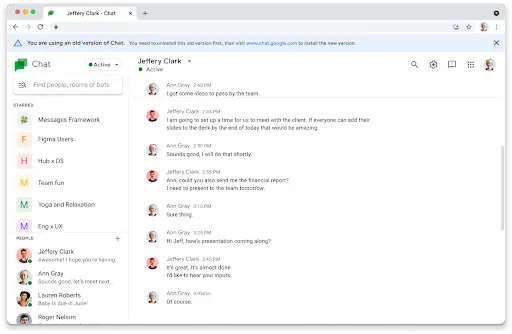
You are using an old version of Chat. You need to uninstall this old version first, then visit www.chat.google.com to install the new version.
Once you’ve right-clicked the Chat app in your Chromebook launcher or on your shelf and chosen the ‘Uninstall’ option, you can visit Google Chat on the web. From there, just look for the install prompt at the top-right of the browser Omnibox, and click it to acquire a new icon for your Chromebook!
If you don’t see it, just visit the three dots ‘more’ menu at the top-right, go down to ‘Settings’, and then ‘More tools’. Once you’re there, just choose the ‘Create shortcut…’ option. A dialog box will appear at the top-middle of your screen asking you to name your new PWA. Do so, check the ‘Open as window’ box to make it a standalone experience and click the blue ‘Create’ button.
In just one week on September 27, 2021, anyone who hasn’t followed this process and who wasn’t automatically upgraded to the new Chat app for any reason will no longer be able to use the existing old one. In its place will be a fullscreen notice forcing them to redirect to Chat on the web and perform the above steps.
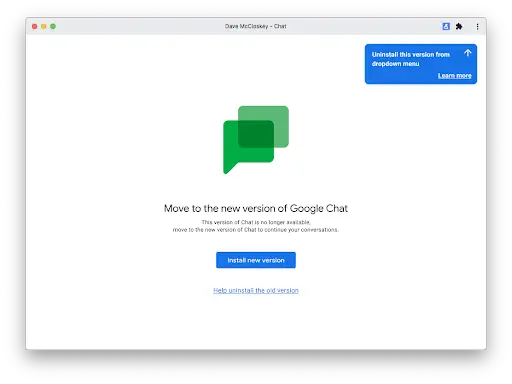
If you did upgrade, and simply forgot to uninstall the old version of the app, you won’t see the ‘Install new version’ button as the image above displays, but everything else will be the same. Simply find the app in your launcher and uninstall it.
If you can’t tell the difference between your old and new Chat app and have both installed, just leave the old version open and it will be highlighted on your Chromebook shelf. If you right-click its icon there to uninstall it instead of in your launcher, you’ll be all set! Ultimately, it’s better just to handle this now so there’s no confusion next week.
This installment of Workspace Sessions is sponsored in part by CTL. CTL is an industry leader in the deployment and management of Chrome and Chrome OS hardware. Headquartered in the USA, CTL designs and purpose builds Chrome devices specifically to meet the needs of its customers. Find out more about CTL here.
SUBSCRIBE TO UPSTREAM
Get Chrome Unboxed delivered straight to your inbox
Upstream is our flagship, curated newsletter with the top stories, most click-worthy deals, giveaways, and trending articles from Chrome Unboxed sent directly to your inbox a few times a week. Join 31,000+ subscribers.