

Support our independent tech coverage. Chrome Unboxed is written by real people, for real people—not search algorithms. Join Chrome Unboxed Plus for just $2 a month to get an ad-free experience, access to our private Discord, and more. Learn more about membership here.
START FREE TRIAL (MONTHLY)START FREE TRIAL (ANNUAL)
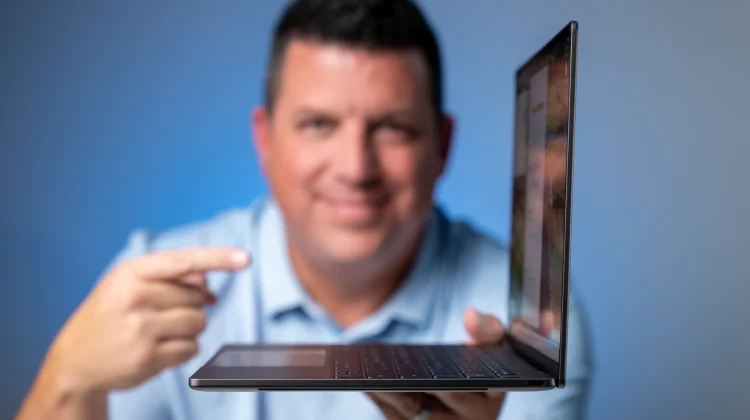
Of all the initial hardware in the Googlebook launch lineup, the Dell XPS Googlebook is easily one of the most anticipated devices we have in the office. We got a brief glimpse of Dell bringing its flagship XPS pedigree to the platform in New York City, but getting this barely-over-two-pound machine out of the box in the studio is a completely different experience.
As you’ll see in the video, I am not going to beat around the bush: this laptop gives off serious MacBook Air vibes in the best way possible. Starting at $999, it combines an ultra-thin, rigid machined aluminum chassis with Qualcomm’s Snapdragon X Elite processor, making it a standout contender in the first wave of Googlebook hardware.
Minimalist XPS hardware that nails the fundamentals
Passing the one-finger lift test with ease, the Dell XPS Googlebook is all about clean, minimalist lines and a simple, understated aesthetic. That minimalism does mean you are limited to just two USB Type-C ports – one on each side – so you will definitely be living the dongle life if you plan to hook up to external monitors at a desk. Inside, however, Dell skipped the divisive capacitive touch rows from past Windows XPS machines in favor of an incredible backlit keyboard and a whisper-quiet physical glass trackpad.
Framing the top of the deck is a 13.4-inch QHD+ (2560×1600) 16:10 matte display that hits 500 nits of brightness and knocks down overhead studio glare effortlessly. At 120Hz, animations and navigation across the OS feel buttery smooth and things look fantastic across the board.
Dell also managed to tuck a remarkably crisp 1080p webcam into the razor-thin top bezel alongside side-firing speakers that get loud enough to fill a room without distortion. While there is no IR sensor for facial recognition, the power button doubles as a fast, reliable fingerprint scanner.
Snapdragon X Elite muscle and Better Together workflows
Under the hood, that $999 starting price nets you a Snapdragon X Elite chip paired with 16GB of DDR5 RAM and 512GB of storage. We already know the multi-core benchmarks on this silicon are massive, and after going through the entire phone-guided QR onboarding process and filming our initial testing, the battery indicator barely budged. I fully expect this machine to push past a single workday and creep into true multi-day battery territory as we put it through our full review gauntlet.
That hardware efficiency pairs naturally with the core ethos behind Googlebook OS: deep, frictionless integration with your Android phone. Earlier today, I was sitting in our office parking lot on my phone looking up golf tee times at a local course while texting with our group.
The second I walked inside and opened the Dell XPS Googlebook, a Chrome icon popped right onto the shelf to pick up that exact booking page where I left off. Beyond browser handoff, you can stream installed phone apps – like firing up the Chick-fil-A app to place a quick lunch order -directly onto the desktop without installing them locally, or drag and drop photos and files up to 200MB straight from your phone’s storage inside the native Files app.
The Glow Bar
And we can’t wrap up without mentioning the Glow Bar on the lid, which sits at a subtle white idle state before shifting into a glowing blue-and-purple gradient whenever you invoke Gemini. Shutting the laptop down triggers a brief cascade of classic Google colors, and plugging in the USB-C charger illuminates the bar to show your live battery level.
Aside from playing around with the hidden Glow Bar Disco setting, I would love to see Google bring back the classic Chromebook Pixel double-knock gesture to check battery status when the lid is closed, alongside opening an API so third-party apps can use the light bar in coffee shops and airports. We will of course be putting the Dell XPS Googlebook through its paces, so stay tuned for our full review soon.
SUBSCRIBE TO UPSTREAM
Get Chrome Unboxed delivered straight to your inbox
Upstream is our flagship, curated newsletter with the top stories, most click-worthy deals, giveaways, and trending articles from Chrome Unboxed sent directly to your inbox a few times a week. Join 31,000+ subscribers.

