


Support our independent tech coverage. Chrome Unboxed is written by real people, for real people—not search algorithms. Join Chrome Unboxed Plus for just $2 a month to get an ad-free experience, access to our private Discord, and more. Learn more about membership here.
START FREE TRIAL (MONTHLY)START FREE TRIAL (ANNUAL)
Back in “the good ol’ days”, Windows users were able to take advantage of Google’s desktop web app launcher, and it was glorious. It was a tool that sat at the bottom left of your taskbar and provided all of your Chrome apps in one place. Chromebook owners will think this sounds familiar because, well, the app launcher and ‘Everything button’ that’s existed there since day one!
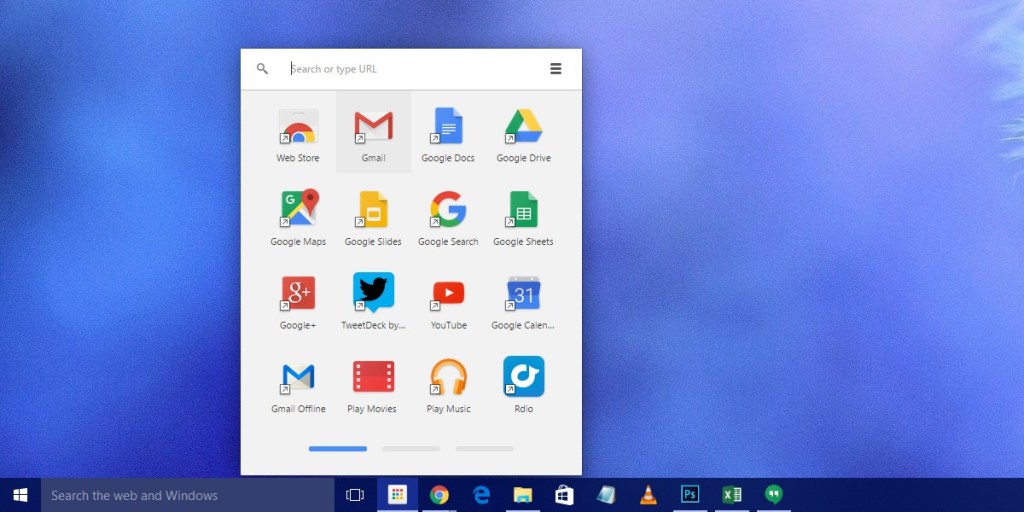
Sadly, Google killed this off years ago, and at that time, it looked and acted identically to that of Chrome OS before the Peeking launcher (and subsequently, the Productivity launcher) became a thing. Now, Windows Chrome users have had their web apps relegated to the bookmarks bar in their browser or via chrome://apps. This feels tucked away and inaccessible compared to the previous method, and if you wanted to uninstall something you added to your desktop or laptop, you’d have to go to this URL to do so.
As a hybrid user who utilizes Windows for many things, I’ve taken a lot of time to figure out how to make Windows act more like a Chromebook, and it’s just not easy or great at the end of the day. Primarily, the issue comes in when you try to uninstall these web apps from Windows 10 or 11 – they just don’t show up in the Programs list like traditional software on the system.
You could and still can technically go to the original Add and Remove Programs menu if you can locate it in order to see a list of Chrome apps on board, but they don’t always show up, and even when they do, they don’t uninstall properly or get removed from the registry in a nice and tidy fashion. This has been my experience, at least.
That’s all about to change though, as the Chrome Canary and Dev builds of the browser are implementing an uninstall prompt via the OS settings. First discovered by Leopeva64-2 on Reddit, this will unify the experience of using Chrome apps alongside downloadable Windows software on Microsoft’s operating system, and I couldn’t be happier!

Reland: “PWA on Desktop Windows: Implement uninstallation via OS settings.”
When user uninstall a PWA from Windows Settings or Control, it also uninstall PWA from browser registrar.
Chromium Gerrit
According to the commit where this showed up, it’s not quite finished yet. Users will currently have to “–enable-features=EnableWebAppUninstallFromOsSettings” to their Chrome browser shortcut under ‘Target’ after right-clicking it and going to ‘Properties’. Do you use Chrome apps on Windows, or do you manually type in websites when you’re ready to visit them? Let me know in the comments if you use your Windows 10 or 11 like I do or like you’d use Chrome OS!
SUBSCRIBE TO UPSTREAM
Get Chrome Unboxed delivered straight to your inbox
Upstream is our flagship, curated newsletter with the top stories, most click-worthy deals, giveaways, and trending articles from Chrome Unboxed sent directly to your inbox a few times a week. Join 31,000+ subscribers.

