

• Skip to main content
  • Skip to primary sidebar
  • Deals
  • Features
  • Guides
  • Chromebooks
  • Videos
  • Podcast
  • More +
    • Reviews
    • Unboxing
    • Upcoming Devices
    • Chromebook Plus
    • Chrome
    • ChromeOS
    • Chrome OS Flex
  • Search
  • Sign Up
  • Log In
Chrome Unboxed – The Latest Chrome OS News

Chrome Unboxed - The Latest Chrome OS News

A Space for All Things Chrome, Google, and More!

  • Deals
  • Features
  • Guides
  • Chromebooks
  • Videos
  • Podcast
  • More +
    • Reviews
    • Unboxing
    • Upcoming Devices
    • Chromebook Plus
    • Chrome
    • ChromeOS
    • Chrome OS Flex
  • Search
  • Sign Up
  • Log In

The Pixel Watch 4 is finally repairable, and that’s a huge deal

August 25, 2025 By Joseph Humphrey View Comments

Support our independent tech coverage. Chrome Unboxed is written by real people, for real people—not search algorithms. Join Chrome Unboxed Plus for just $2 a month to get an ad-free experience, access to our private Discord, and more. Learn more about membership here.
START FREE TRIAL (MONTHLY)START FREE TRIAL (ANNUAL)

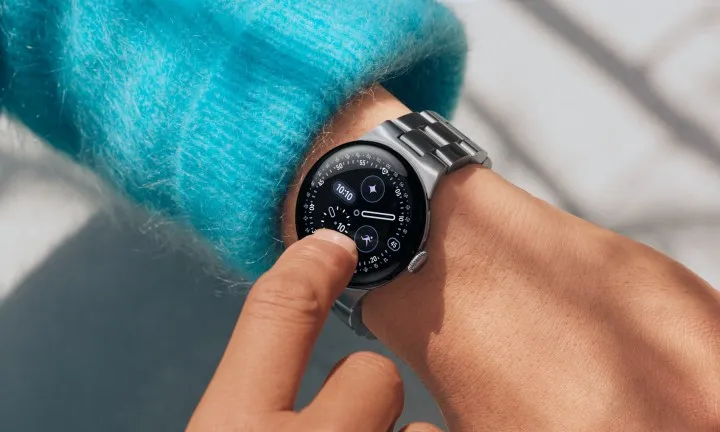
For the past three generations, the Pixel Watch has had one major flaw. If you broke the screen or the battery started to fade, you were simply out of luck. Without a warranty, your only option was a full, costly replacement. It was a glaring hole in Google’s sustainability message and a major frustration for owners. With the Pixel Watch 4, I’m happy to report that this fundamental flaw has finally been fixed.

In a recent interview with Wired, Google detailed the collaboration between its design and engineering teams that cracked the code on making the Pixel Watch 4 serviceable. The solution is both simple and elegant: hidden inside the mounting slots for the watch bands are a pair of standard T2 screws. By removing them, the watch can be disassembled to access its internals.

Xremove ads

What’s truly impressive here is that Google achieved this without using any fussy adhesives, all while maintaining the watch’s robust 5ATM / IP68 water resistance rating. This new design allows for both battery and display replacements, and official spare parts will be sold through iFixit.

How the Pixel Watch 4 repair process actually works
The process itself sounds remarkably straightforward. Once those two initial screws are out, the biosensor hub on the back is accessible, but cleverly doesn’t need to be disconnected for a simple battery swap. To replace the battery, you just remove the haptic motor and two more screws holding the battery in place—all using that same T2 Torx screwdriver. The intentional use of a single, common screw type for the entire process is a thoughtful touch that lowers the barrier for DIY repairs.

Featured Videos

Xremove ads

Replacing the display requires a few more steps, like unplugging the biosensor hub and removing four more screws, but the principle remains the same. According to the quick video from Wired, a full demo of a battery replacement took a mere 13 minutes to complete, which speaks volumes about the accessibility of the design.

Ultimately, this news is more significant than any single software feature. It represents a new level of maturity for Google’s hardware, shifting the Pixel Watch from a potentially disposable gadget into a genuine long-term investment. By providing a clear and accessible path to repair the most common points of failure (the battery and display), Google is finally making a serious commitment to sustainability and consumer rights.

It’s a huge step in building a more robust ecosystem, one that builds owner confidence and shows Google is serious about the lifecycle of its products. When the watch begins shipping this October, it will not only be Google’s smartest wearable, but also the most practical one yet.

Xremove ads
pre-order the Pixel Watch 4 at Best Buy

SUBSCRIBE TO UPSTREAM

Get Chrome Unboxed delivered straight to your inbox

Upstream is our flagship, curated newsletter with the top stories, most click-worthy deals, giveaways, and trending articles from Chrome Unboxed sent directly to your inbox a few times a week. Join 31,000+ subscribers.

SUBSCRIBE HERE!

Filed Under: Accessories, Android, News, Wear

About Joseph Humphrey

Joe has been a part of Chrome Unboxed since 2016 when he started helping Robby produce YouTube videos. Although normally behind the scenes, Joe has spent countless hours editing reviews and unboxings of many, many Chromebooks. Now a Partner in Unboxed Media, Joe is constantly thinking strategically about the Chromebook industry and how Chrome Unboxed can continue to innovate in the space.

Primary Sidebar

Xremove ads

Deals

The best Chromebook deals today

By Robby Payne
April 20, 2026

Deal Alert: the excellent Lenovo Chromebook Plus 2-in-1 returns to $429

By Robby Payne
April 20, 2026

Lenovo Legion Tab Gen 3 drops to $399, ahead of the much pricier Gen 5 release

By Joseph Humphrey
April 18, 2026

How to get 50% off YouTube Premium for a full year with Google One

By Robby Payne
April 16, 2026

The Pixel 10a just dropped to $449, but here’s why you should buy the Pixel 10 instead

By Joseph Humphrey
April 13, 2026

More Deals

Xremove ads

Reviews

Acer Chromebook Plus Spin 514 Review: Kompanio Ultra power in a convertible

By Robby Payne
December 24, 2025

My review after 6 weeks with the Lenovo Chromebook Plus 14 [VIDEO]

By Robby Payne
August 11, 2025

One week with the best small Android tablet you can buy, and I’m sold

By Robby Payne
May 9, 2025

Best Chromebooks of 2024 [VIDEO]

By Robby Payne
November 28, 2024

Samsung Galaxy Chromebook Plus Review: Samsung is back! [VIDEO]

By Robby Payne
October 28, 2024

More Reviews

Xremove ads

Guides

This Chromebook trackpad shortcut is definitely not new, but is blowing my mind

By Robby Payne
March 11, 2024

How to reduce broadcast delay on YouTube TV to stop live spoilers

By Robby Payne
December 8, 2023

Windows PC keyboard and Chromebook

How to use a Windows keyboard with a Chromebook

By Joseph Humphrey
December 8, 2023

How reset and revert your Chromebook to the previous version of Chrome OS

By Robby Payne
November 29, 2023

My Chromebook Plus features disappeared: here’s how I fixed it

By Robby Payne
November 24, 2023

More Guides

TWITTER · FACEBOOK · INSTAGRAM · YOUTUBE · EMAIL · ABOUT

Copyright © 2026 · Chrome Unboxed · Chrome is a registered trademark of Google Inc.
We are participants in various affiliate advertising programs designed to provide a means for us to earn fees by linking to affiliated sites.

PRIVACY POLICY