


Support our independent tech coverage. Chrome Unboxed is written by real people, for real people—not search algorithms. Join Chrome Unboxed Plus for just $2 a month to get an ad-free experience, access to our private Discord, and more. Learn more about membership here.
START FREE TRIAL (MONTHLY)START FREE TRIAL (ANNUAL)
Borealis, the official Steam gaming support in Chromebooks, has been in development for at least a year now (and likely much longer). Let’s go over some new revelations we’ve found and then take a look back at what we know so far. There are many signs that point to a release of Borealis in the coming months so let’s dive right into the details!
Version pinning
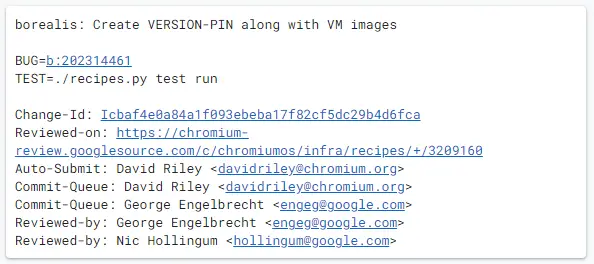
According to this commit I recently found, Borealis has previously always been using the latest development build available. That’s all about to change as it also mentions that there will now be versioned releases. That implies that each new version will be used for helping to test for issues, keep track of any that occurred, and know which version had a specific issue. It means that Borealis has finally reached a certain level of stability and will continue to get more on-going quality assurance testing that our friends over at Boiling Steam had reported on.
SSH keys
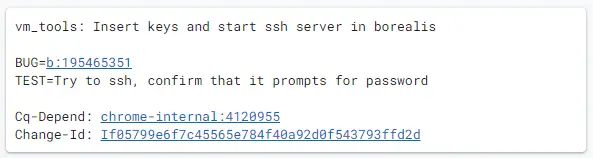
SSH is a common protocol used to access Linux computers remotely. In the context of Crostini – and, by extension, Borealis – it’s used to streamline upgrades and to log you into a virtual machine via the Terminal app once you launch the “Linux” application. This commit shows that SSH access has finally been configured for Borealis. What this basically means is that Google is now focusing on making it consumer friendly.
Public beta
Last year, we reported on how Google developers have stated that a “Soft Launch […] is currently slated for no earlier than Q2/Q3 2021″. Well, we’ve now entered Q4 of 2021 so the deadline slipped a bit but we can assume that it must still be around that time frame. All of the pieces required are in place already as we’ll continue to get into next.
Vulkan support
Vulkan unlocks the full gaming potential of Chromebooks. In the past, it has never worked with the Crostini framework (crosvm) which is also what Borealis will use. That’s all changed as we’ve been tracking lots of development regarding Vulkan support. For the brave souls with the knowledge and willpower, I put together a guide on how you can even get Vulkan working in Crostini today! This brings the graphic capabilities for Chrome OS up to the modern era. Our early benchmarks do show that further work needs to be done to improve the performance, however, and I see the current lackluster Vulkan performance as the biggest blocker right now for a Borealis launch.
Anti-cheat
What’s the point of having a gaming computer if you can’t play online with your friends? A lot of popular online games use some form of anti-cheat software to prevent hackers from ruining fun games. The bad news is that, historically, anti-cheat has not worked on Linux very well. Thankfully, this problem has finally been solved thanks to Valve. Sort of. Anti-cheat providers are now officially supporting Linux (including Wine and Proton). Similar to Crostini, Borealis is built on-top of Linux. It’s now up to the game developers to enable support for Linux in their games.
Borealis Chromebooks
We already know which Chromebooks and Chromebases will be getting Borealis first. Most of the devices getting Borealis are already on the market! What better way to sell more Chromebooks this holiday season than to throw in Steam support. That’s the icing on the cake!
An AMD dGPU Chromebook has been in testing for a few years now. It’s strangely using a MacBook Pro exclusive graphics card (perhaps for the better UNIX-like drivers). Knowing that Valve has a close relationship with AMD for their hand-held Steam Deck device, it would make a lot of sense to see that partnership in other markets such as laptops.
Steam Deck
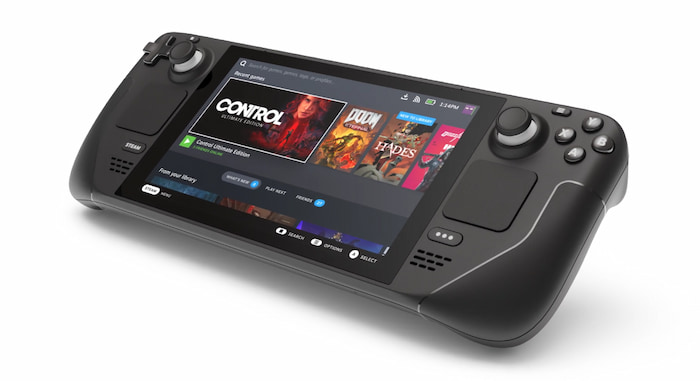
This December, Valve’s Steam Deck is launching. Again, there would be great synergy for Valve to have more products available for holiday shopping. It would be in their best interest to get as many Steam-enabled devices on store shelves to be wrapped up as presents for the family.
Beyond just the peak shopping season, they aim to have almost 100% of games working on the Steam Deck before the end of the year. Once they’re able to reach that level of compatibility (the number of working games grows larger every day), it’d be the perfect opportunity to open the doors for Steam on Chrome OS.
Chrome OS updates are changing
By the end of this year, Google is switching to a faster release candidate for Chrome OS. This will allow more updates to be pushed out faster. This will help them test and polish the gaming experience at a much quicker rate. A big restructure of the Chrome OS development cycle seems like an opportune time to release some big, new features.
What do you think?
Would Borealis be a big selling point for you this holiday season? Chromebooks are already a top-selling gift item as we move through Q4 each year, so Steam gaming should only make that more enticing for potential buyers. If that’s something you are interested in, let us know in the comments below!
SUBSCRIBE TO UPSTREAM
Get Chrome Unboxed delivered straight to your inbox
Upstream is our flagship, curated newsletter with the top stories, most click-worthy deals, giveaways, and trending articles from Chrome Unboxed sent directly to your inbox a few times a week. Join 31,000+ subscribers.
