


Support our independent tech coverage. Chrome Unboxed is written by real people, for real people—not search algorithms. Join Chrome Unboxed Plus for just $2 a month to get an ad-free experience, access to our private Discord, and more. Learn more about membership here.
START FREE TRIAL (MONTHLY)START FREE TRIAL (ANNUAL)
It’s about time! Google Stadia is finally rolling out an official search bar that will help users find games and add-ons. It should be appearing at the top-right of the window for many of you right about now. Go ahead and refresh your ‘game console’ in order to begin making use of it. We previously went over how you could add a search bar to the platform using an extension called Stadia Enhanced.
Now, you may no longer need such an extension for searching, but it’s still fantastic for its other things – namely the ability to change the grid size of the games library among others features. I’m not really sure why the Stadia team waited so long to include a feature that’s core to every other Google service, but we’re glad they did. Well done, team!
Another fantastic feature on its way is the ability to sort your games library! While we’re unsure of what sort of, well, sorting will be available aside from ‘Recently played’, as the screenshot provided below only shows the option and not its drop-down contents, I’m hoping for tools for sorting non-Stadia Pro titles to the top and alphabetization (yep, totally a word). I’m also noticing that the Stadia games that appear below are very square compared to their current rectangle counterparts. There may be more UI changes coming than we thought.

Most interestingly, at least for me, is the inclusion of a new ‘Activity feed’. The image we’re seeing here was provided by Google’s Stadia Community Blog, and it’s a mockup that is likely to change. Even still, the awesome team there was ecstatic to share it with the fans, so we’re getting a sneak peek at what they’re working on behind the scenes. It looks like a complete social network centered around Stadia activity! I’m so incredibly excited for this! I have many thoughts about how Google is going to dominate social one day (@ me in a few years), and how each of its services have begun to implement social features.
I truly believe that the future of social is a niche, separated, highly focused flow of content where people want it (Google Maps, anyone?), not a big jumble of junk like Facebook currently provides. Regardless, the addition of a place to boast about your achievements, captures, and more is a super cool way to get plugged in with the Stadia community around you.
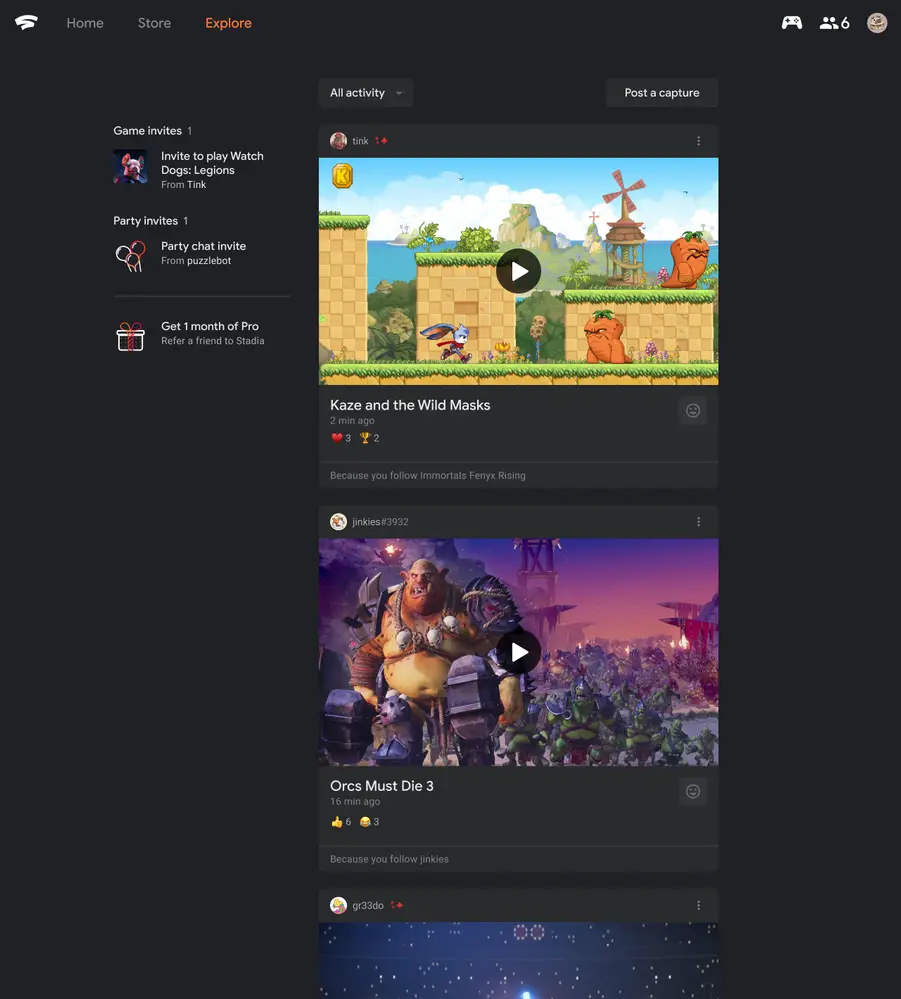
I understand that a social aspect to a service may not be welcome by all, but I do think that it can serve to bolster the experience for those who are playing Stadia often. Two more things – the Stadia team is making it possible to access the service directly through your Android web browser instead of having to open the app and also building out the ability to bulk delete captures on the web. Quality of life updates, to be sure, but welcome ones, wouldn’t you agree?
Please comment below to tell me which of these features you’re most excited for. I know you’ll likely say that the search bar is where it’s at, but let’s not discount the to sort and organize your library! Maybe one day we’ll get the ability to drag and drop them to organize them or to add them into shelves – hey, I can dream, can’t I?
SUBSCRIBE TO UPSTREAM
Get Chrome Unboxed delivered straight to your inbox
Upstream is our flagship, curated newsletter with the top stories, most click-worthy deals, giveaways, and trending articles from Chrome Unboxed sent directly to your inbox a few times a week. Join 31,000+ subscribers.


