Up next in 10

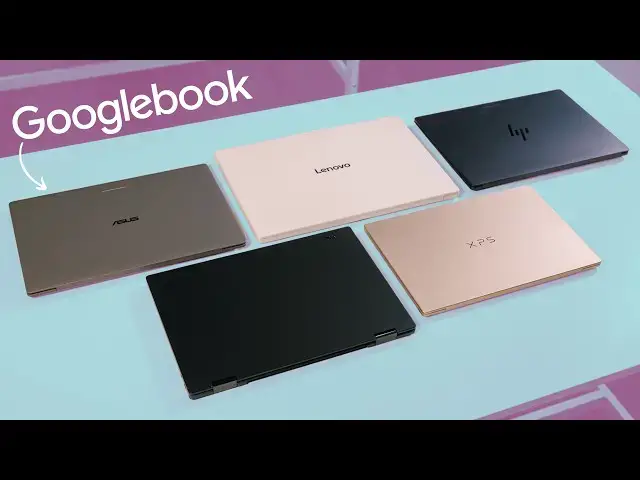
Googlebook Has Arrived: Android-Powered Laptops from Google
Sep 21, 2026


Join Chrome Unboxed Plus for access to our private Discord, an ad-free website experience, AMAs, exclusive giveaways, and more! Start your 7-day FREE TRIAL here: https://chromeunboxed.com/join/
・・・・・・・
Buy the Acer Googlebook 14 at Best Buy: https://bestbuycreators.7tiv.net/rENDWv
Buy the Dell XPS Googlebook at Best Buy: https://bestbuycreators.7tiv.net/m4yE1M
Buy the ASUS Googlebook 14 at Best Buy: https://bestbuycreators.7tiv.net/KBdXEN
Buy the HP Googlebook 14 at Best Buy: https://bestbuycreators.7tiv.net/dyJVrj
Buy the Lenovo Googlebook 15: https://bestbuycreators.7tiv.net/QYdng9
・・・・・・・
Buy Chrome Unboxed Glowbar merch: https://cottonbureau.com/p/YGGDM3/shirt/glowbar#/23914930/tee-men-premium-heavyweight-black-100percent-cotton-s
Read more:
https://chromeunboxed.com/we-went-hands-on-with-all-5-new-googlebook-laptops-here-is-our-first-look-video/
https://chromeunboxed.com/googlebook-is-here-and-we-went-hands-on-with-the-new-software-in-nyc-video/
・・・・・・・
👉 Shop the best Chromebook deals today: https://chromeunboxed.com/the-best-chromebook-deals-today-updated/
📧 Subscribe to our Upstream newsletter: https://bit.ly/4jVq0de
☕ Fueled by Fresh Roasted Coffee! Buy the special edition Chrome Unboxed bag here: https://chromeunboxed.com/coffee
Subscribe to the channel: http://bit.ly/2xFuj6L
Follow us: https://x.com/chromeunboxed
https://www.instagram.com/chromeunboxed
https://www.threads.net/@chromeunboxed
https://www.facebook.com/Chromeunboxed
Show More Show Less View Video Transcript
0:00
Today, Google is officially unveiling
0:02
Google Book. And this isn't just some
0:04
incremental Chromebook update. Google
0:07
has completely rebuilt their laptop
0:09
operating system on top of a full
0:11
Android stack, introduced native phone
0:13
continuity that absolutely rivals what
0:16
you would see with iPhones and MacBooks,
0:18
brought in the iconic Glow Bar, and
0:20
partnered with five major OEMs to launch
0:23
five flagship laptops that feature stuff
0:25
like incredible displays, haptic
0:27
trackpads, premium metal builds, and way
0:30
more. We spent a couple hours hands-on
0:32
with every single device in the room.
0:34
And today we want to discuss the massive
0:36
software shift, the actual useful AI
0:39
features that Google highlighted on
0:41
stage, and the five brand new laptops
0:43
that are about to completely change the
0:45
Google laptop game. So, let's get into
0:47
it.
0:52
But before we get into the video, a
0:54
quick invitation uh to join our Chrome
0:57
Unbox Plus community. in there. There
0:59
are just tons of people that are
1:00
interested in Chromebooks, but also very
1:02
interested in Google Books. And as these
1:04
new devices start showing up with this
1:06
new OS and all the new things that
1:08
Google is doing in the laptop space,
1:10
it's going to be an incredible place to
1:12
connect with other kind of like
1:13
like-minded individuals that want to
1:15
talk about this stuff, discuss the good
1:16
and the bad, the fun, and the
1:18
aggravating parts of this entire
1:20
journey. So, uh, if you head over to
1:22
chromeunbox.com/join,
1:24
you can learn more about how to get
1:26
plugged into this group. It includes ad
1:28
free access and some other perks there
1:30
as well. But mainly, we just want to
1:32
invite you to join this community
1:33
because it's full of awesome people. And
1:35
if you're someone who's into Google
1:37
Books and Chromebooks, I think it might
1:39
be a good fit for you. So, you can learn
1:40
more uh down in the description as well,
1:42
but again, just go to
1:43
chromeandbox.com/join
1:45
to learn more. There is a ton to discuss
1:48
here. So, let's start with the software
1:50
piece because that's really the reason
1:52
this entirely new Google Book category
1:54
exists in the first place. At its core,
1:56
Google Book is built on an Android
1:58
foundation paired up with the desktop
2:00
UI, web browser, and security
2:02
architecture we know and love from
2:04
Chrome OS. And the big narrative Google
2:06
was really pushing on stage is that if
2:07
you carry an Android phone in your
2:09
pocket, these are 100% laptops built for
2:12
you. That's never really been the case
2:14
before, and Google Book is here to close
2:16
that gap. There are quite a few ways
2:18
Google Book plays nicely with Android
2:20
phones, and one of the biggest ones is
2:22
called Continue On. If you're on your
2:24
phone creating a project in an app like
2:26
Bandlab on your commute, the moment you
2:28
open your Google Book Lid, that active
2:30
task is just sitting right there in your
2:32
desktop taskbar, ready for you to click
2:34
and pick up on the bigger screen exactly
2:37
where you left off on your phone. Then
2:39
you have the Files app integration.
2:41
Instead of having to email yourself a
2:43
photo or quick share to your laptop,
2:45
your phone's storage and photos and
2:47
everything else live natively inside the
2:49
Google Book Files app. No different than
2:51
having a USB drive mounted to look for
2:53
your files. You can simply click over to
2:55
your connected phone snag any file that
2:57
you need right when you need it. And
2:59
then there is cast my apps. If you get a
3:02
two-factor authentication code or you
3:04
need to interact with like a delivery
3:05
app or something that doesn't have a
3:06
really good web counterpart or you just
3:08
don't want to open another app on your
3:10
desktop, you can stream that app exactly
3:12
as it is on your phone right in an
3:14
isolated desktop window without ever
3:16
reaching into your pocket. These are all
3:17
features I'm certain I'll use on day one
3:20
with Google Book. But laptop to phone
3:22
features aren't all we're looking at
3:23
with Google Book OS. And yes, that is
3:26
the technical name of the OS running on
3:28
Google Book. They spend a lot of time on
3:30
stage talking about Gemini Intelligence,
3:32
taking advantage of dedicated ondevice
3:34
NPUs that push over 45 plus tops across
3:37
the board on all of these devices. The
3:39
feature they demonstrated most heavily
3:40
is called Magic Pointer. Rather than
3:42
opening a side panel or copying and
3:44
pasting things back and forth with an AI
3:46
open somewhere else, just give your
3:48
mouse cursor a quick wiggle or hit the
3:50
keyboard shortcut and you can activate
3:52
the feature. In the example used on
3:53
stage, they were looking in a messy half
3:56
marathon training schedule on a web page
3:58
that wasn't interactive or dynamic at
4:00
all. So, with a quick wiggle of the
4:01
cursor, they highlighted the schedule,
4:03
asked Gemini to put it on their
4:04
calendar, and it immediately dropped the
4:06
entire thing fully formatted right into
4:08
Google calendar. You can use it to
4:09
inspect suspicious emails for fishing,
4:12
select multiple images on screen to ask
4:14
Gemini to combine them visually, or any
4:16
number of things you can dream up. It
4:18
really feels like the sky's is the limit
4:20
with this feature and how exactly people
4:22
are going to find ways to use it. My
4:23
personal favorite introduction was the
4:25
addition of Rambler, built directly into
4:27
the quick insert feature brought over
4:29
from Chrome OS. Unlike standard voice
4:31
dictation that writes down every single
4:33
uh and um that you say, Rambler's
4:36
designed for conversational thought
4:38
capture, you can do a completely
4:40
disorganized verbal like brain dump,
4:42
even switch between languages
4:44
mid-sentence. I mean, I can't do that,
4:46
but you could. And Rambler can
4:47
automatically clean it all up, strip out
4:49
all the junk, and structure it into
4:51
clear, concise language. And then
4:53
there's create my widget which lets you
4:55
generate custom desktop widgets just by
4:57
describing what you want in plain
4:59
English. This feature is interesting in
5:01
its possibilities and it's made possible
5:03
by the fact that Google Book brings
5:04
widgets and desktop shortcuts to
5:06
Google's laptops for the first time.
5:09
It's just something that was sorely
5:10
missing on Chromebooks. And finally, at
5:12
least for the purposes of this video,
5:14
for developers, Google gave the Linux
5:16
side of things a major upgrade. You get
5:18
a full command line terminal running in
5:20
a deeply isolated secured environment
5:22
tied directly to the hardware. So that
5:24
means you have real access to hardware
5:26
ports, your local network, and all the
5:28
standard git repos without ever risking
5:30
the stability of the core OS. Obviously,
5:32
there's plenty more to talk about in the
5:34
coming weeks and months. And this just
5:36
all feels like scratching the surface.
5:37
But as impressive as all those software
5:39
features are, the other massive story
5:41
here is clearly the hardware this new OS
5:43
is launching on. It's very clear that
5:45
Google and its OEM partners have
5:47
established an impressive baseline for
5:49
what Google Book is expected to be
5:51
across all five of these initial
5:52
devices. There's not really a single
5:54
compromise to be found. And all of them
5:56
are built from premium materials. We're
5:58
talking machined aluminum, magnesium
6:01
alloys, carbon fiber, and the rigidity
6:04
and fit and finish across all of them
6:06
feels incredible in the hand. And yes,
6:08
every Google book features a one-finger
6:10
lift of the lid when you go to open it.
6:12
Every single Google Book features a
6:13
high-res touchscreen with nearly all of
6:16
them utilizing OLED panels pushing more
6:18
than 500 nits of brightness. Everyone
6:20
has a custom backlit keyboard with
6:23
Google's new keyboard layout, and almost
6:25
all of them feature massive glass haptic
6:27
touchpads. You're getting highquality
6:29
cameras across the board, fingerprint
6:31
sensors on all five, and facial
6:33
recognition with IR sensors on a few as
6:35
well. They've all packed in high quality
6:37
speaker systems with Dolby Atmas, multi-
6:39
mic arrays with noise cancellation, and
6:41
at least 14 hours of battery life. Under
6:43
the hood, every single model also starts
6:45
with a baseline of 16 gigs of RAM, and
6:48
fast SSD storage. And of course, they
6:50
all include the iconic glow bar from the
6:52
original Chromebook Pixel days. It
6:54
animates when you boot it up, and it
6:55
sweeps to show your current battery
6:57
level and pulses when you interact with
6:59
Gemini. It's an absolutely crazy high
7:01
standard across the board. But what's
7:03
really fun is seeing how each individual
7:05
OEM slotted themselves into that
7:06
overarching blueprint. So, let's quickly
7:09
hit on each device. Let's start with the
7:11
Acer Google Book 14, the only 360°
7:14
convertible of the bunch that's built
7:16
with an aluminum and magnesium chassis,
7:18
weighs just 2.7 lbs, and is powered by
7:20
Intel's new Core Ultra 3 Panther Lake
7:23
processor. It comes with a 14inch 2.8K
7:25
OLED 500nit touchscreen. So, if you want
7:28
a Google Book that can flip over into
7:30
tent mode for media or fold flat for
7:32
tablet use, Acer has the exclusive
7:34
design here, and it starts at $899. Next
7:37
up is the Asus Google Book 14 that comes
7:39
in at $1,299. If pure portability is
7:42
what you want, this was easily one of
7:44
the most shocking devices to pick up off
7:46
the table. It weighs just 2.2 lb with an
7:49
impossibly thin aluminum magnesium build
7:52
running Intel's Core Ultra 3. But ASUS
7:55
didn't strip back the specs to hit that
7:56
weight. It features a 14-inch 3K OLED
7:59
panel at 500 nits, a full glass haptic
8:02
trackpad, and a fingerprint scanner. And
8:04
Dell rejoins the Google laptop Frey with
8:07
the XPS Google Book starting at $1,199.
8:10
Dell brought their signature XPS
8:12
industrial design to the Google
8:14
ecosystem, and it's every bit as
8:16
striking in person as you'd imagine.
8:17
It's the most compact Google book of the
8:19
bunch, featuring a 13-in 2.5K 500nit
8:23
display and 12.5 mm thin machined
8:26
aluminum frame weighing at just 2.5 lb.
8:29
On the inside, Dell went with Qualcomm
8:31
Snapdragon X Elite paired up with 16
8:33
gigs of RAM, 512 gigs of storage, and it
8:36
also features a glass haptic trackpad,
8:38
and includes both fingerprint scanner
8:40
and IR face unlock. HP took a very
8:43
similar silicon route with the HP Google
8:46
Book 14 priced at $1,299. It's also
8:49
powered by the Snapdragon X Elite,
8:51
giving it that nice cool, quiet arm
8:53
efficiency and battery life. And they
8:55
went with an all aluminum unibody at 2.7
8:57
lb, paired up with a gorgeous 14in 2.8K
9:01
OLED touch panel, again at 500 nits. It
9:04
also features a fantastic haptic
9:05
trackpad, uh, fingerprint scanner, and a
9:08
really clean keyboard that just feels
9:11
awesome to type on. And finally, Lenovo
9:13
brings the big screen option with the
9:14
Lenovo Google 15 starting at $1,299.
9:18
If you're looking for a bigger screen
9:20
for multitasking, this device features a
9:22
15.3 in 2.8K OLED display with Dolby
9:25
Atmos audio powered by Intel's Core
9:28
Ultra 3. But what's wild is the weight.
9:30
Normally, a 15-inch laptop carries some
9:33
heft, but Lenovo built this using a
9:35
blend of magnesium alloys and carbon
9:37
fibers that feels buttery smooth to the
9:39
touch and brings the total weight down
9:41
to just 2.68 lb. That means this 15.3 in
9:44
laptop is actually lighter than some of
9:46
the 14-in models in the room. It also
9:48
includes both IR, face authentication,
9:50
and a fingerprint scanner alongside a
9:52
huge haptic trackpad. The entire
9:54
hardware lineup is impressive, but
9:56
Google's also packing in tons of extra
9:59
day one value as well. Every Google book
10:01
comes with 12 months of Google AI Pro, 5
10:04
terabytes of cloud storage, and three
10:06
months of YouTube Premium, Adobe
10:07
Photoshop, and Cap Cut, a year of
10:09
GeForce Now cloud gaming, and up to 10
10:11
years of guaranteed OS updates and
10:14
feature drops. Yes, 10 years of updates.
10:17
Pre-orders are open now with retail
10:19
availability landing on October 4th in
10:21
the US and rolling out internationally
10:23
to Canada, the UK, and Europe on October
10:26
5th. There's so much to explore, so much
10:28
to learn, so much to be excited for, and
10:31
you can bet tons of new videos are on
10:33
the way soon. So, if you aren't yet, get
10:36
subscribed, give us a thumbs up, and
10:38
click that notification icon as well if
10:39
you'd like to be alerted when we make
10:41
all sorts of future Google book videos
10:43
[music] just like this one. Until next
10:45
time, we'll see you.
10:48
[music]
10:55
>> [music]
#Science