

Support our independent tech coverage. Chrome Unboxed is written by real people, for real people—not search algorithms. Join Chrome Unboxed Plus for just $2 a month to get an ad-free experience, access to our private Discord, and more. Learn more about membership here.
START FREE TRIAL (MONTHLY)START FREE TRIAL (ANNUAL)
Today, Google is officially pulling back the curtain on Googlebook, opening pre-orders, and introducing a completely new category of laptops designed from the ground up for the way we actually work today.
This is not an incremental ChromeOS update, and it is certainly not just a fresh coat of paint. Over the last fifteen years, Google laptops have lived in what I’d describe as an adjacent lane from the phone in your pocket. Even if you carried an Android phone, your Chromebook many times treated it like an acquaintance rather than a close, intimate friend.
Googlebook changes that entirely. Built directly on top of the Android technology stack and fused with the desktop foundations of ChromeOS, Googlebook is built from day one for seamless, deep, out-of-the-box connection with your Android smartphone. See it in action in our hands-on video below, and don’t miss out on all the hardware revealed at the launch event as well that we’ve covered in our companion post to this one!
Built on Android, honed for the desktop
To understand why this is such a monumental moment, you have to look at the architectural foundation.
Googlebook OS (yes, that is the name of the underlying OS) is built on a shared Android foundation. Instead of running Android apps inside an emulated, virtualized container like ChromeOS has done for years, apps on Googlebook run natively as first-class desktop citizens with the type of quick loading and advanced windowing you expect on desktop.
Bolted directly onto that Android core is the full, uncompromised desktop Chrome browser complete with web extensions and developer tools, paired with the well-tested multi-window desktop interface and security architecture we know from ChromeOS.
You also get a functional desktop with app shortcuts and custom widgets, breaking away from the clean-but-non-functional desktop ChromeOS held onto for over a decade.
The companion your Android phone deserves
Today, we constantly start tasks on our phones and finish them on our laptops. Googlebook bridges that gap with native phone continuity features that finally rival the Apple ecosystem:
- Continue On: Pick up exactly where you left off on your phone, right on your laptop screen. If you are creating a project in an app like BandLab on your phone during your morning commute, the moment you open your Googlebook lid, that active task is sitting right on your desktop taskbar. One click opens it right where you left off. As we noted when Android 17 added the ‘Continue activity’ settings hub, this handoff happens automatically in the background.
- Files App Integration: Forget emailing attachments to yourself, hunting through Google Drive folders, or waiting on services like Quick Share. Inside Googlebook’s native Files app, your connected Android phone mounts directly like a local drive. You can browse internal storage folders, pull photos straight off your camera roll, and work with phone files instantly.
- Cast My Apps: If you need to grab a one-time two-factor authentication code from Messages or order dinner from a delivery app that lacks a solid web portal, Cast My Apps streams and interacts with your phone’s apps in an isolated desktop window without interrupting your workflow. You never have to reach into your pocket.
Even setup is effortless: logging into your Googlebook automatically pulls over your Android phone’s Wi-Fi passwords, saved network profiles, and secure credentials using end-to-end encryption.
Gemini Intelligence: Proactive on-device AI
Great hardware needs software that can keep up, and Googlebook is built with local AI that brings Gemini directly into your desktop workflow. Powered by dedicated NPUs pushing over 45+ TOPS across the lineup, Googlebook processes complex multimodal tasks locally and quietly. Here are the main features Google highlighted in their keynote.
Work smarter with Magic Pointer
Magic Pointer completely reinvents the decades-old point-and-click mouse experience. With a quick wiggle of your cursor or a keyboard shortcut, Magic Pointer brings Gemini multimodal vision directly to whatever is on your screen:
- Instant Scheduling: Highlight a messy marathon training plan on a static webpage, and ask Gemini to automatically map out those runs and schedule them into Google Calendar.
- Security Verification: Hover over a suspicious email or invoice and ask Gemini to analyze the text, headers, and images to verify whether it is spam or legitimate.
- Visual Synthesis: Select multiple images with Magic Pointer and ask Gemini to visualize them together with no manual downloading, uploading, or complex prompt writing.
Google built Magic Pointer with privacy at its core: it only takes action when summoned by that deliberate wiggle gesture and stays completely off when you are not using it. And if you don’t want it, you can simply disable it.
Talk naturally with Rambler
Standard voice dictation writes down everything that comes out of your mouth, including every stutter, mistake, and filler word. Cleaning up that mess often takes longer than just typing it on the keyboard.
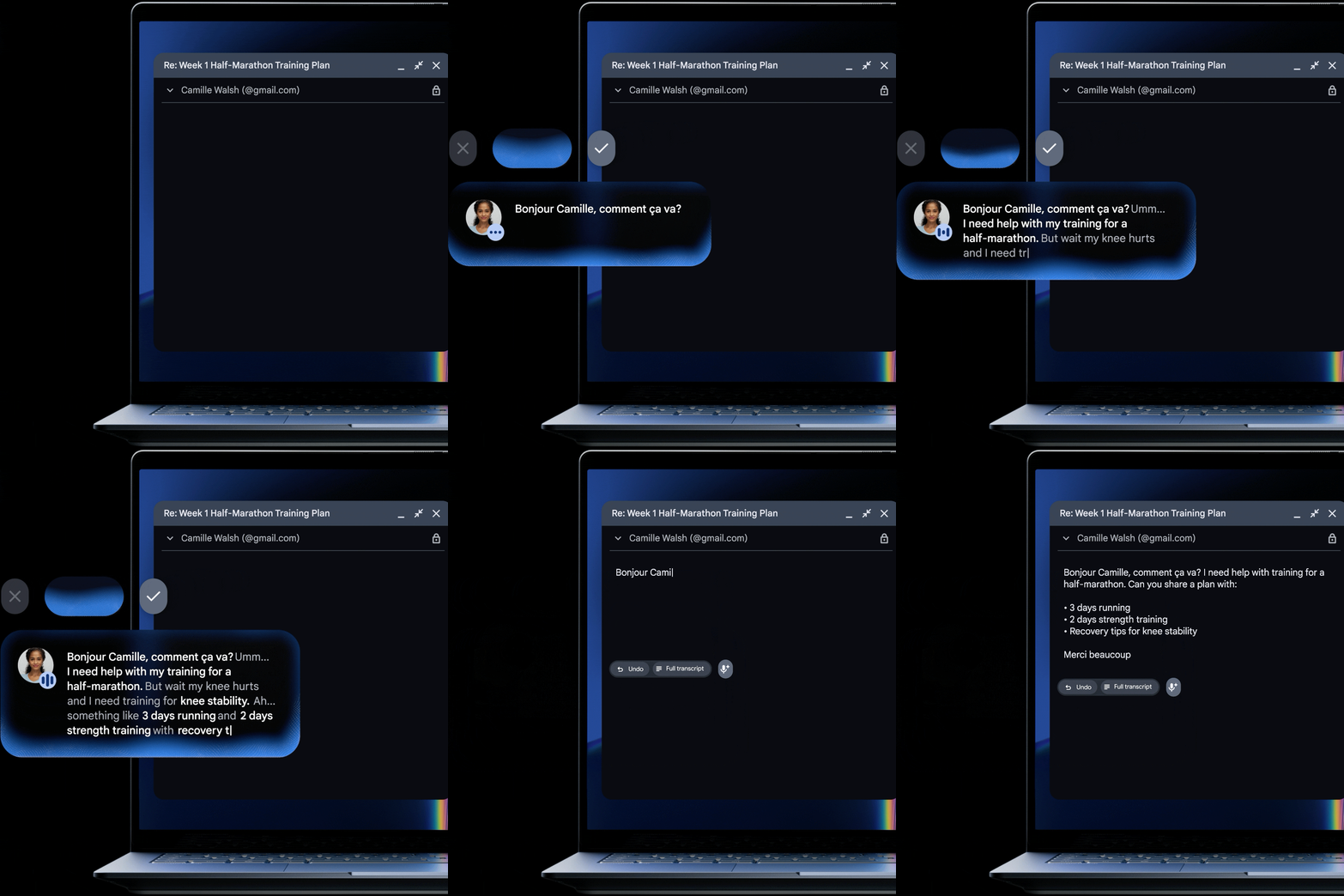
Rambler, accessible directly through the Quick Insert key, understands the context and nuance behind your speech. You can do a completely disorganized verbal brain dump, and Rambler cleans up the errors, strips out the filler, organizes action items into clean bulleted lists, and even adds relevant emojis. It is also natively multilingual, allowing you to switch languages mid-sentence without losing a beat.
Customize your workspace with Create My Widget
Create My Widget lets you build bespoke desktop widgets using natural language, requiring zero coding experience. You can describe what you need in plain English – whether that is a live tracker for your favorite sports team’s scores or a visual countdown for your next family trip – and Gemini generates a persistent, functional widget right on your desktop canvas.
A massive app ecosystem and developer muscle
Googlebook brings together the full web alongside millions of Android apps, with top creative suites like Adobe Photoshop, Adobe Lightroom, and CapCut running natively.
For entertainment, apps like Netflix and Disney+ support full offline downloads for travel. For gaming, Google’s Play Games Level Up program ensures top mobile titles are fully optimized for keyboard, mouse, and high-resolution screens, complemented by a complimentary year of GeForce NOW cloud gaming included in the box.
For builders and makers, Googlebook includes Google Antigravity, Google’s agentic workflow and development environment. Developers get a full Linux terminal environment backed by a Level 5 security-certified hypervisor with pKVM (Protected Kernel-based Virtual Machine) isolation.
This allows developers to safely pull Git repositories, access local hardware ports and networks, and run advanced command-line tools like Claude CLI or Antigravity CLI without ever risking the stability of the core operating system.
Launch perks, pricing, and availability
Google is packing an enormous amount of day-one value into the Googlebook launch. Starting at $899, every Googlebook purchase includes:
- 12 months of Google AI Pro: Delivering 5TB of cloud storage and full access to Gemini Advanced tools
- 3 months of premium subscriptions: Complimentary access to YouTube Premium, Adobe Photoshop, and CapCut
- 1 year of GeForce NOW: Giving you instant access to high-end cloud gaming
- 10 years of guaranteed updates: Setting an industry-leading standard for regular OS feature drops and security patches
Pre-orders are officially open today on the Google Store, Best Buy, and select retail partners. Devices will arrive on shelves starting October 4 in the U.S., and October 5 in Canada, the U.K., Ireland, France, Germany, and Australia.
Make sure to check out our companion breakdown exploring all five launch laptops from Acer, ASUS, Dell, HP, and Lenovo, and stay tuned as we dive deep into review testing with Googlebook OS in the days ahead!
SUBSCRIBE TO UPSTREAM
Get Chrome Unboxed delivered straight to your inbox
Upstream is our flagship, curated newsletter with the top stories, most click-worthy deals, giveaways, and trending articles from Chrome Unboxed sent directly to your inbox a few times a week. Join 31,000+ subscribers.

