


Support our independent tech coverage. Chrome Unboxed is written by real people, for real people—not search algorithms. Join Chrome Unboxed Plus for just $2 a month to get an ad-free experience, access to our private Discord, and more. Learn more about membership here.
START FREE TRIAL (MONTHLY)START FREE TRIAL (ANNUAL)
My jaw practically dropped when I saw a user on Reddit by the name of PasswordIs54321 post images in the K12sysadmin subreddit of a Chromebook they had accidentally left in the oven before deciding to make dinner. As a Chromebook expert in Best Buy stores for nearly four years, I can confidently say that I’ve never seen this before, and I’ve seen nearly everything. For example, someone once brought in a Chromebook that had been dropped out of a moving vehicle on a highway and it had been run over by other cars – somehow they had managed to collect all of its remaining pieces and yes, it was as bad as you’re picturing it in your head.

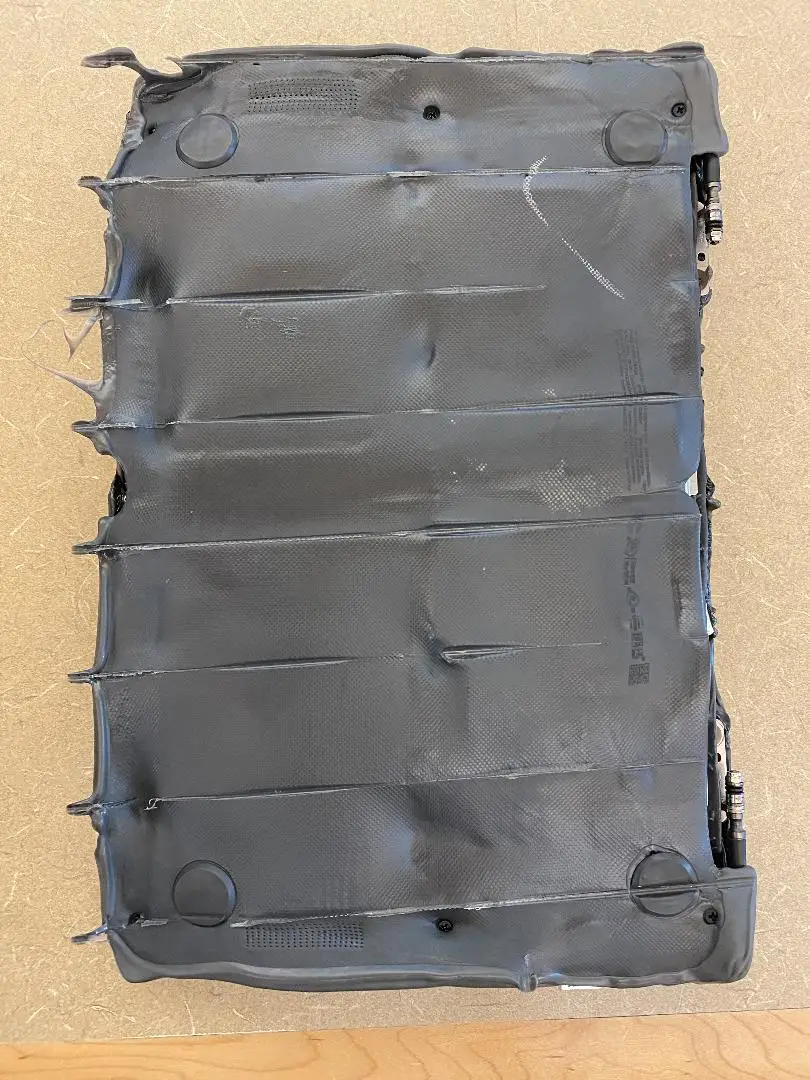

However, seeing a Chromebook for education cooked to a crisp is new for me! The user states that the parents of the child (presumably) had hidden the device in the oven in order to restrict them from using it for purposes other than schoolwork. I mean, yes, the oven is a great hiding spot – unless you’re Hansel or Gretel (or worse still, the witch – spoilers). What’s incredible to me is that the tag on the device is still almost completely intact after it was preheated to 350 (assuming they had pizza that night because why not?)
Anyway, Password states that they don’t recall if they got accidental handling protection on this specific batch of devices, so I can only guess this user is a teacher or a school admin, especially because of where these images were posted. With that being said, there are better ways to get your hands on “cookbooks” rather than, well, making them. At least now I can say I’ve seen a Chromebook overheat – something they rarely do, of course. Despite its time in the furnace, the battery did not explode, everyone was okay, and this little toughy gave Shadrach, Meshach, and Abednego a run for their money. It will be funny to see if the user opts to open up a support ticket with HP after such an event. Maybe the company will use this as a marketing strategy for their durability.
Believe it or not, there is a better way to keep the kids out of Youtube or their favorite games when they should be studying. Google Family Link provides parental controls for Chrome OS and it’s gotten pretty amazing since it launched. Not only can you block or allow specific websites, but you can also set allowance timers for the usage of specific applications. Recently, Google added the ability to exclude apps from daily screen time limitations. This comes in handy for apps that will be used for school, such as calculators, and so on. Family Link is honestly a much better way to create healthier digital habits – no calorie counting required. If you’ve never used it before, I recommend you set it up using the blue button below as it can now be used with school accounts and Google Workspace for Education
SUBSCRIBE TO UPSTREAM
Get Chrome Unboxed delivered straight to your inbox
Upstream is our flagship, curated newsletter with the top stories, most click-worthy deals, giveaways, and trending articles from Chrome Unboxed sent directly to your inbox a few times a week. Join 31,000+ subscribers.


