


Support our independent tech coverage. Chrome Unboxed is written by real people, for real people—not search algorithms. Join Chrome Unboxed Plus for just $2 a month to get an ad-free experience, access to our private Discord, and more. Learn more about membership here.
START FREE TRIAL (MONTHLY)START FREE TRIAL (ANNUAL)
 If you’ve watched our Pixelbook vs. Samsung Chromebook Pro video, you’ll note that one of the victories Samsung scored over our current favorite Chromebook is the availability of a silo in the device where the pen can live.
It sounds like a small thing, but if you keep a stylus pen around most times, you really need a place to put it. This becomes especially poignant if the pen you use is perfectly round.
Superior To A Point
The Pixelbook Pen is – by all counts – better than the Samsung Pen when you are using it. It feels better, more natural, and has a few tricks that the Samsung Pen doesn’t. It is an overall great experience…while you are using it.
The moment you put it down, however, things can get a bit dicey. Without a magnet like Microsoft’s Surface Pen or a silo to go into like Samsung’s, the Pixelbook pen is left without a place to chill while not in use. This is an unfortunate trait the pen experience shares with the Apple Pencil, and it has a few negative side-effects.
First, at a coffee shop or simply an uneven table, your pen has a tendency to freely roll away. It is clunky and annoying.
Second, because of the first point, I don’t get into the habit of taking my Pixelbook Pen out at all times when using the Pixelbook. Frankly, I don’t want to worry about it rolling away on me, so I tend to default to leaving it in the case.
A Fix For Now
We reported earlier this week that Google is providing ALL Pixelbook owners with a free pen loop that will give users a place for their pen to live, but so far we haven’t seen those peripherals start shipping out. If you are reading this and haven’t already, you need to take advantage of this deal
Until that time, we’ve stumbled upon a little trick to give you a place to stash your pen once you’ve set up your Pixelbook for a work/play session.
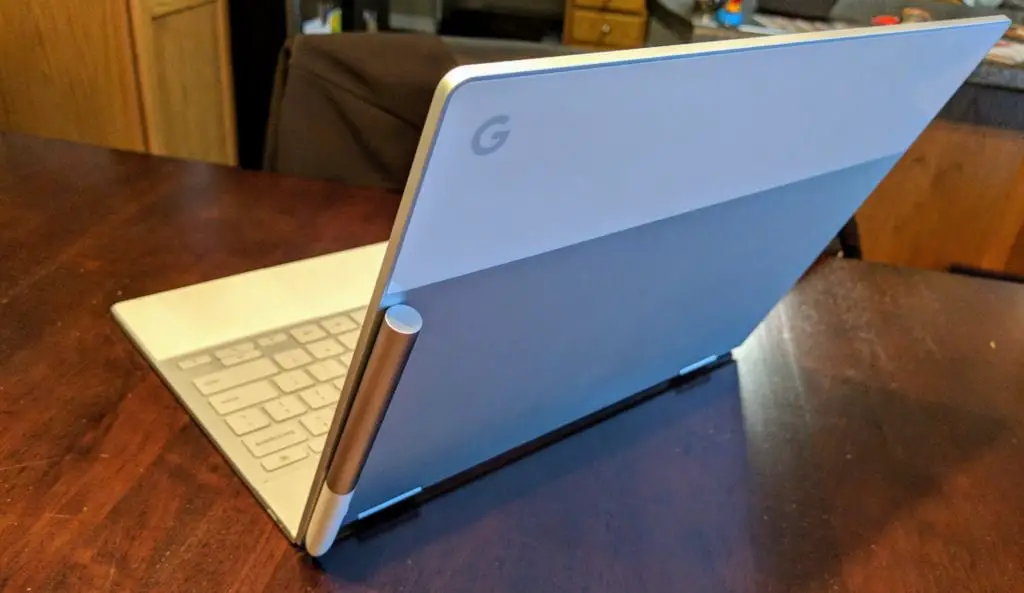
On the top of the lid, behind the screen, on the side with the G logo, there is a magnet that is present to keep the convertible closed when in tablet mode. It isn’t super-strong nor is it meant for this use-case. However, you can use it to hold up your Pixelbook Pen.
With the point facing down, simply touch the pen to the back of the screen portion and voila! Your pen will automagically attach.
Buy The Pixelbook Pen On Amazon
The hold is very weak and any quick movements will likely cause the pen to fall off. This isn’t meant as a place to permanently store you pen and it is not an official method from Google.
But is does work pretty well!
It has quickly become my defacto storage spot for the Pixelbook Pen and I am finding myself keeping the pen out and within reach more often than I used to. Once my Google-supplied pen loop shows up, I probably won’t use this method much, but it is still fun and begs the question: Why didn’t Google make a magnetized area for the Pixelbook Pen?
I honestly have no idea.

