


Support our independent tech coverage. Chrome Unboxed is written by real people, for real people—not search algorithms. Join Chrome Unboxed Plus for just $2 a month to get an ad-free experience, access to our private Discord, and more. Learn more about membership here.
START FREE TRIAL (MONTHLY)START FREE TRIAL (ANNUAL)
Today Google is announcing “practice sets,” a new feature for students and teachers who are using Google Classroom. Practice sets will make it easier for teachers to create and grade practice activities and reduce learner frustration by providing just-in-time support for students. Google did some solid market research and identified three challenges that it is aiming to solve:
- Teachers spend a lot of time developing practice activities
- Students (and parents) get frustrated when they get stuck on a homework assignment
- Grading homework and providing feedback doesn’t always happen in a timely manner
To address these problems, Google is relying on several impressive technologies (a.k.a. “Google Magic”). First, practice sets can identify questions and problems from existing PDF files and images uploaded to Google Classroom. Google has gotten quite good at pulling text out of images. You may have experienced this through tools like Google Lens.
It would appear that some form of this technology is being used to turn the static content found in images and PDFs into editable lessons. This is a big time saver for teachers who can upload photos snapped from a textbook image or a PDF of practice problems rather than making something brand new.
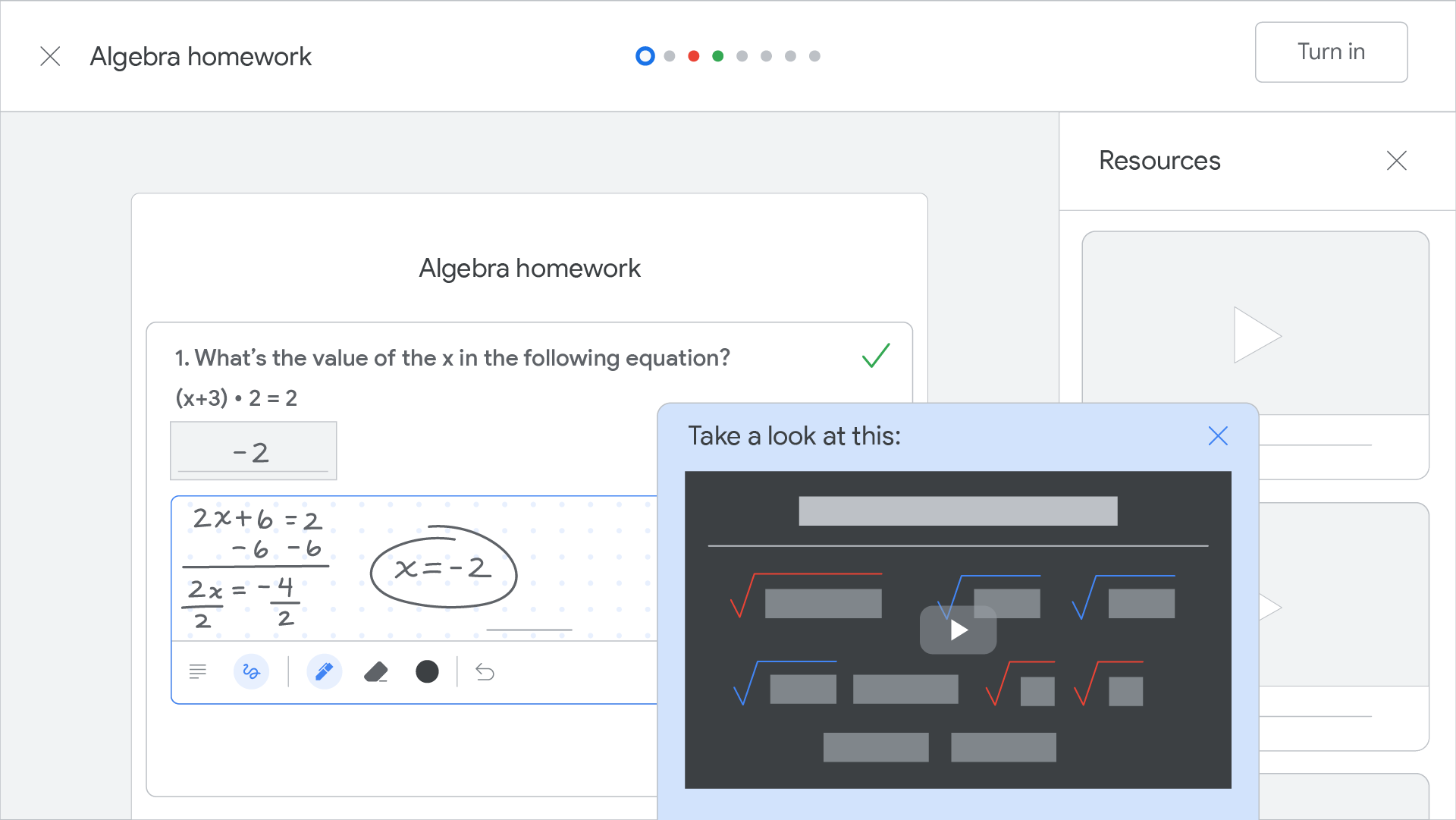
Great news for math teachers!
It’s pretty clear that this new Classroom feature is targeted at math instruction. Students can input their responses using the built-in math keyboard, or by hand-written responses using digital ink. The ability to read and parse hand-written submissions is an illustration of Google’s work in language and handwriting recognition technologies.
Initially, practice sets will support multiple choice, free response, and check box (all that apply) style questions. Support for voice responses is something that is being considered as well.
Solving homework frustration
There’s nothing more frustrating for a student, and their parents, than getting stuck on a homework assignment over the weekend, with no way to contact the teacher. Google would like to solve this problem by using its machine learning expertise to curate resources specifically related to each practice problem.
I had the opportunity to interview Taryn Sullivan on the Chromebook Classroom podcast (as did the team here at Chrome Unboxed) and she mentioned that Google’s ability to identify and suggest supportive content was a key feature they worked hard to build into practice sets.
“Teachers are spending hours upon hours trying to find supportive content for their students. This is something that Google can help with!
Taryn Sullivan
If a student gets stuck or enters an incorrect answer, a carousel of suggestions will appear on the right side of the screen, providing just-in-time support for the struggling learner (and their frustrated parents!). Teachers will be able to preview questions as a student to view the suggested resources that Google displays, making changes as necessary.
Instant results!
The final interesting piece of technology Google included into practice sets is an “enhanced autograder” which can account for answer variations like “1/2” and “0.5” and understands that “3x+y” is the same thing as “y+3x.” As a former teacher myself, I have been thrilled to use a technology like this!
Tools like Google Forms work well enough, but when you move beyond simple multiple choice questions, most autograders don’t do a very good job. Again, the examples and illustrations that have been provided by Google are very math-centric, but support for written responses is also being developed.
Sign up as a beta tester
If you are an educator who is interested in trying out practice sets with your students you can sign up to be a beta tester by filling out this form. It is important to note that your school will need to be on one of the premium workspace accounts (Teaching & Learning or Education Plus) in order to qualify for the beta program. The beta program will be expanded throughout Q2 and Q3 of 2022 with a full public launch expected sometime during the 2022-23 school year.
Will practice sets live up to the hype?
Google is using some cool technology and making some bold promises with this feature announcement. As a teacher myself, I’m interested to see if this new Google Classroom feature can live up to the hype. I already signed up for the beta program and am eager to give practice sets a whirl! You can read my honest thoughts over on The Chromebook Classroom, my education blog focused on teaching with Chromebooks.

