

Support our independent tech coverage. Chrome Unboxed is written by real people, for real people—not search algorithms. Join Chrome Unboxed Plus for just $2 a month to get an ad-free experience, access to our private Discord, and more. Learn more about membership here.
START FREE TRIAL (MONTHLY)START FREE TRIAL (ANNUAL)
It’s no surprise that Google has been doing its best to rid itself of the “G Suite” branding in favor of the new and improved Workspace branding. Unfortunately, they’ve needed to bridge that gap using a gradual approach. There are currently several versions of Workspace that are still housed under the G Suite branding, but we’ll talk about those shortly. Today though, G Suite Enterprise and G Suite for Education are dead. I want you to welcome the new Google Workspace for Education!
Today during the Learning with Google event, Google revealed that many of its recent tools and updates such as the new recording and screenshot feature, the improvements to Google Meet on Chromebooks, and more were all leading up to this reveal. Workspace for Education will come in four flavors, each one offering something slightly different. You can and should check out the full comparison chart found by clicking the blue button at the bottom of this article to gain a better understanding of these differences, but here is an overview of the basics.
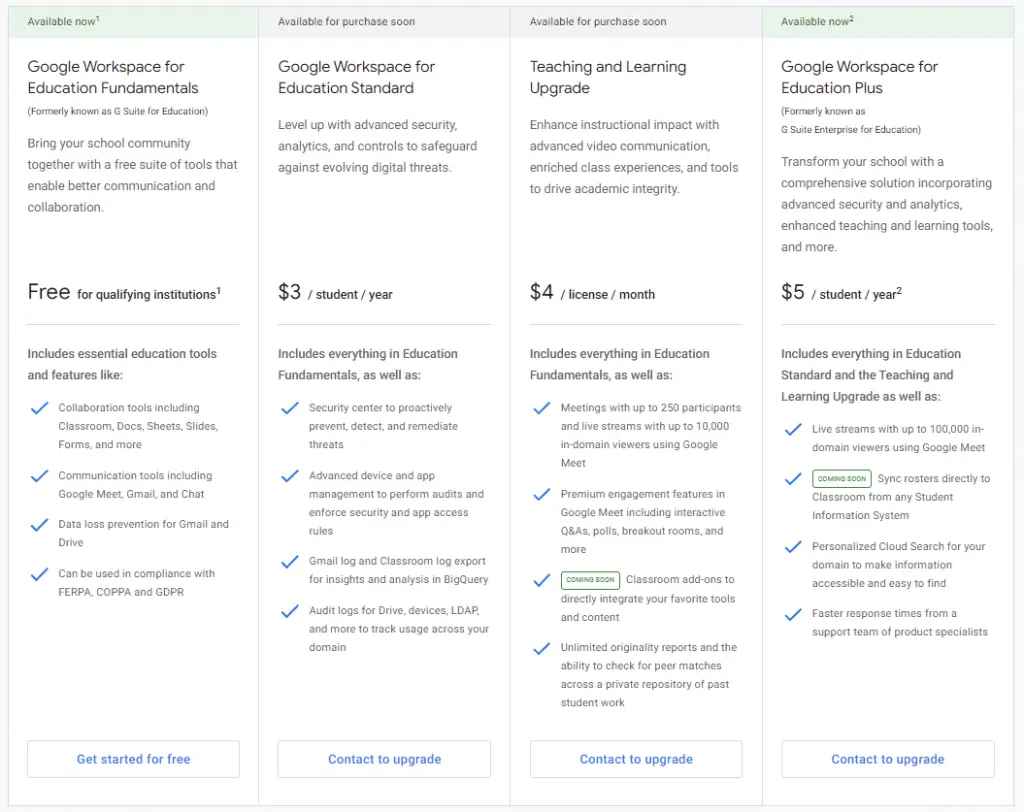
- Google Workspace for Education Fundamentals – G Suite for Education’s new name. It will continue to be free for qualifying schools and universities. If you continue to use this, you’ll see no change aside from the new branding and name!
- Google Workspace for Education Standard – The same as Fundamentals, but with enhanced security
- Teaching and Learning Upgrade – Builds on the previous two, but offers advanced video communication capabilities, enriched class experience in Classroom, and tools that guide critical thinking and academic integrity.
- Google Workspace for Education Plus – The new name for G Suite Enterprise for Education. Includes all features from Fundamentals, Standard, Teaching and Learning Upgrade, and more.
In addition to these drastic changes, Google is pulling the plug on unlimited free storage for Educators. You heard that right – after doing so for regular Google account holders, the golden age of free storage is now at an end for teachers and students. The company claims that this will affect less than 1% of users. After updating its storage policies, it states that now, schools and universities will instead be offered a “pooled cloud storage” (see aforementioned chart using the button) which will have a baseline of 100TB – enough to store over 100 million documents, 8 million presentations, or 400,000 hours of video. To me, it seems like most institutions simply didn’t make much use of unlimited storage, and it sounds as though the new approach will be sufficient for most. Let’s discuss this in the comments section.
Admins should also get new tools to manage this storage and how it’s allocated across their organization. My bet is that it will be similar to what regular users got when unlimited storage was taken away from them – a colorful bar showing the storage quota and how it’s divided among file types or services.
In fact, upon reading Google’s Storage FAQ, we find that “pooled storage” includes all Google Drive files, Gmail, and Google Photos from every single student in that organization, all in one pool. For institutions with 20,000 or more students, faculty, and staff or 20,000 active users that follow the Google Workspace for Education TOS and Acceptable Use Policy will be provided with additional storage before the end of the year. Everyone else will need to upgrade.
Google Workspace for Education Fundamentals and Education Plus are available today. You’ll be able to upgrade to Education Standard and the Teaching and Learning license as early as April 14, 2021. The new storage policies we just discussed will go into effect in July of 2022.
All that currently remains under the G Suite nomenclature is G Suite Basic and G Suite for Business. I have no doubt that in an effort to completely wipe the old branding off of the face of the planet, we’ll see more Workspace updates soon which will address these two.
View Full Comparison of Workspace for Education Editions
SUBSCRIBE TO UPSTREAM
Get Chrome Unboxed delivered straight to your inbox
Upstream is our flagship, curated newsletter with the top stories, most click-worthy deals, giveaways, and trending articles from Chrome Unboxed sent directly to your inbox a few times a week. Join 31,000+ subscribers.

