
• Skip to main content
  • Skip to primary sidebar
  • Deals
  • Features
  • Guides
  • Chromebooks
  • Videos
  • Podcast
  • More +
    • Reviews
    • Unboxing
    • Upcoming Devices
    • Chromebook Plus
    • Chrome
    • ChromeOS
    • Chrome OS Flex
  • Search
  • Sign Up
  • Log In
Chrome Unboxed – The Latest Chrome OS News

Chrome Unboxed - The Latest Chrome OS News

A Space for All Things Chrome, Google, and More!

  • Deals
  • Features
  • Guides
  • Chromebooks
  • Videos
  • Podcast
  • More +
    • Reviews
    • Unboxing
    • Upcoming Devices
    • Chromebook Plus
    • Chrome
    • ChromeOS
    • Chrome OS Flex
  • Search
  • Sign Up
  • Log In

You can now drag images out of Keep into other apps on Android

July 5, 2022 By Johanna Romero View Comments

Support our independent tech coverage. Chrome Unboxed is written by real people, for real people—not search algorithms. Join Chrome Unboxed Plus for just $2 a month to get an ad-free experience, access to our private Discord, and more. Learn more about membership here.
START FREE TRIAL (MONTHLY)START FREE TRIAL (ANNUAL)

Google Keep has been the subject of several APK teardowns lately that have revealed some interesting “possible” new features. Just last month, it was discovered that Keep is likely adding basic text formatting options, such as the ability to bold or italicize your text, as well as adding different font sizes. Considering the app is nearly ten years old and hasn’t seen many changes or improvements during that time, it was nice to hear that something was in the works.

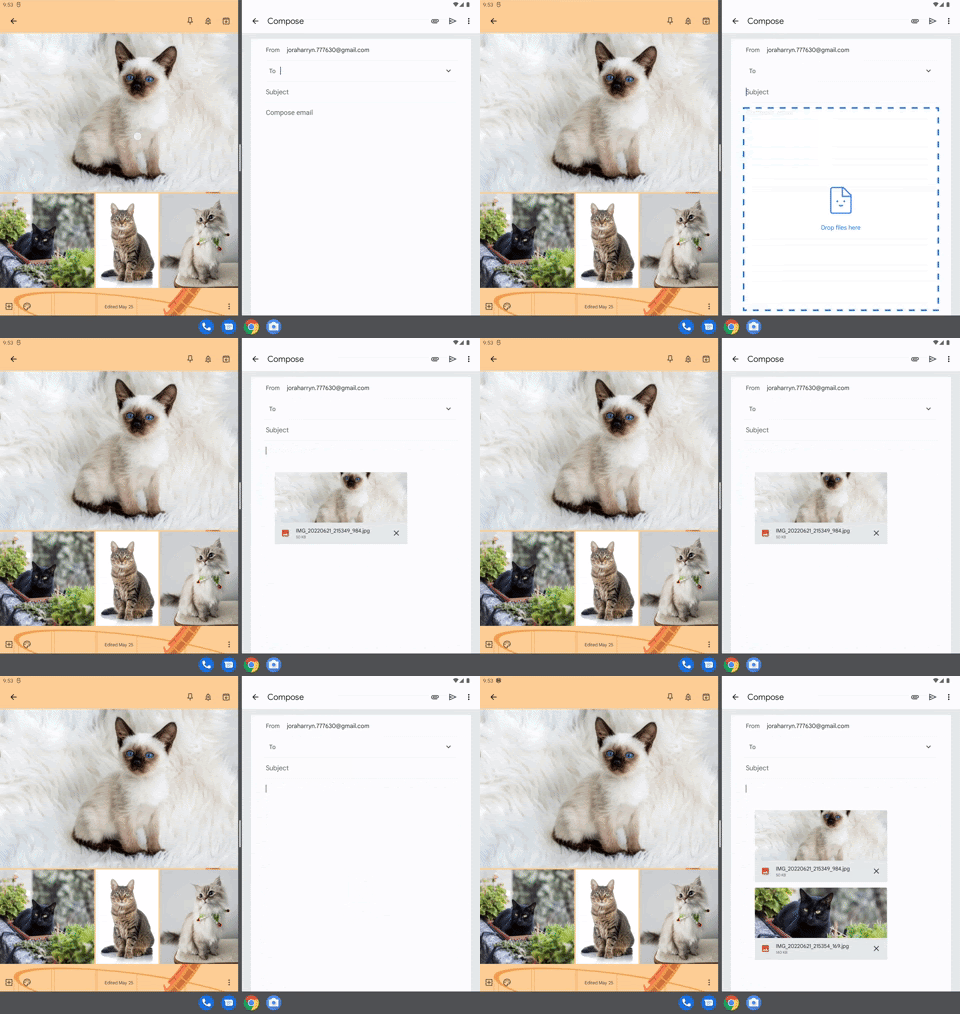
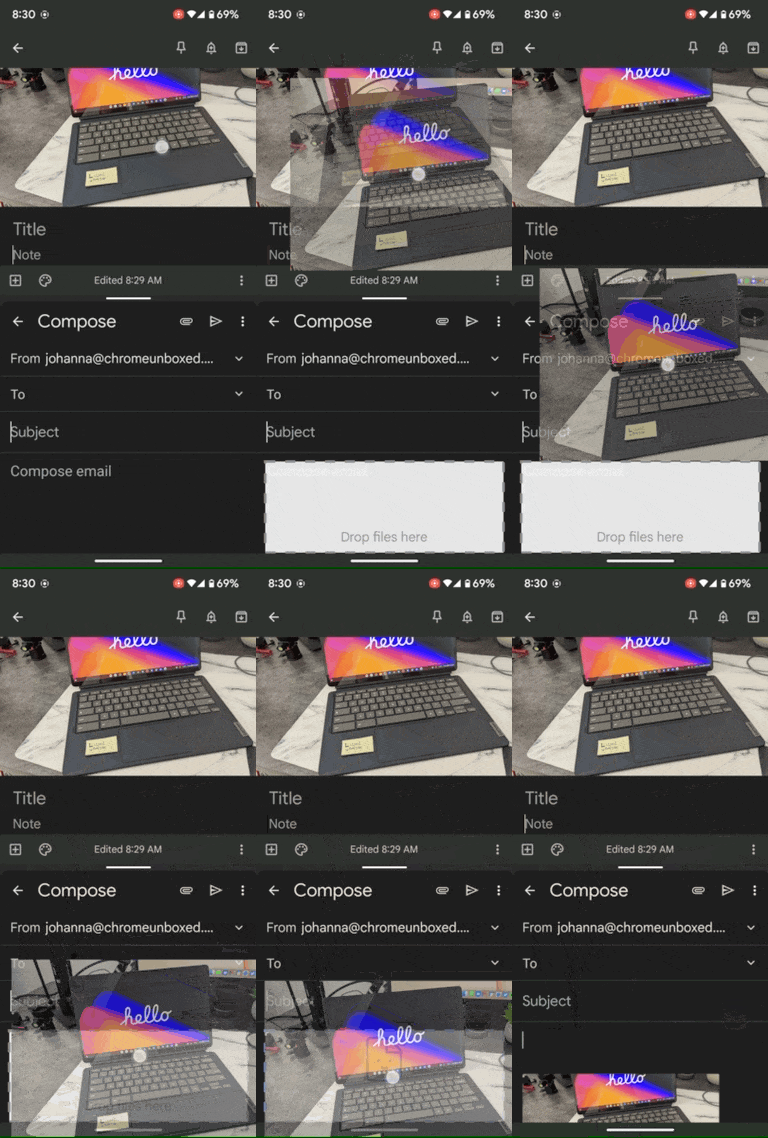
However, last week we finally saw the first official blog post where Keep has started to change. Although there was no mention of the formatting options discovered during the APK teardowns, another unexpected feature was announced: You will now be able to drag an image already saved in a Google Keep note into other apps by dragging it out from the image carousel on Android. This can be helpful if you want to repurpose an image you previously used on a Keep note but don’t want to go through the steps of re-downloading it so you can attach it to an email.

Xremove ads

In the example image below, you can see the feature in action on an Android tablet by having the two apps (Keep and Gmail) split side by side. I also got this to work on my Pixel phone by splitting the top and bottom of the apps, then following the same process of dragging the image out of Keep and into an email.
Although not something to get crazily excited about, I see this as possibly the beginning of the updates that Keep is meant to receive soon. I know it’s a bit of speculating on my part, but considering the new features were already present in the APKs, it’s obvious that it’s just a matter of time until they are available in a public build. We’ll keep an eye on the Google Workspace blog for any new developments with Keep and will report them here as they become available.

Featured Videos

Xremove ads

SUBSCRIBE TO UPSTREAM

Get Chrome Unboxed delivered straight to your inbox

Upstream is our flagship, curated newsletter with the top stories, most click-worthy deals, giveaways, and trending articles from Chrome Unboxed sent directly to your inbox a few times a week. Join 31,000+ subscribers.

SUBSCRIBE HERE!

Filed Under: Android, Apps, New & Upcoming Features, Workspace Tagged With: android, google keep, google workspace, keep, workspace

Primary Sidebar

Xremove ads

Deals

The best Chromebook deals today

By Robby Payne
April 20, 2026

Deal Alert: the excellent Lenovo Chromebook Plus 2-in-1 returns to $429

By Robby Payne
April 20, 2026

Lenovo Legion Tab Gen 3 drops to $399, ahead of the much pricier Gen 5 release

By Joseph Humphrey
April 18, 2026

How to get 50% off YouTube Premium for a full year with Google One

By Robby Payne
April 16, 2026

The Pixel 10a just dropped to $449, but here’s why you should buy the Pixel 10 instead

By Joseph Humphrey
April 13, 2026

More Deals

Xremove ads

Reviews

Acer Chromebook Plus Spin 514 Review: Kompanio Ultra power in a convertible

By Robby Payne
December 24, 2025

My review after 6 weeks with the Lenovo Chromebook Plus 14 [VIDEO]

By Robby Payne
August 11, 2025

One week with the best small Android tablet you can buy, and I’m sold

By Robby Payne
May 9, 2025

Best Chromebooks of 2024 [VIDEO]

By Robby Payne
November 28, 2024

Samsung Galaxy Chromebook Plus Review: Samsung is back! [VIDEO]

By Robby Payne
October 28, 2024

More Reviews

Xremove ads

Guides

This Chromebook trackpad shortcut is definitely not new, but is blowing my mind

By Robby Payne
March 11, 2024

How to reduce broadcast delay on YouTube TV to stop live spoilers

By Robby Payne
December 8, 2023

Windows PC keyboard and Chromebook

How to use a Windows keyboard with a Chromebook

By Joseph Humphrey
December 8, 2023

How reset and revert your Chromebook to the previous version of Chrome OS

By Robby Payne
November 29, 2023

My Chromebook Plus features disappeared: here’s how I fixed it

By Robby Payne
November 24, 2023

More Guides

TWITTER · FACEBOOK · INSTAGRAM · YOUTUBE · EMAIL · ABOUT

Copyright © 2026 · Chrome Unboxed · Chrome is a registered trademark of Google Inc.
We are participants in various affiliate advertising programs designed to provide a means for us to earn fees by linking to affiliated sites.

PRIVACY POLICY