
• Skip to main content
  • Skip to primary sidebar
  • Deals
  • Features
  • Guides
  • Chromebooks
  • Videos
  • Podcast
  • More +
    • Reviews
    • Unboxing
    • Upcoming Devices
    • Chromebook Plus
    • Chrome
    • ChromeOS
    • Chrome OS Flex
  • Search
  • Sign Up
  • Log In
Chrome Unboxed – The Latest Chrome OS News

Chrome Unboxed - The Latest Chrome OS News

A Space for All Things Chrome, Google, and More!

  • Deals
  • Features
  • Guides
  • Chromebooks
  • Videos
  • Podcast
  • More +
    • Reviews
    • Unboxing
    • Upcoming Devices
    • Chromebook Plus
    • Chrome
    • ChromeOS
    • Chrome OS Flex
  • Search
  • Sign Up
  • Log In

Just point and shoot – Your Chromebook camera will soon be able to scan documents

September 16, 2021 By Michael Perrigo View Comments

Support our independent tech coverage. Chrome Unboxed is written by real people, for real people—not search algorithms. Join Chrome Unboxed Plus for just $2 a month to get an ad-free experience, access to our private Discord, and more. Learn more about membership here.
START FREE TRIAL (MONTHLY)START FREE TRIAL (ANNUAL)

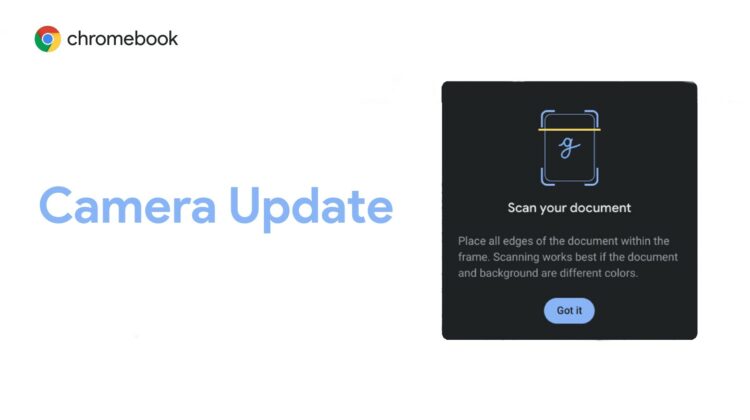
While this update has been a long time coming, it’s yet to make an official appearance until today. On Chrome OS 96 Canary, the camera app on my Pixelbook Go displayed the message you see below, indicating that instead of having to scan through the traditional built-in ‘Scan’ app, I could technically capture a document directly.

Scan your document

Place all edges of the document within the frame. Scanning works best if the document and background are different colors.

After opening the app itself, a new ‘Scan’ option appears on the bottom navigation alongside the pre-existent ‘Video’, ‘Photo’, ‘Square’, and ‘Portrait’ options. Once you dismiss the tutorial message, all you’ll need to do is point your Chromebook at the document, line up the edges and snap the shutter button.

Xremove ads

You may have noticed I said to point your Chromebook at the document. Those of you with standard clamshell devices may be a bit confused right now. Even if you had a rear-facing camera, how awkward would that be to do? That’s why those with world-facing cameras will be the only ones to truly benefit from this new feature. That means that if you can flip your keyboard out of the way and have a tablet-style or detachable Chromebook, this will be possible for you.

Once you place a document in the frame of the camera, a blue bounding box will intelligently adjust around it, moving and shifting to appropriately capture the edges. If you aren’t doing it right, a message will appear at the top reminding you to ‘color in the lines’, so to speak. You may also notice that the QR Code scanner is now built-in to the document scanner – they’re one in the same with a simple flip of the switch.

Featured Videos

Xremove ads

Alright, great! You’ve now captured a document. On the bottom-left, you’ll be presented with a ‘Retake’ option, just in case it wasn’t to your liking. On the bottom-right, you’ll see ‘Save as Photo’ and ‘Save as PDF’ options, both of which drop the new document into your Files app. We’re not yet sure when this is due to roll out, but seeing it appear as usable and very well polished today means it can’t be far off.

SUBSCRIBE TO UPSTREAM

Get Chrome Unboxed delivered straight to your inbox

Upstream is our flagship, curated newsletter with the top stories, most click-worthy deals, giveaways, and trending articles from Chrome Unboxed sent directly to your inbox a few times a week. Join 31,000+ subscribers.

SUBSCRIBE HERE!

Filed Under: Apps, Chrome OS Tablet, ChromeOS, New & Upcoming Features, News

About Michael Perrigo

Known as "Google Mike" to his customers, Michael worked at Best Buy as a Chromebook Expert who dedicated his time to understanding the user experience from a regular Chromebook owner's perspective. Having spent nearly 20 years meeting you face-to-face, he strives to help you understand your technology through carefully crafted guides and coverage, relentlessly seeking out the spark in what's new and exciting about ChromeOS.

Primary Sidebar

Googlebook

Googlebook OS is getting keyboard shortcuts for play/pause and previous/next in media

By Robby Payne
November 28, 2026

Flagships, tablets, or budget laptops: why the Googlebook launch was always going to be a gamble

By Robby Payne
November 25, 2026

Googlebook ‘Pelion’ borrows its battery from one of my favorite Acer Chromebooks

By Robby Payne
November 25, 2026

Entry-level Googlebooks might finally be coming with Snapdragon C silicon

By Robby Payne
November 24, 2026

When I need to get technical work done, I still reach for a Chromebook over a Googlebook

By Robby Payne
November 24, 2026

More Googlebook

Xremove ads

Deals

The best Black Friday Googlebook and Chromebook deals

By Robby Payne
November 27, 2026

The first Googlebook deals are here, slashing up to $300 off two 3K OLED models

By Robby Payne
November 20, 2026

My favorite convertible Chromebook is $150 off right now and primed for Googlebook OS

By Robby Payne
September 29, 2026

Google Pixel Buds 2a in Hazel bundled with a new Googlebook laptop at Best Buy

Score a free $129 pair of Pixel Buds 2a with any Googlebook pre-order at Best Buy

By Robby Payne
September 28, 2026

The best Chromebook ever made is $350 off at Best Buy right now

By Robby Payne
August 21, 2026

More Deals

Xremove ads

Reviews

My brutally honest thoughts on Googlebook after one month [VIDEO]

By Robby Payne
November 2, 2026

Acer Chromebook Plus Spin 514 Review: the best convertible you can buy [VIDEO]

By Robby Payne
July 1, 2026

Lenovo Chromebook Plus 2-in-1 Review: pretty great in a vacuum

By Robby Payne
April 23, 2026

My review after 6 weeks with the Lenovo Chromebook Plus 14 [VIDEO]

By Robby Payne
August 11, 2025

One week with the best small Android tablet you can buy, and I’m sold

By Robby Payne
May 9, 2025

More Reviews

Xremove ads

TWITTER · FACEBOOK · INSTAGRAM · YOUTUBE · EMAIL · ABOUT

Copyright © 2026 · Chrome Unboxed · Chrome is a registered trademark of Google Inc.
We are participants in various affiliate advertising programs designed to provide a means for us to earn fees by linking to affiliated sites.

PRIVACY POLICY