


Support our independent tech coverage. Chrome Unboxed is written by real people, for real people—not search algorithms. Join Chrome Unboxed Plus for just $2 a month to get an ad-free experience, access to our private Discord, and more. Learn more about membership here.
START FREE TRIAL (MONTHLY)START FREE TRIAL (ANNUAL)
A buddy of mine named Scott Jacobson, who is a science and game design teacher (thanks, Scott!) recently brought a cool product to my attention. He stated that he had used a Chromebook to prototype a VR game with his students at the start of the global pandemic, like many people. However, while software like Construct 3 came to the rescue, an unlikely hero also emerged.
You see, he was searching for web-based apps that could be used on the Chromebooks his students were given but he also wanted to be sure it was rigorous enough for in-depth learning and application. What he discovered was something called Blocksmith, a user-friendly 3D content creation, and sharing platform.
What is Blocksmith Builder?
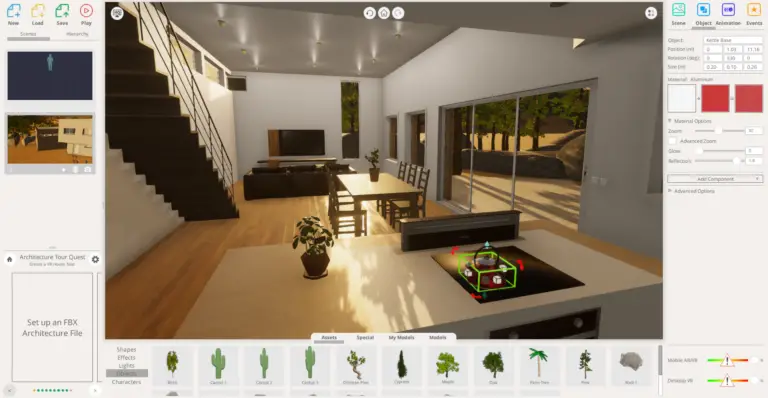
Blocksmith Builder (not sponsored) helps both the amateur and the professional rapidly create 3D art assets and develop virtual reality experiences right in Chrome. By launching the editor in one click, you or your class can effortlessly position, scale, and rotate models either from the vast inbuilt library or your own imported ones.
Sure, you could load up Blender via the Linux container, but considering there is literally no setup for this service, it’s much more accessible for the layperson, and that’s awesome. Truly, this is my cup of tea when it comes to discovering and recommending forward-thinking PWAs to you all.
Oh, I nearly forgot to mention that there are built-in animations you can use to bring your creations to life as well as tactical and visual reactions among other interactive elements that can be applied to whatever scene you’re creating. Once you’re done, you can view this in a VR headset, on the web, on your mobile device, or really anywhere else. There’s a player that can be embedded into any web page as well.
It feels like the company has thought of pretty much everything for its users, including performance metrics for shipping to various platforms. If that’s not enough, you can even export your project and continue building it directly in Unity3D – wild, right?
Pricing
This is technically a free tool if you just want to play with the XR Builder App, have a bit of cloud storage and access to nearly 3000 3D models and templates, but there is a paid tier if you want more from the experience. It’s affordable though, which is great. Over 50 hours of learning curriculum, a ton of extra cloud storage space, and assets will cost you just $7.99 USD per month. It’s worth it if this is a tool you’ll find yourself accessing often, I think.
So that there’s no confusion, releasing a commercial product built with Blocksmith will cost you $1,200 for a year, but this pricing is meant for companies, creative teams, and client projects, not for individuals! There are countless games and projects that have been created already by those who have either paid for themselves or used the app for free, so check out the community hub if you want to get a better sense for what it’s capable of.
You get out of it what you put into it
Honestly, what’s there isn’t super impressive, but when you look at what professionals are doing with it to create virtual home tours, VR training sessions for companies, and even video production, I think its purpose and potential will become much clearer and the tools will become more appealing. Don’t forget – it looks as good as you make it with imported 3D models like those you see below!
Ultimately, this is a robust toolset that lets you get out of it the measure which you put into it, and can be seen more as an incredible sandbox playground than anything else. I’m certainly going to tinker a bit more throughout the upcoming week. I’m quite surprised I’d never heard of Blocksmith Builder until today when Scott and I were talking. Let me know in the comments if you’re going to check it out!
SUBSCRIBE TO UPSTREAM
Get Chrome Unboxed delivered straight to your inbox
Upstream is our flagship, curated newsletter with the top stories, most click-worthy deals, giveaways, and trending articles from Chrome Unboxed sent directly to your inbox a few times a week. Join 31,000+ subscribers.

