

• Skip to main content
  • Skip to primary sidebar
  • Deals
  • Features
  • Guides
  • Chromebooks
  • Videos
  • Podcast
  • More +
    • Reviews
    • Unboxing
    • Upcoming Devices
    • Chromebook Plus
    • Chrome
    • ChromeOS
    • Chrome OS Flex
  • Search
  • Sign Up
  • Log In
Chrome Unboxed – The Latest Chrome OS News

Chrome Unboxed - The Latest Chrome OS News

A Space for All Things Chrome, Google, and More!

  • Deals
  • Features
  • Guides
  • Chromebooks
  • Videos
  • Podcast
  • More +
    • Reviews
    • Unboxing
    • Upcoming Devices
    • Chromebook Plus
    • Chrome
    • ChromeOS
    • Chrome OS Flex
  • Search
  • Sign Up
  • Log In

How to create and learn about music production through the browser using Chrome Music Lab

November 20, 2022 By Michael Perrigo View Comments

Support our independent tech coverage. Chrome Unboxed is written by real people, for real people—not search algorithms. Join Chrome Unboxed Plus for just $2 a month to get an ad-free experience, access to our private Discord, and more. Learn more about membership here.
START FREE TRIAL (MONTHLY)START FREE TRIAL (ANNUAL)

I’m always on the hunt for fantastic web apps that allow students and creatives to flourish without having to buy software or install anything. That being said, they normally come with a hefty monthly subscription. Take, for example, Soundtrap. I absolutely love this service, and in my personal opinion, it’s one of the best web-based tools for audio production to date.

Today, I want to introduce you to a free-to-use alternative that’s primarily focused on kids and students. Chrome Music Lab is a suite of educational tools that lets you learn musical theory without it being overly boring or saturated in technical detail. It’s a sandbox for expression, and it’s owned by Google. It’s also a part of the company’s Chrome Experiments which often get updated with new and interesting resources.
Xremove ads

Now, I’m not about to say these are robust tools for music creation, but they are a great way to get your feet wet as someone who’s new to the idea of making and understanding music. In the mix, we have several options for getting started:

  • Shared Piano
  • Rhythm
  • Spectrogram
  • Soundwave
  • Arpeggios
  • Kandinsky
  • Voice Spinner
  • Harmonics
  • Piano Roll
  • Oscillators
  • Strings
  • Melody Maker
  • Chords

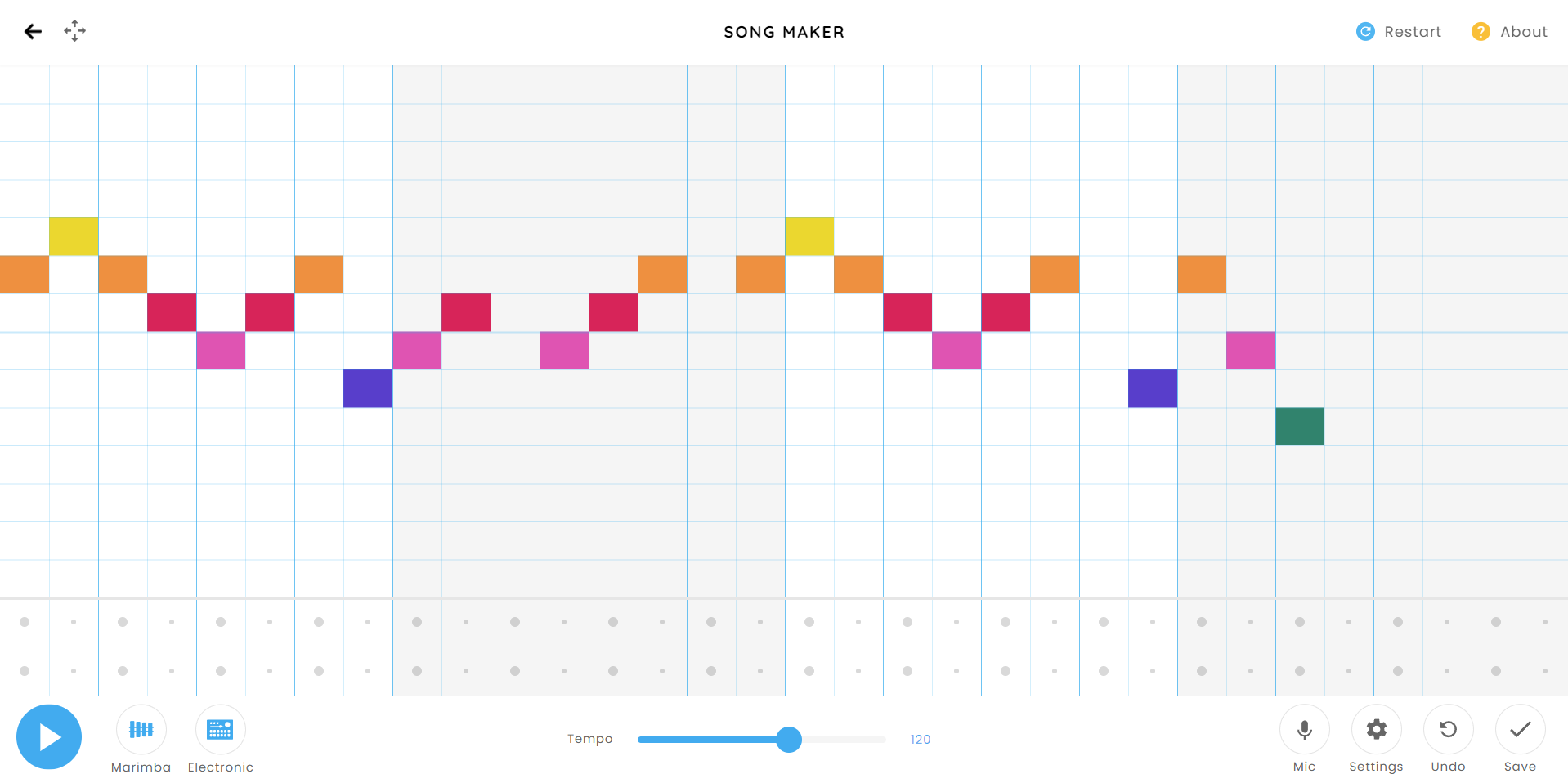
While these all vary in their use and sound, the main event here is the “Song Maker” where you’ll make a song by simply adding notes via clicks on the grid. You can then share it with a web link. The most interesting part, and what I suspect will be the will be intriguing for many of you is the fact that you can plug in a MIDI keyboard or microphone to speed up production and make it more comfortable.

Featured Videos

Xremove ads

Don’t worry though – if you don’t have either, you can simply use the keys on your keyboard as a means of emulating an actual piano roll. Pressing the arrow keys to move, you can tap enter and backspace to create or destroy notes. Tapping the space bar plays and pauses your song.

I played around with it for a while, and I’m definitely better at the shared piano (besides having no one to play with!) as I’ve taken many years of the instrument back in school. It’s amazing how you never really forget what you’ve learned, despite having to brush up quite a bit. I let my son with Song Maker for a while, and though I won’t be teaching him to play anything but the guitar at this point, it was a really fun experience for him and gave us a few laughs.

SUBSCRIBE TO UPSTREAM

Get Chrome Unboxed delivered straight to your inbox

Upstream is our flagship, curated newsletter with the top stories, most click-worthy deals, giveaways, and trending articles from Chrome Unboxed sent directly to your inbox a few times a week. Join 31,000+ subscribers.

Xremove ads
SUBSCRIBE HERE!

Filed Under: Education, Guides and How-To's

About Michael Perrigo

Known as "Google Mike" to his customers, Michael worked at Best Buy as a Chromebook Expert who dedicated his time to understanding the user experience from a regular Chromebook owner's perspective. Having spent nearly 20 years meeting you face-to-face, he strives to help you understand your technology through carefully crafted guides and coverage, relentlessly seeking out the spark in what's new and exciting about ChromeOS.

Primary Sidebar

Googlebook

Henry Cavill is partnering with Google to build a video game on Googlebook

By Robby Payne
October 1, 2026

Googlebook is taking over Best Buy with an unprecedented in-store marketing push

By Robby Payne
September 30, 2026

‘Blanc’ is another new Intel Wildcat Lake-powered Googlebook already in the works

By Robby Payne
September 29, 2026

Google re-confirms ChromeOS will get regular updates through mid-2034

By Robby Payne
September 29, 2026

Sold out at Best Buy: The only place to order the ASUS Googlebook 14 right now

By Robby Payne
September 28, 2026

More Googlebook

Xremove ads

Deals

My favorite convertible Chromebook is $150 off right now and primed for Googlebook OS

By Robby Payne
September 29, 2026

Google Pixel Buds 2a in Hazel bundled with a new Googlebook laptop at Best Buy

Score a free $129 pair of Pixel Buds 2a with any Googlebook pre-order at Best Buy

By Robby Payne
September 28, 2026

The best Chromebook deals today

By Robby Payne
September 2, 2026

The best Chromebook ever made is $350 off at Best Buy right now

By Robby Payne
August 21, 2026

The excellent, powerful Acer Chromebook Plus Spin 514 is $150 off right now

By Robby Payne
August 12, 2026

More Deals

Xremove ads

Reviews

Acer Chromebook Plus Spin 514 Review: the best convertible you can buy [VIDEO]

By Robby Payne
July 1, 2026

Lenovo Chromebook Plus 2-in-1 Review: pretty great in a vacuum

By Robby Payne
April 23, 2026

My review after 6 weeks with the Lenovo Chromebook Plus 14 [VIDEO]

By Robby Payne
August 11, 2025

One week with the best small Android tablet you can buy, and I’m sold

By Robby Payne
May 9, 2025

Best Chromebooks of 2024 [VIDEO]

By Robby Payne
November 28, 2024

More Reviews

Xremove ads

TWITTER · FACEBOOK · INSTAGRAM · YOUTUBE · EMAIL · ABOUT

Copyright © 2026 · Chrome Unboxed · Chrome is a registered trademark of Google Inc.
We are participants in various affiliate advertising programs designed to provide a means for us to earn fees by linking to affiliated sites.

PRIVACY POLICY