Support our independent tech coverage. Chrome Unboxed is written by real people, for real people—not search algorithms. Join Chrome Unboxed Plus for just $2 a month to get an ad-free experience, access to our private Discord, and more. Learn more about membership here.
START FREE TRIAL (MONTHLY)START FREE TRIAL (ANNUAL)
Update 6/15/21: Check out our video on what Material You might look like on Chromebooks below!
Google recently spoke openly about wanting to further integrate its Assistant into Chrome OS in a more meaningful way, but we still don’t exactly know what that means. It’s only been just over a year since it made its debut on the operating system, and as of right now, it can be accessed via the ‘Everything button’, and through the context menu, for quick answers for information you highlight and right-click, but that’s it.
With Assistant getting pretty intelligent and useful through Google’s other products, I thought it would be fun to take a look at a tighter integration between the company’s helper and its laptops. Today, I went ahead and mocked up what it would look like to have Assistant’s Snapshot feature baked directly into Chrome OS. Mind you, this was done as a part of a larger project where I mocked up what Google’s Material You design would look like on Chromebooks, so it isn’t meant to be anything earth-shattering on its own.

There are no doubt much more meaningful ways for Google to integrate Assistant into Chrome OS, but since we’re still waiting for more information on what that could look like, this was a fun side project I thought up in the meantime and is just one example of what it could mean when it arrives. It’s true that Snapshot notifications could just be integrated into the standard notification tray above the quick settings, but having Snapshot separate would allow a quick way for users to glance at pertinent information on their laptop throughout the day without it being jumbled in with other notifications that may not be time-sensitive.
What do you think? Would you be interested in having direct access to calendar, weather, and other scheduling notifications as they come up without having to immediately pull up the Calendar web application? Do you feel that such a tool would allow you to get your bearings on your day even after you’ve dismissed such items from your notification section? I love the Snapshot tool in the Search app on Android, but I scarcely ever use it as I forget it exists! I do believe that such a tool would be more useful on a laptop, but that’s just my opinion.
I initially mocked up a sort of calendar widget, but I thought it less feasible and Googley than a Snapshot alternative, but if you’re interested, I’ll place that below as well. I imagine this alternative as showing upcoming calendar events and providing the user with a full glanceable month of dates similar to that of Windows. I know such a thing has been on many people’s wishlist while others loathe the idea of Chrome OS becoming more like Windows, but you can’t argue that it’s useful.
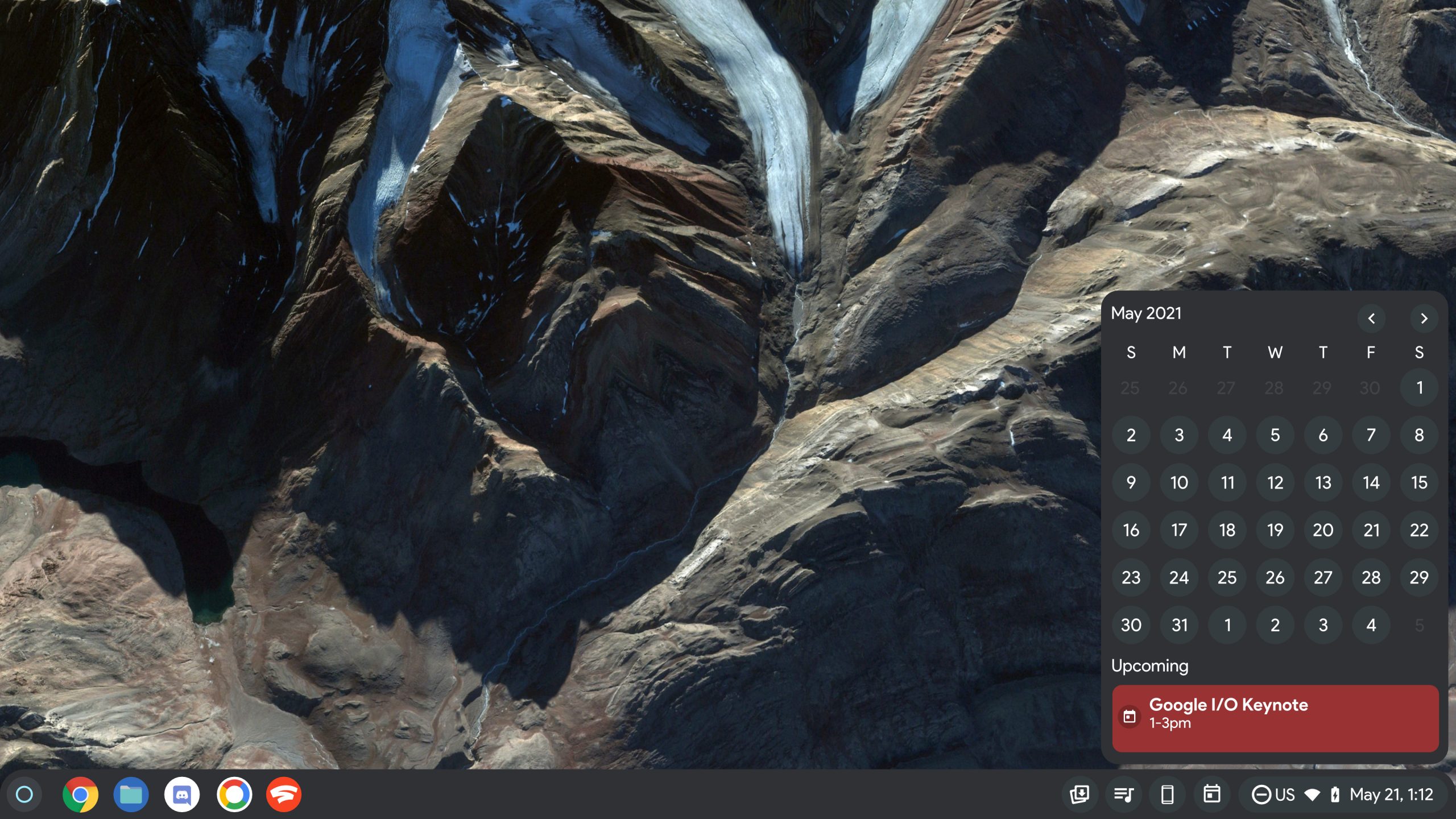
I often wonder why something like this has yet to be implemented, and each time I need to know what day a specific date falls on, I have to open the Calendar PWA to manually check or ask Assistant – both of which feel like extra steps, especially in an environment where you can’t talk to your computer or make lots of noise (Not to mention, talking to your computer is still very new to people).
It would also be cool if clicking on the date or upcoming events from either mock-up would launch the Calendar website and take you directly to that event. If you have a Meet call, perhaps this could launch you straight into your scheduled meeting – wishful thinking, I know, but shouldn’t Chrome OS interact more natively with Google’s services? My goal with these designs was to reduce the friction to interacting with important information, and since Google is obsessed with these little tools at the bottom of the shelf as of late, I figured I would add a few of my own! Of course, if such a widget were created by the company, they would probably have to separate it, quick settings, and notifications into three shelf tools, with the date and time indicator pulling up the calendar directly, but I don’t see that happening any time soon.
Getting back to Assistant, Google has committed to making Chromebooks more intelligent and helpful to everyone over the next 10 years. For starters, it has decided that it wants to make AI more prevalent throughout the core experiences of the OS and not merely a separate tool. The company has stated it’s finding new ways to help users proactively using it, so beyond scheduling, what would you like to see your laptop do with it? Perhaps scheduling could kick off a chain of automated tasks like opening specific applications during a certain time or event without your direct intervention using Assistant Routines or something.
While Chromebooks don’t have the maturity that Windows or macOS have, it also doesn’t carry many of the same stigmas or presuppositions about what computing should be, so Google has an opportunity to make it anything, even if it’s wildly imaginative in its approach to the future. What if Chromebooks come to do things no one ever thought them capable of? I’m here for that ride, are you? I wanted these designs to kick off a conversation with you, our readers so that I could get your opinion on how you would like Chrome OS evolve over the next few years, so sound off in the comments!
SUBSCRIBE TO UPSTREAM
Get Chrome Unboxed delivered straight to your inbox
Upstream is our flagship, curated newsletter with the top stories, most click-worthy deals, giveaways, and trending articles from Chrome Unboxed sent directly to your inbox a few times a week. Join 31,000+ subscribers.