

Support our independent tech coverage. Chrome Unboxed is written by real people, for real people—not search algorithms. Join Chrome Unboxed Plus for just $2 a month to get an ad-free experience, access to our private Discord, and more. Learn more about membership here.
START FREE TRIAL (MONTHLY)START FREE TRIAL (ANNUAL)
Trackpads on Chromebooks are universally used by everyone, love them or hate them. Since the inception of the Chromebook, the trackpad has been front and center on every device that has shipped and, by and large, the experience of using any of those trackpads has been great.
Sure, there are cheap, plastic trackpads on some Chromebooks that aren’t quite up to snuff with the glass offerings on some of the newer, more expensive Chromebooks. But, when compared with the horrendous trackpads of the past on many Windows machines, the overall experience on Chromebooks across the price spectrum has been quite good because of Google’s attention to detail and pickiness when it comes to trackpad quality.
Because of the ubiquity of trackpads on most of our devices these days, this mode of input has also become the way that most people navigate a desktop. With the gestures for scrolling, zooming, switching tabs, overview mode and more, it is safe to say that I would prefer to operate my Chromebook with a trackpad versus a traditional mouse.
There are many times, however, that having your trackpad separated from your Chrome OS device is not only preferred, but necessary. Consider a Chromebox, Chromebase, or extended monitor setup when you Chrome OS device is out of reach or doesn’t have a built-in trackpad and you can quickly see that the need for an external option is real. All that is not to mention the poor ergonomics of using a touch device in the center of the keyboard (where it is located on your actual device) for long periods of time every day.
Enter The Wireless Trackpad
What is the solution, then, for a scenario where a trackpad is needed and not available or in a position to be used for long periods of time? A wireless trackpad, of course! Oh, wait. There aren’t any, are there? Logitech has stopped making their fantastic T650 and no one else even manufactures a wireless trackpad at this point for Chrome OS or Windows. We know that there is a great option coming, but we aren’t sure when we’ll see the C-Touch Wireless Trackpad from Brydge. Rest assured, when it does come out, it will make for the perfect pairing alongside the C-Type keyboard; it simply isn’t available right now and may not be for many months.
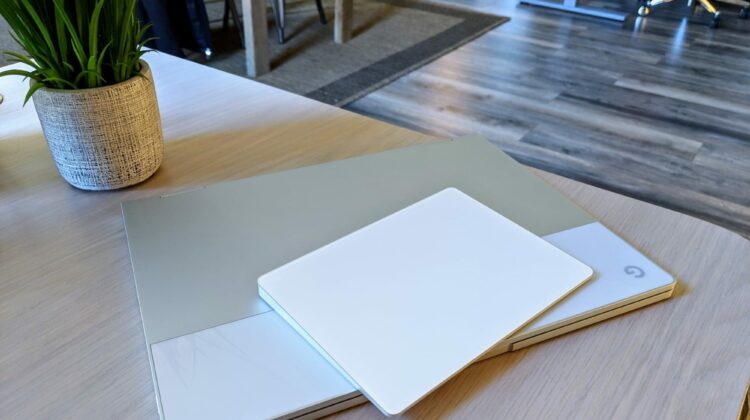
So, what are you left with? The Apple Magic Trackpad 2. Yep, you’re reading that right. I’m suggesting you go and get an Apple product to use on a daily basis with your Chrome OS device. We talked about support for this trackpad coming back in October, and to be honest, it simply fell off my radar after that. I had an itch to give it a try on my Pixelbook today and I was pleasantly surprised to find that it was an easy setup and every single gesture, tap and click works exactly like you’d expect.
Add to this the fact that Apple makes – without doubt – the best trackpads in the business and you now have an option for a perfect external pointing device for any Chromebook, Chromebox, or Chromebase you have. I’m unsure how long this has been working so flawlessly, but it doesn’t really matter at this point. The important thing for you to know is the Apple Magic Trackpad 2 works perfectly, is a joy to use, and can be bought just about anywhere you want to get one (we put a quick link to Amazon down there if you are interested). For me, it is time to say goodbye to my T650 and hello to the Magic Trackpad 2.
Well, at least until the Brydge C-Touch comes out later this year.

