
• Skip to main content
  • Skip to primary sidebar
  • Deals
  • Features
  • Guides
  • Chromebooks
  • Videos
  • Podcast
  • More +
    • Reviews
    • Unboxing
    • Upcoming Devices
    • Chromebook Plus
    • Chrome
    • ChromeOS
    • Chrome OS Flex
  • Search
  • Sign Up
  • Log In
Chrome Unboxed – The Latest Chrome OS News

Chrome Unboxed - The Latest Chrome OS News

A Space for All Things Chrome, Google, and More!

  • Deals
  • Features
  • Guides
  • Chromebooks
  • Videos
  • Podcast
  • More +
    • Reviews
    • Unboxing
    • Upcoming Devices
    • Chromebook Plus
    • Chrome
    • ChromeOS
    • Chrome OS Flex
  • Search
  • Sign Up
  • Log In

Google acquires Playspace in hopes of making your Workspace more fun and interactive

September 4, 2021 By Michael Perrigo View Comments

Support our independent tech coverage. Chrome Unboxed is written by real people, for real people—not search algorithms. Join Chrome Unboxed Plus for just $2 a month to get an ad-free experience, access to our private Discord, and more. Learn more about membership here.
START FREE TRIAL (MONTHLY)START FREE TRIAL (ANNUAL)

Playspace is an incredibly innovative digital whiteboarding web software that segments users out into ‘Rooms’ where they can collaborate with one another with advanced tools. It seamlessly integrates into Google Calendar and has worked well for Workspace in the past. Now, Playspace is being bought by Google, and the company has put out a statement on its acquisition.

You see, Google has been hell-bent on creating the world’s best set of collaborative tools for the hybrid workplace that’s been born – no, created – and has some to be the “new normal” since the global pandemic began. Last year, it acquired ThreadIt – a company doing something in a similar vein as Playspace.

Xremove ads

ThreadIt provides ‘short video recordings to share work, connect your team, and get your day back.’ The concept is simple – take something akin to a Google Meet agenda and call, and break it into short clips that can be watched and replied to asynchronously in a room. Video email, anyone?

Playspace in action

It sounded more than a little exciting: here was a widely adopted platform, built atop one of the world’s most advanced tech stacks, ready and eager to evolve to meet the needs of remote collaboration. Google Workspace aims to be a key platform for teamwork in our new hybrid world, and seeks to pave the way with collaborative tools that just work. Javier invited us to be part of their journey in building solutions for the hybrid future of work — and the opportunity has us positively giddy.

Playspace – New Path

With its acquisition, Google is most certainly going to be kicking things up a notch with Workspace. The Playspace team stated in a blog post that the current iteration of its software will be ‘paused’ on September 9, 2021, and all user data will be wiped with the opportunity to export the switch is flipped. Afterward, it will come to life as an experience within Google Workspace, though we’re not sure how long it will take for that to surface. My bet is on a year or less, but only time will tell.

Featured Videos

Xremove ads

With Playspace, users can whiteboard, collaborate with one another on scratch notes, and even music. Each call participant has his or her own cursor with their name attached that floats around the screen while they make modifications (see below) and there are a slew of tools present that Google Meet simply doesn’t have at this time.
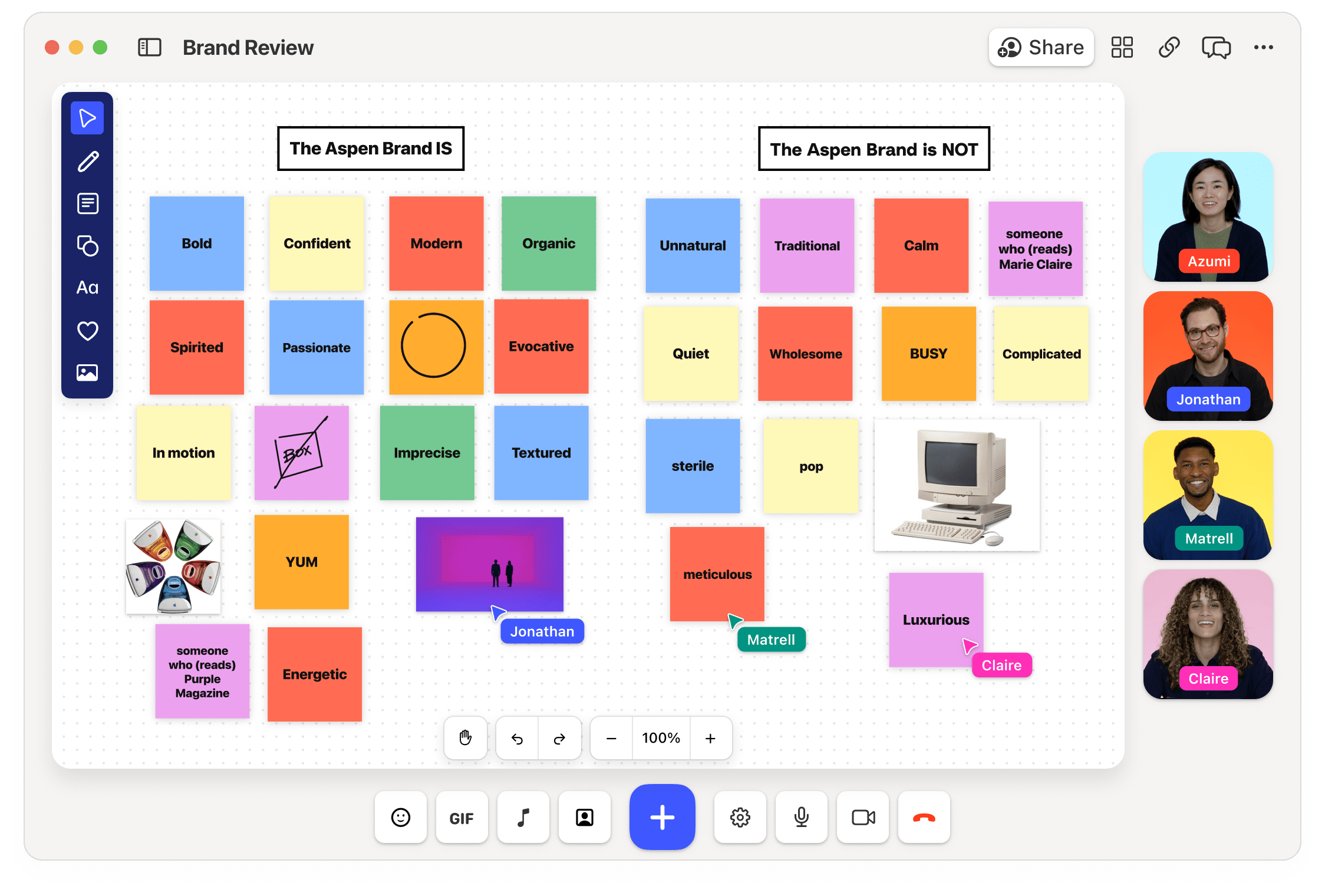
These Whiteboarding tools are more advanced than Jamboard!

The obvious play here is to integrate said tools into Google’s video chat platform, but there’s no reason why we couldn’t see them bleed into its other products too. For instance, there already exists some cross-pollination between Meet and Chat in the form of follow up chat suggestions, and so on, so perhaps something you create in Meet via the new Playspace update (one day) will be dropped into your Chat or even in Gmail for further collaboration after the fact.

Filed Under: Apps, Education, Enterprise, New & Upcoming Features, News, Updates, Workspace Sessions Tagged With: videos

About Michael Perrigo

Known as "Google Mike" to his customers, Michael worked at Best Buy as a Chromebook Expert who dedicated his time to understanding the user experience from a regular Chromebook owner's perspective. Having spent nearly 20 years meeting you face-to-face, he strives to help you understand your technology through carefully crafted guides and coverage, relentlessly seeking out the spark in what's new and exciting about ChromeOS.

Primary Sidebar

Xremove ads

Deals

Massive Deal Alert: The Acer Chromebook Plus Spin 714 just hit an all-time low $499

By Robby Payne
April 1, 2026

The best Chromebook deals today

By Robby Payne
March 30, 2026

The Acer Chromebook Plus Spin 714 hits a new all-time low at $270 off

By Robby Payne
March 25, 2026

You can score $40 off Google’s battery-powered Nest Doorbell right now

By Joseph Humphrey
March 20, 2026

The touchscreen Lenovo Chromebook Slim 3 is a steal at under $200

By Robby Payne
March 16, 2026

More Deals

Xremove ads

Reviews

Acer Chromebook Plus Spin 514 Review: Kompanio Ultra power in a convertible

By Robby Payne
December 24, 2025

My review after 6 weeks with the Lenovo Chromebook Plus 14 [VIDEO]

By Robby Payne
August 11, 2025

One week with the best small Android tablet you can buy, and I’m sold

By Robby Payne
May 9, 2025

Best Chromebooks of 2024 [VIDEO]

By Robby Payne
November 28, 2024

Samsung Galaxy Chromebook Plus Review: Samsung is back! [VIDEO]

By Robby Payne
October 28, 2024

More Reviews

Xremove ads

Guides

This Chromebook trackpad shortcut is definitely not new, but is blowing my mind

By Robby Payne
March 11, 2024

How to reduce broadcast delay on YouTube TV to stop live spoilers

By Robby Payne
December 8, 2023

Windows PC keyboard and Chromebook

How to use a Windows keyboard with a Chromebook

By Joseph Humphrey
December 8, 2023

How reset and revert your Chromebook to the previous version of Chrome OS

By Robby Payne
November 29, 2023

My Chromebook Plus features disappeared: here’s how I fixed it

By Robby Payne
November 24, 2023

More Guides

TWITTER · FACEBOOK · INSTAGRAM · YOUTUBE · EMAIL · ABOUT

Copyright © 2026 · Chrome Unboxed · Chrome is a registered trademark of Google Inc.
We are participants in various affiliate advertising programs designed to provide a means for us to earn fees by linking to affiliated sites.

PRIVACY POLICY