


Support our independent tech coverage. Chrome Unboxed is written by real people, for real people—not search algorithms. Join Chrome Unboxed Plus for just $2 a month to get an ad-free experience, access to our private Discord, and more. Learn more about membership here.
START FREE TRIAL (MONTHLY)START FREE TRIAL (ANNUAL)
How would you like to attend video meetings without actually having to attend video meetings? Today, remote learning and remote work rely largely on individuals scheduling a time when they can all meet ‘face to face’, so to speak, and then they all sit in front of the computer screen and perform tasks and synchronize with one another in real-time. The problem with this is that despite a calendar event being written in stone, it doesn’t mean it’s ideal for all participants. Google’s in-house incubator called Area 120 is looking to solve this problem once and for all with a new service called ThreadIt.
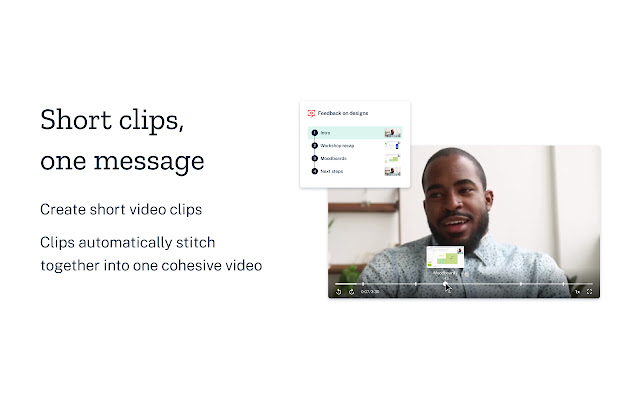
ThreadIt seeks to revolutionize the video meeting space by taking the idea of meeting with others simultaneously and trashing it altogether. That sounds bonkers, I know, but check this out. ThreadIt allows you to record short video clips, title them and then share them with others. Anyone participating in this so-called ‘video meeting’ can then watch the recording, provide feedback or ask questions, and record a video response, in the same manner, to be sent back to you. All participants can record and or watch clips at whatever time suits their schedule. All of these clips are basically stitched together into one cohesive video that closely represents an actual video meeting, just with the Youtube Chapters approach to separating content.
There’s even an extension that lets you record directly from Gmail and so on. I would probably best describe this as ‘Video Gmail’. It makes face-to-face meetings asynchronous, and that’s incredibly clever. Area 120 is known for its off-the-wall ideas that are innovative and risky, but they tend to explore areas that others simply don’t go – especially area 120, see what I did there? I guess Area 51 was already taken, so 120 was the next most mysterious number. Anyway, the incubator’s projects often last a few years before they’re shuttered, and then that technology and the lessons the team learned from building it are often integrated nicely into official Google services and products. Google does own Area 120 after all, and it provides them a sandbox to play with risky ideas without affecting their core lineup of offerings.
We saw Area 120 do their thing recently in a large way with Rivet – the children’s book reading service shuttered, and then shortly thereafter, its contents and the tech were repurposed for Google’s Nest Hub Family Tab, which I totally saw coming. About now you are probably asking yourself how any of this has anything to do with Google Meet, and I’m finally getting to the good part. Since Area 120 has a track record for the aforementioned workflow, I have little doubt in my mind that should this concept of asynchronous video meetings where ideas are split into chapters becomes successful, Google would be very interested in baking it directly into Google Meet.
Think about it – with its recent massive efforts toward the service as it pertains to distance learning in the face of the pandemic, the company has shone a light on what Meet is truly capable of for schools and businesses who working and learning from home. One of the greatest challenges facing teachers, students, and employees right now in the work from home model is that there are so many individual factors pertaining to scheduling that need to be accounted for in a way that was never truly considered when those individuals got in their car and drove to the job, or got on the bus and rode to the classroom. Children, pets, other family members, and so on simply do not wait for you to finish your video lesson and they certainly don’t keep the noise down while you watch your teacher explain quantum entanglement through your Chromebook screen (is that what the kids are learning these days?)
That’s why I don’t believe that the reveal of ThreadIt at this very particular time in history is by any means coincidental. I think that Google has a ton of impressive and innovative features planned that are meant to make the digital workspace and classroom more intentional and personal. While there has been zero connection between ThreadIt and Google Meet at this time, I want to point out that they’re both video calling platforms, and both are technically owned by Google – oh, and when it comes to Area 120, I have a darn good track record of predicting their trajectory long before they reveal it to the world.
What do you think about ThreadIt from the video below? Would you be interested in using it if it were directly baked into Google Meet, or do you think that it further decomposes the social connection we all lost when the pandemic struck? Where is the balance between social interaction and innovation or even convenience? Can we have our cake and eat it too, or are we headed for destruction as a society? All kidding aside (Am I kidding?) let’s discuss this in the comments section!
Check out ThreadIt by Area 120
SUBSCRIBE TO UPSTREAM
Get Chrome Unboxed delivered straight to your inbox
Upstream is our flagship, curated newsletter with the top stories, most click-worthy deals, giveaways, and trending articles from Chrome Unboxed sent directly to your inbox a few times a week. Join 31,000+ subscribers.

