


Support our independent tech coverage. Chrome Unboxed is written by real people, for real people—not search algorithms. Join Chrome Unboxed Plus for just $2 a month to get an ad-free experience, access to our private Discord, and more. Learn more about membership here.
START FREE TRIAL (MONTHLY)START FREE TRIAL (ANNUAL)
Google Tasks has become instrumental in my productivity, and I know I’m not alone – having all of my to-do items in one place, and instantly synchronize between a list and my calendar allows me to have ultimate visibility into the things that are most important to me across all areas of my life and to plan for the future. However, there’s always been one point of contention that’s made it difficult to get the most out of Tasks – being a family man, it’s impossible to share Tasks with my significant other or family members and to plan life together. Instead, it’s limited to that which I’m responsible for – I can’t divvy out tasks to her, and I can’t communicate about goals on a daily basis all in one place.
Now that Google has transformed Gmail and Hangouts into Google Workspace and made it free for everyone though, this changes entirely. I’ve recently imported all of my Google Tasks into Rooms within Google Chat and invited her to each one of them. Now, instead of chatting via SMS or in Hangouts, we discuss things in the room that those details pertain to. Additionally, We can assign items to one another from our tasks, see everyone together, and even mark them off!
It’s actually quite fun, doing life together digitally. It’s by no means a replacement for good, direct conversation, but it does make it much easier to churn out our life goals in between taking our son to school, working different jobs, and all of the other things that life throws at us in an average (or not so average) week!
I wanted to discuss this today because Google has always run multiple experiments for productivity side by side with one another, and it’s often hard to decide which one you should invest in (or which one they will kill off!) Workspace opening up to free Gmail users allows families to gain a whole new sense of unity in mission than any of the company’s services have individually to date. I’ve fallen in love with how it’s bringing us together and allows us to tackle tasks asynchronously, while also allowing us to bookmark our conversations and leave notes for one another. It’s sort of our fridge magnet now if you know what I mean by that!
I personally don’t see Google ‘sunsetting’ this setup, but I do see them sending Tasks by name into the great beyond. While there’s not yet a way to import your Tasks into Chat en mass, I believe that it will eventually be possible and even further, I believe this will be the future of the service. Google isn’t going to nix the ability to manage tasks and lists – that’s really its thing – instead, I believe it will continue to evolve as it has up until this point.
Before the big Tasks revamp, it was just known as Google Tasks – no fancy logo, no nothing. Its evolution into a unified Workspace with sharing and collaboration is just the next step in the company’s plan to bring unity to its services and to make them work better together. With all of that out of the way, I wanted to take a moment and show off how I’m using Chat Rooms with my family. I’m not even sure if Google intended for this to be so useful to families, but it’s certainly helping us out to make use of it!
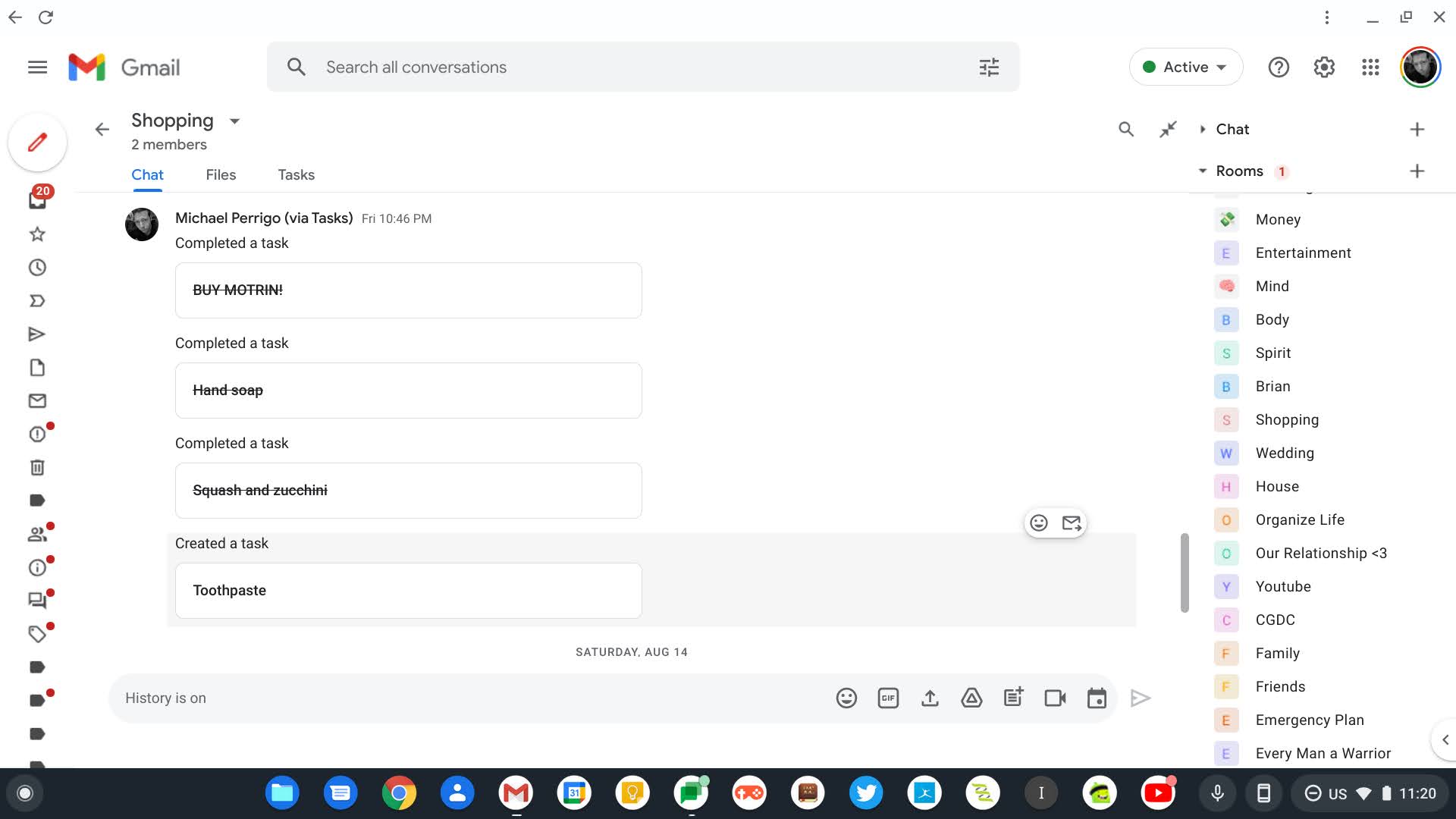
I prefer to have my Rooms set up on the right side of the Gmail window, but you can also place them on the left (where they are by default) or use them independent of Gmail altogether by visiting Chat on the web – yep, your Rooms will appear there! If you want to shift it over to the right side in order to avoid having to constantly resize Chat, Meet, Rooms, and Mail on the left, simply visit the Settings at the top-right and click Chat and Meet.
Once you’ve done that, it feels great to have everything in one space – email, to-do items, and family discussions! It’s so useful that we’ve moved away from standard SMS with Google Messages as a result. I’ve named each room based on an aspect of our life, and yes, you get a little peek into the inner circle here! A room for Entertainment – sharing things from Marvel and media that we enjoyed reading or watching on the web or Youtube, a room for grocery shopping, another for our attempt to look buy our first home, and yet another for housework and so on. I’ve also created rooms for those most important to my daily life – my son, and anything pertaining to him, my closest colleagues or friends whom I do business with daily, and even my brother.
Lastly, I have rooms for discussions around money, planning my and filming Youtube videos, maintenance on our vehicles, and even one for Emergency planning checklists. Yes, I know – I’m obsessive with my desire to plan and execute on every aspect of my life. It’s not OCD, I swear. Either way, the fact that each of these is self-contained in Chat but appears on the date and time you schedule it via Calendar is a godsend. Pair this with the ability to organize and share notes via Keep while setting reminders on them that also appear on Calendar, and you have a rock-solid family productivity system!
Let me know in the comments if you use Workspace, and more specifically, Google Chat ‘Rooms’ (clever naming, Google, we’re back to the ’90s!) with your family, or if you only utilize it in your business. I would be interested in seeing how many consumers outside of the Enterprise space are taking advantage of these new tools and finding ways to implement them in their daily lives. To reiterate, Tasks is great for individuals since they can’t be shared, but Workspace is better not only for companies and employees but also for families. The only thing we’re missing now is the ability to create recurring tasks, and I’m hoping Google adds that soon instead of relying on us using Calendar events in its place.
SUBSCRIBE TO UPSTREAM
Get Chrome Unboxed delivered straight to your inbox
Upstream is our flagship, curated newsletter with the top stories, most click-worthy deals, giveaways, and trending articles from Chrome Unboxed sent directly to your inbox a few times a week. Join 31,000+ subscribers.


