

• Skip to main content
  • Skip to primary sidebar
  • Deals
  • Features
  • Guides
  • Chromebooks
  • Videos
  • Podcast
  • More +
    • Reviews
    • Unboxing
    • Upcoming Devices
    • Chromebook Plus
    • Chrome
    • ChromeOS
    • Chrome OS Flex
  • Search
  • Sign Up
  • Log In
Chrome Unboxed – The Latest Chrome OS News

Chrome Unboxed - The Latest Chrome OS News

A Space for All Things Chrome, Google, and More!

  • Deals
  • Features
  • Guides
  • Chromebooks
  • Videos
  • Podcast
  • More +
    • Reviews
    • Unboxing
    • Upcoming Devices
    • Chromebook Plus
    • Chrome
    • ChromeOS
    • Chrome OS Flex
  • Search
  • Sign Up
  • Log In

Google Tasks in Chat rooms get a ‘view in chat’ button to help give context about their creation

August 26, 2021 By Michael Perrigo View Comments

Support our independent tech coverage. Chrome Unboxed is written by real people, for real people—not search algorithms. Join Chrome Unboxed Plus for just $2 a month to get an ad-free experience, access to our private Discord, and more. Learn more about membership here.
START FREE TRIAL (MONTHLY)START FREE TRIAL (ANNUAL)

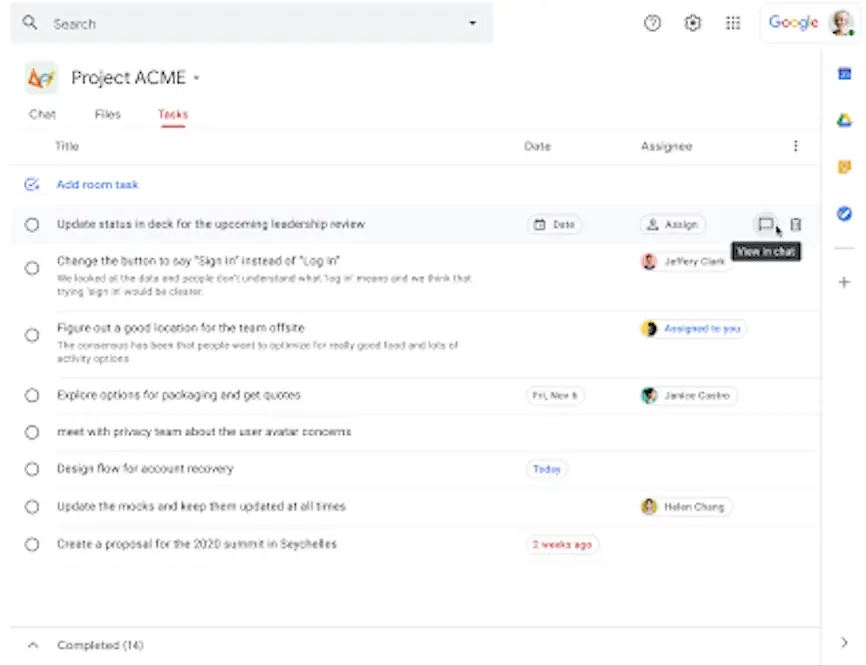
Tasks created in Google Chat Rooms will soon be gaining the ability to view the context surrounding their creation using a “View in Chat” button that will appear to the right of them. When clicked, you’ll be navigated back to the Chat message where the task was created or the task creation was indicated.

As you’ve probably already seen, creating a task in a Chat Room adds an anchor point in the chat section for it. Clicking on it jumps you over to that specific task in the tasks tab. This “View in Chat” button that will be appearing on the tasks will do exactly the reverse of that. Google wants this to make it easier for you to surface context for the task(s) and re-engage with Room participants with updates, questions, and further collaboration.

Xremove ads

Unfortunately, the images that the company provided on their Google Workspace Updates blog for this update are blurry as all get out, so you can click through the gallery below to see the button in action, but it’s not very clear. The first image is of Chat on desktop, and the second is of the app on mobile. You’ll notice that the same chat bubble icon appears on both, just in different locations.
Google Workspace Updates

I personally really like the idea of adding an anchor to the moment the task was created since I often discuss details about the task in preparation for creating it or as a follow-up to doing so right in the chat with my family. I’ve already discussed how I use Chat Rooms to do life with those closest to me, and if you haven’t set it up yet, I’d recommend you take a look!

Featured Videos

Xremove ads

Another unfortunate thing is that the rollout for this update is potentially more than two weeks away (but it could be sooner!), which is uncommon, but once it does appear for you and your users, it will be toggled on by default. There’s also no admin control for the “View in Chat” feature, so it’s just something that will exist right there in the app and on the web – no questions asked. Just as with other recent Chat updates, this will be available to all Workspace customers, and G Suite Basic and Business users as well.

SUBSCRIBE TO UPSTREAM

Get Chrome Unboxed delivered straight to your inbox

Upstream is our flagship, curated newsletter with the top stories, most click-worthy deals, giveaways, and trending articles from Chrome Unboxed sent directly to your inbox a few times a week. Join 31,000+ subscribers.

SUBSCRIBE HERE!

Filed Under: Apps, Education, Enterprise, New & Upcoming Features, News, Updates

About Michael Perrigo

Known as "Google Mike" to his customers, Michael worked at Best Buy as a Chromebook Expert who dedicated his time to understanding the user experience from a regular Chromebook owner's perspective. Having spent nearly 20 years meeting you face-to-face, he strives to help you understand your technology through carefully crafted guides and coverage, relentlessly seeking out the spark in what's new and exciting about ChromeOS.

Primary Sidebar

Googlebook

Dell XPS Googlebook unboxing: MacBook Air vibes and Snapdragon power

By Robby Payne
October 27, 2026

Googlebook should have been framed as the Chromebook successor, not a MacBook rival

By Robby Payne
October 27, 2026

Chrome 156 for Googlebook delivers 14 desktop upgrades and a look at what’s coming next

By Robby Payne
October 26, 2026

Googlebook OS is finally getting one of my favorite ChromeOS features

By Robby Payne
October 26, 2026

Google is bringing Chromebook’s best unlock feature to Googlebooks

By Robby Payne
October 26, 2026

More Googlebook

Xremove ads

Deals

My favorite convertible Chromebook is $150 off right now and primed for Googlebook OS

By Robby Payne
September 29, 2026

Google Pixel Buds 2a in Hazel bundled with a new Googlebook laptop at Best Buy

Score a free $129 pair of Pixel Buds 2a with any Googlebook pre-order at Best Buy

By Robby Payne
September 28, 2026

The best Chromebook deals today

By Robby Payne
September 2, 2026

The best Chromebook ever made is $350 off at Best Buy right now

By Robby Payne
August 21, 2026

The excellent, powerful Acer Chromebook Plus Spin 514 is $150 off right now

By Robby Payne
August 12, 2026

More Deals

Xremove ads

Reviews

Acer Chromebook Plus Spin 514 Review: the best convertible you can buy [VIDEO]

By Robby Payne
July 1, 2026

Lenovo Chromebook Plus 2-in-1 Review: pretty great in a vacuum

By Robby Payne
April 23, 2026

My review after 6 weeks with the Lenovo Chromebook Plus 14 [VIDEO]

By Robby Payne
August 11, 2025

One week with the best small Android tablet you can buy, and I’m sold

By Robby Payne
May 9, 2025

Best Chromebooks of 2024 [VIDEO]

By Robby Payne
November 28, 2024

More Reviews

Xremove ads

TWITTER · FACEBOOK · INSTAGRAM · YOUTUBE · EMAIL · ABOUT

Copyright © 2026 · Chrome Unboxed · Chrome is a registered trademark of Google Inc.
We are participants in various affiliate advertising programs designed to provide a means for us to earn fees by linking to affiliated sites.

PRIVACY POLICY