
• Skip to main content
  • Skip to primary sidebar
  • Deals
  • Features
  • Guides
  • Chromebooks
  • Videos
  • Podcast
  • More +
    • Reviews
    • Unboxing
    • Upcoming Devices
    • Chromebook Plus
    • Chrome
    • ChromeOS
    • Chrome OS Flex
  • Search
  • Sign Up
  • Log In
Chrome Unboxed – The Latest Chrome OS News

Chrome Unboxed - The Latest Chrome OS News

A Space for All Things Chrome, Google, and More!

  • Deals
  • Features
  • Guides
  • Chromebooks
  • Videos
  • Podcast
  • More +
    • Reviews
    • Unboxing
    • Upcoming Devices
    • Chromebook Plus
    • Chrome
    • ChromeOS
    • Chrome OS Flex
  • Search
  • Sign Up
  • Log In

You can now star your important Google Tasks and sort them by importance

June 9, 2022 By Johanna Romero View Comments

Let’s be honest: as a productivity app, Google Tasks hasn’t quite been the number one choice for most people when it comes to productivity. Its feature set is good-enough, allowing you to schedule and check off simple tasks, but its options are not considered “Pro” or even consistent throughout all the platforms where you can access it. However, it’s starting to feel like Google wants to change that perception and is finally starting to give Tasks the attention it deserves.

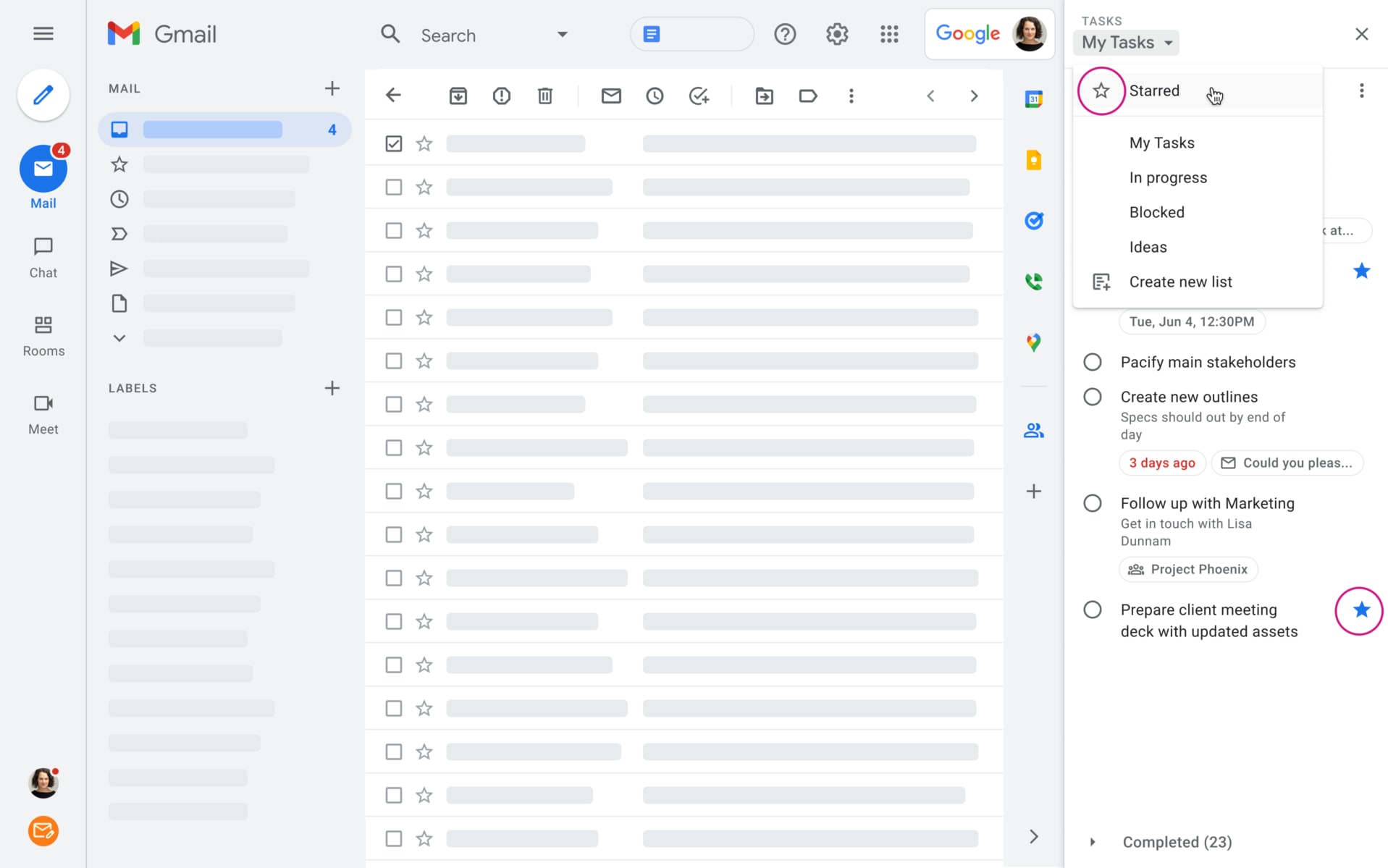
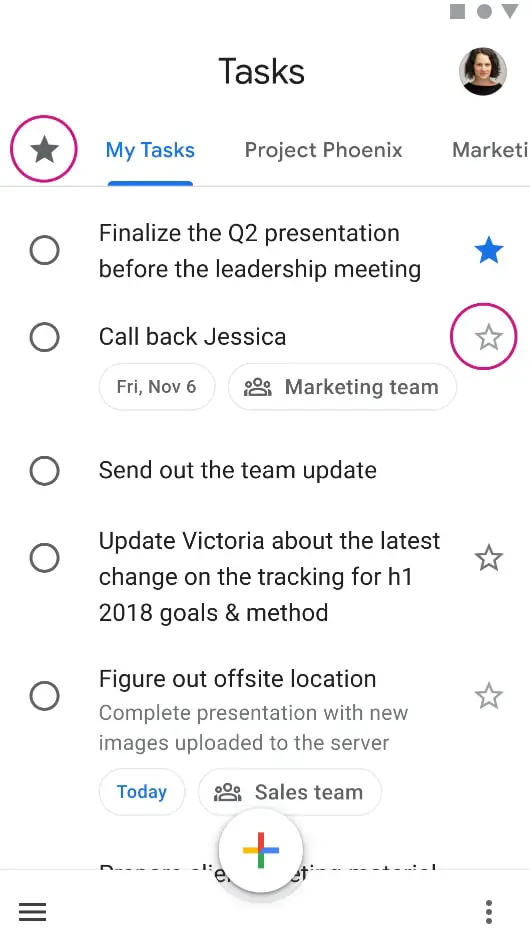
Following a recent update adding the ability to set end dates directly on recurring Google Tasks, Google has announced that you will now be able to mark important tasks with a star. In addition, with the new “starred” view, you will be able to view and sort your starred items in all your task lists. Check out the images below for a look at how this feature will look on both the Web and Mobile:
Xremove ads
Google Tasks starring on Web
Google Tasks starring on Mobile

This update began its two-week rollout yesterday to all Google Workspace customers, legacy G Suite Basic and Business customers. There will be no admin control for this feature as it will automatically show up for end-users.

I am very happy to see Tasks getting some much-needed love. Updates like these encourage people like me to give Tasks a second look and incorporate it into their daily workflow. Of course, now we just need a standalone Google Tasks page so we can have our tasks in a new tab or window. Fingers crossed that option gets some consideration down the line.

Featured Videos

Xremove ads

Filed Under: Apps, New & Upcoming Features, Workspace Tagged With: google tasks, google workspace, starred tasks, workspace

Primary Sidebar

Xremove ads

Deals

The best Chromebook deals today

By Robby Payne
December 15, 2025

Save $220 on the powerful, versatile Acer Chromebook Plus Spin 714

By Robby Payne
December 10, 2025

The Google Pixel 9a just hit its lowest price ever at $150 off

By Joseph Humphrey
December 8, 2025

At $349, this Lenovo Chromebook Plus is one of the best value laptops you can buy

By Joseph Humphrey
December 3, 2025

The elusive 8GB Lenovo Chromebook Duet 11 is finally back in stock and down to $279

By Robby Payne
December 2, 2025

More Deals

Xremove ads

Reviews

My review after 6 weeks with the Lenovo Chromebook Plus 14 [VIDEO]

By Robby Payne
August 11, 2025

One week with the best small Android tablet you can buy, and I’m sold

By Robby Payne
May 9, 2025

Best Chromebooks of 2024 [VIDEO]

By Robby Payne
November 28, 2024

Samsung Galaxy Chromebook Plus Review: Samsung is back! [VIDEO]

By Robby Payne
October 28, 2024

Lenovo Chromebook Duet 11″ Review [VIDEO]

By Robby Payne
October 19, 2024

More Reviews

Xremove ads

Guides

This Chromebook trackpad shortcut is definitely not new, but is blowing my mind

By Robby Payne
March 11, 2024

How to reduce broadcast delay on YouTube TV to stop live spoilers

By Robby Payne
December 8, 2023

Windows PC keyboard and Chromebook

How to use a Windows keyboard with a Chromebook

By Joseph Humphrey
December 8, 2023

How reset and revert your Chromebook to the previous version of Chrome OS

By Robby Payne
November 29, 2023

My Chromebook Plus features disappeared: here’s how I fixed it

By Robby Payne
November 24, 2023

More Guides

TWITTER · FACEBOOK · INSTAGRAM · YOUTUBE · EMAIL · ABOUT

Copyright © 2025 · Chrome Unboxed · Chrome is a registered trademark of Google Inc.
We are participants in various affiliate advertising programs designed to provide a means for us to earn fees by linking to affiliated sites.

PRIVACY POLICY