

• Skip to main content
  • Skip to primary sidebar
  • Deals
  • Features
  • Guides
  • Chromebooks
  • Videos
  • Podcast
  • More +
    • Reviews
    • Unboxing
    • Upcoming Devices
    • Chromebook Plus
    • Chrome
    • ChromeOS
    • Chrome OS Flex
  • Search
  • Sign Up
  • Log In
Chrome Unboxed – The Latest Chrome OS News

Chrome Unboxed - The Latest Chrome OS News

A Space for All Things Chrome, Google, and More!

  • Deals
  • Features
  • Guides
  • Chromebooks
  • Videos
  • Podcast
  • More +
    • Reviews
    • Unboxing
    • Upcoming Devices
    • Chromebook Plus
    • Chrome
    • ChromeOS
    • Chrome OS Flex
  • Search
  • Sign Up
  • Log In

Google Play Games now lets you filter out games with in-app purchases and ads

September 14, 2020 By Michael Perrigo View Comments

Support our independent tech coverage. Chrome Unboxed is written by real people, for real people—not search algorithms. Join Chrome Unboxed Plus for just $2 a month to get an ad-free experience, access to our private Discord, and more. Learn more about membership here.
START FREE TRIAL (MONTHLY)START FREE TRIAL (ANNUAL)

Google Play Games Product Manager Boris Masis, otherwise known as BorisfromGoogle on Reddit just announced that his team has added two new filters to the Play Games app for Android and Chromebooks – one for filtering out in-app purchases and the other for filtering out games with advertisements. The project is known internally at Google as ‘Fireball’. I can’t think of a better name for this as fireballs burn things up and destroy them on impact. While gamers will love the idea of in-app purchases and ads being obliterated by a fireball, I’m sure that developers, who make money on these methods, are a bit less ecstatic. I suppose that’s why it’s an ‘internal’ name instead of a marketing tagline though, right?

As you can see below, the filters can be applied from the home screen of the Play Games app. All you need to do is to scroll to the bottom of the app and tap on them. Just keep in mind that historically speaking, developers who add in-app purchases and ads into their games will most likely have a much larger budget to make games that are more appealing. So, while filtering these out does provide a breath of fresh air from being inundated by these types of games, it doesn’t necessarily mean you will have more fun. Don’t forget – you can also stack filters to get highly customized recommendations too!

Xremove ads

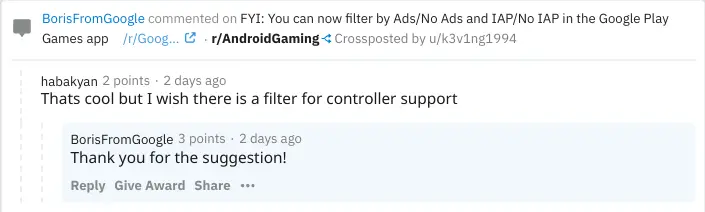
Boris has been taking suggestions regarding this update and what potential features we as users would like to see in the Play Games app going forward. One user suggested a filter for games which have native controller support built in. Based on his reply, it seems as though it’s something we could see in the future! We went ahead and requested a ‘Chromebook’ filter for games that have landscape, mouse and keyboard and even controller support all at once. As of writing, we did not yet receive a reply, but we’ll keep you posted! Let us know in the comments section what features you would like to see come to the Play Games app. Do you use this on your Chromebook?
Featured Videos

Xremove ads

Filed Under: Gaming

About Michael Perrigo

Known as "Google Mike" to his customers, Michael worked at Best Buy as a Chromebook Expert who dedicated his time to understanding the user experience from a regular Chromebook owner's perspective. Having spent nearly 20 years meeting you face-to-face, he strives to help you understand your technology through carefully crafted guides and coverage, relentlessly seeking out the spark in what's new and exciting about ChromeOS.

Primary Sidebar

Xremove ads

Deals

Gemini Live might be the real reason to buy the new Google Home Speaker, and you can try it free for 6 months

By Joseph Humphrey
June 18, 2026

Lenovo’s powerful 8.8-inch Legion Tab Gen 5 Android gaming tablet is now $150 off

By Joseph Humphrey
June 10, 2026

The Google TV Streamer hits $80 again, bringing Gemini and smart home control to your living room

By Joseph Humphrey
June 5, 2026

The best Chromebook deals today

By Robby Payne
May 25, 2026

Save $300 as Acer’s Chromebook Plus Spin 714 returns to its all-time low price

By Robby Payne
May 21, 2026

More Deals

Xremove ads

Reviews

Lenovo Chromebook Plus 2-in-1 Review: pretty great in a vacuum

By Robby Payne
April 23, 2026

Acer Chromebook Plus Spin 514 Review: Kompanio Ultra power in a convertible

By Robby Payne
December 24, 2025

My review after 6 weeks with the Lenovo Chromebook Plus 14 [VIDEO]

By Robby Payne
August 11, 2025

One week with the best small Android tablet you can buy, and I’m sold

By Robby Payne
May 9, 2025

Best Chromebooks of 2024 [VIDEO]

By Robby Payne
November 28, 2024

More Reviews

Xremove ads

Guides

This Chromebook trackpad shortcut is definitely not new, but is blowing my mind

By Robby Payne
March 11, 2024

How to reduce broadcast delay on YouTube TV to stop live spoilers

By Robby Payne
December 8, 2023

Windows PC keyboard and Chromebook

How to use a Windows keyboard with a Chromebook

By Joseph Humphrey
December 8, 2023

How reset and revert your Chromebook to the previous version of Chrome OS

By Robby Payne
November 29, 2023

My Chromebook Plus features disappeared: here’s how I fixed it

By Robby Payne
November 24, 2023

More Guides

TWITTER · FACEBOOK · INSTAGRAM · YOUTUBE · EMAIL · ABOUT

Copyright © 2026 · Chrome Unboxed · Chrome is a registered trademark of Google Inc.
We are participants in various affiliate advertising programs designed to provide a means for us to earn fees by linking to affiliated sites.

PRIVACY POLICY