


Support our independent tech coverage. Chrome Unboxed is written by real people, for real people—not search algorithms. Join Chrome Unboxed Plus for just $2 a month to get an ad-free experience, access to our private Discord, and more. Learn more about membership here.
START FREE TRIAL (MONTHLY)START FREE TRIAL (ANNUAL)
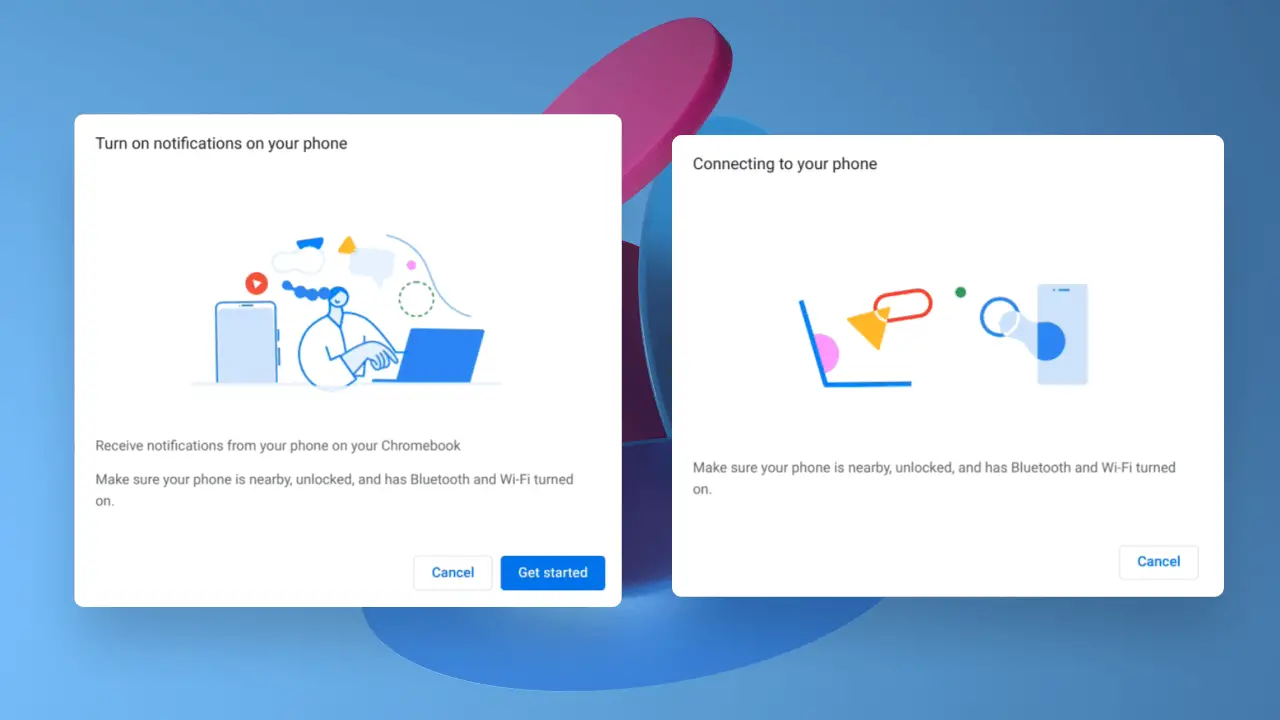
We’ve spoken at length about Google’s new Phone Hub project which will enable deeper integration between your phone and your Chromebook as a part of their “Better Together” initiative. Up until now though, we have only had placeholder artwork for what it would look like when it fully rolls out. Thanks to the amazing Kent Duke over at Android Police, who has unearthed some new onboarding UI visuals, we can see that it now has a lot more polish which gives us a clearer sense of its functionality.
Is this the final “Phone Hub” look?
The new UI images are packed full of Google’s iconic illustrations. They present a much more welcoming setup process for users and while it’s leagues better than anything we’ve previously seen, it by no means indicates that this is its final design. What is obvious though is that Phone Hub may soon move out of Canary and into Developer mode, and with the accelerated rate at which it’s being developed, it may be in our hands sooner than we expected. As you can see below, some of the illustrations mirror what saw a few months ago while others are brand new.
With just a few simple clicks, a user’s phone will be connected to their Chromebook and it looks as though the process will fit squarely into the approachable design that Chrome OS is well known for. Kent was using the new light mode that we showed you in October, but the onboarding UI will have a dark design if you navigate it without alterations.
‘Continue Reading’ is now ‘Task Continuation’
Previously, Google was toying with the idea of allowing you to use your Chromebook to pick up where you left off on your Android phone if you were reading a web page on Chrome by tossing it into the ‘Recents’ section of your launcher. Before it rolled out widely, it needed to be enabled with a Chrome flag – chrome://flags/#enable-continue-reading. With this latest update to Phone Hub, the continue reading functionality seems to have been absorbed by it and is now a part of it’s ‘Task Continuation’ feature. If you ask me, it makes way more sense to place it in Phone Hub than for it to be standalone, so it’s nice to see a grander sense of unification here – way to go, Dev team!
“Description of for the ‘Phone Hub Task Continuation’ setting. This feature lets users resume in-app actions and chrome tabs that are open on a connected Android phone from Chrome OS devices.”
View recent Chrome tabs from your phone
Chromium Gerrit
Notification Mirroring
One of the most frustrating things about Chrome OS, in my not-so-humble opinion, is that when you receive notifications on your phone, those same notifications are pushed to your Chromebook if you have the corresponding app installed there too. That’s fine and all, but then both devices make a noise when information is pushed to them and if you dismiss a notification on one device, it remains on the other.
This is because while you have the same apps installed on both devices from the same Google account, there is no real way for them to communicate to one another that you’ve dismissed that local push notification on the opposite device. There’s nothing broken here, it’s this way by design, but we can do better, right? Currently, if you connect your Android phone to your Chromebook, your Google SMS messages will synchronize across devices, but that’s it. With Phone Hub, you will presumably be able to mirror all of your notifications, and have unified management of them across devices. This is one major thing that Apple got right years ago and we’re hoping that this is exactly how Phone Hub will function when it launches!
Chrome OS is growing up
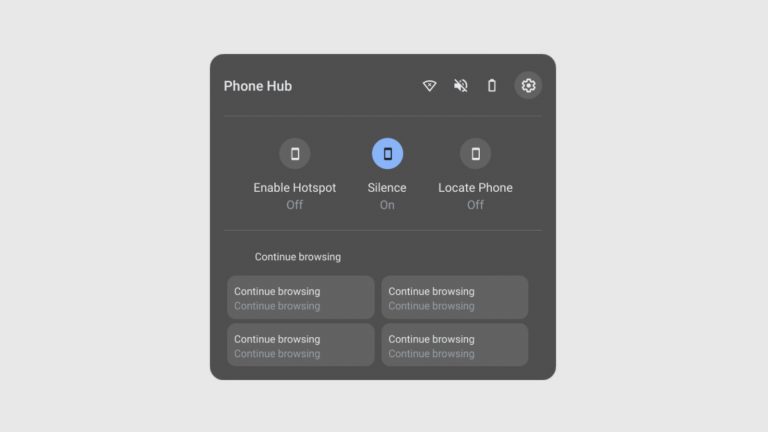
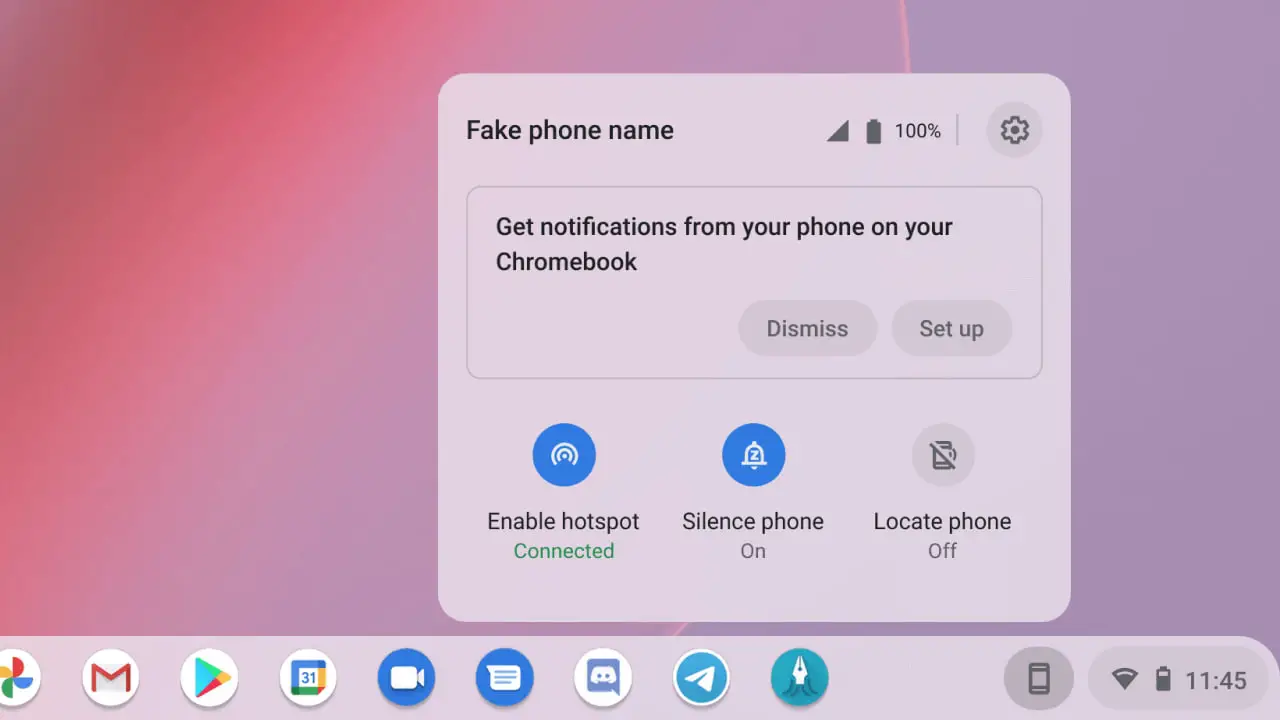
The entire Hub interface is well thought out simple. It will allow you to toggle on your phone’s hotspot, place it on silent or locate it if you’ve lost it. Additionally, you’ll be able to see connection and battery information all in one place. While we’ve known about these features for many months, we’ve yet to see them fully implemented with such polish. We think that with the addition of Phone Hub along with Holding Space, Chromebook users will have a much more unified and seamless workflow across their devices. It shows rapid growth and maturity in Chrome OS and we believe that it’s only a hint towards what Google has planned for the future.
The beauty of Google’s operating system is that it’s free to explore new and innovative ideas whereas established systems must juggle decades of features that have been set in their ways – for better or for worse – and have expectations heavily tied to them. There will likely be plenty more to get excited about for Chrome OS in the coming year, so stay tuned!
SUBSCRIBE TO UPSTREAM
Get Chrome Unboxed delivered straight to your inbox
Upstream is our flagship, curated newsletter with the top stories, most click-worthy deals, giveaways, and trending articles from Chrome Unboxed sent directly to your inbox a few times a week. Join 31,000+ subscribers.

