
• Skip to main content
  • Skip to primary sidebar
  • Deals
  • Features
  • Guides
  • Chromebooks
  • Videos
  • Podcast
  • More +
    • Reviews
    • Unboxing
    • Upcoming Devices
    • Chromebook Plus
    • Chrome
    • ChromeOS
    • Chrome OS Flex
  • Search
  • Sign Up
  • Log In
Chrome Unboxed – The Latest Chrome OS News

Chrome Unboxed - The Latest Chrome OS News

A Space for All Things Chrome, Google, and More!

  • Deals
  • Features
  • Guides
  • Chromebooks
  • Videos
  • Podcast
  • More +
    • Reviews
    • Unboxing
    • Upcoming Devices
    • Chromebook Plus
    • Chrome
    • ChromeOS
    • Chrome OS Flex
  • Search
  • Sign Up
  • Log In

[U] Virtual Google Pay cards now rolling out to some users for tap to pay in stores

July 27, 2021 By Michael Perrigo View Comments

Support our independent tech coverage. Chrome Unboxed is written by real people, for real people—not search algorithms. Join Chrome Unboxed Plus for just $2 a month to get an ad-free experience, access to our private Discord, and more. Learn more about membership here.
START FREE TRIAL (MONTHLY)START FREE TRIAL (ANNUAL)

Update 7/27/21: Virtual card now rolling out to some users!


According to 9to5Google, Google Pay users who have the new application installed on their devices will soon be able to utilize their Pay balance to buy things in brick and mortar retail locations via NFC. Previously, one could only use a credit or debit card that was pre-loaded into the app for tap to pay, but with this change, which should be rolling out to users in the United States right now, you’ll be able to use the money you’ve got stored up in the same way.

Xremove ads

Oftentimes, I’ll have someone send me money through Google Pay, and in order to use it, I’ll need to transfer it to my bank periodically. Instant transfers now require a fee to be taken out, and I’m constantly reminded of the barrier that exists between me and my money. Many people opt to use something like Zelle to avoid such troubles, but I quite prefer the Google service for peer-to-peer money transfers.
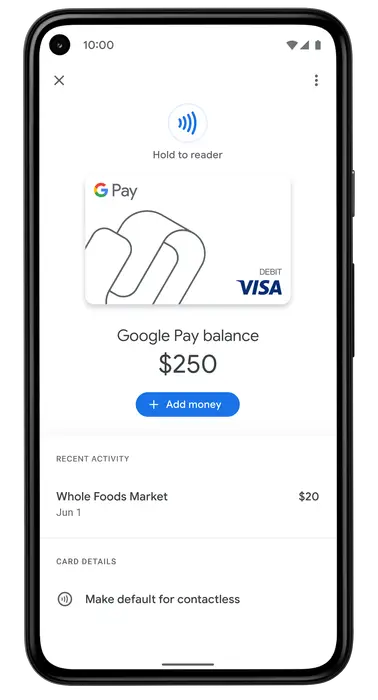
Credit: 9to5Google

Now, Android users in the US can request a virtual Google Pay balance card in order to make purchases at merchants that accept Google Pay for contactless payments (in-store) or accept tokenized payments via Buy with Google Pay (online). 

9to5Google

In order to make this possible, Google is introducing a new ‘Google Pay balance card’ – a digital card that will sit alongside your other credit and debit cards in the application, making it possible to use it the same way. You’ll first need to request one via the Pay app though. For those familiar with the Google Wallet card, yes, I had one stuffed into my pocket at all times, and no, I don’t think we’ll get another version of a physical card any time soon. Still, this is a welcome change – one that should have been made long ago, arguably at the inception of the new Google Pay.

Featured Videos

Xremove ads

Now, instead of solely using your Pay balance to buy things on the Google Play Store or online, you’ll be able to use that extra little bit of cash you’ve got saved up because you split the pizza bill with your friends on small things here and there if you find yourself in a store and realize that your other payment methods inaccessible or unavailable.

If you don’t live in the United States, don’t fret – Google says that this option will be coming to all Google Pay users with an Android phone soon, though we don’t have an exact timeline. Does this sound like music to your ears as much as it does mine? Perhaps Google is hoping to get people to load cash directly into the app from their banks more often, and if so, this is a good way to encourage that!

SUBSCRIBE TO UPSTREAM

Get Chrome Unboxed delivered straight to your inbox

Upstream is our flagship, curated newsletter with the top stories, most click-worthy deals, giveaways, and trending articles from Chrome Unboxed sent directly to your inbox a few times a week. Join 31,000+ subscribers.

Xremove ads
SUBSCRIBE HERE!

Filed Under: Apps, New & Upcoming Features, News, Updates

About Michael Perrigo

Known as "Google Mike" to his customers, Michael worked at Best Buy as a Chromebook Expert who dedicated his time to understanding the user experience from a regular Chromebook owner's perspective. Having spent nearly 20 years meeting you face-to-face, he strives to help you understand your technology through carefully crafted guides and coverage, relentlessly seeking out the spark in what's new and exciting about ChromeOS.

Primary Sidebar

Xremove ads

Deals

How to get 50% off YouTube Premium for a full year with Google One

By Robby Payne
April 16, 2026

The Pixel 10a just dropped to $449, but here’s why you should buy the Pixel 10 instead

By Joseph Humphrey
April 13, 2026

Save up to $200 on the two best Chromebooks on the market

By Robby Payne
April 13, 2026

The best Chromebook deals today

By Robby Payne
April 13, 2026

You can grab the battery-powered Nest Doorbell for just $129.99 right now

By Joseph Humphrey
April 11, 2026

More Deals

Xremove ads

Reviews

Acer Chromebook Plus Spin 514 Review: Kompanio Ultra power in a convertible

By Robby Payne
December 24, 2025

My review after 6 weeks with the Lenovo Chromebook Plus 14 [VIDEO]

By Robby Payne
August 11, 2025

One week with the best small Android tablet you can buy, and I’m sold

By Robby Payne
May 9, 2025

Best Chromebooks of 2024 [VIDEO]

By Robby Payne
November 28, 2024

Samsung Galaxy Chromebook Plus Review: Samsung is back! [VIDEO]

By Robby Payne
October 28, 2024

More Reviews

Xremove ads

Guides

This Chromebook trackpad shortcut is definitely not new, but is blowing my mind

By Robby Payne
March 11, 2024

How to reduce broadcast delay on YouTube TV to stop live spoilers

By Robby Payne
December 8, 2023

Windows PC keyboard and Chromebook

How to use a Windows keyboard with a Chromebook

By Joseph Humphrey
December 8, 2023

How reset and revert your Chromebook to the previous version of Chrome OS

By Robby Payne
November 29, 2023

My Chromebook Plus features disappeared: here’s how I fixed it

By Robby Payne
November 24, 2023

More Guides

TWITTER · FACEBOOK · INSTAGRAM · YOUTUBE · EMAIL · ABOUT

Copyright © 2026 · Chrome Unboxed · Chrome is a registered trademark of Google Inc.
We are participants in various affiliate advertising programs designed to provide a means for us to earn fees by linking to affiliated sites.

PRIVACY POLICY