
• Skip to main content
  • Skip to primary sidebar
  • Deals
  • Features
  • Guides
  • Chromebooks
  • Videos
  • Podcast
  • More +
    • Reviews
    • Unboxing
    • Upcoming Devices
    • Chromebook Plus
    • Chrome
    • ChromeOS
    • Chrome OS Flex
  • Search
  • Sign Up
  • Log In
Chrome Unboxed – The Latest Chrome OS News

Chrome Unboxed - The Latest Chrome OS News

A Space for All Things Chrome, Google, and More!

  • Deals
  • Features
  • Guides
  • Chromebooks
  • Videos
  • Podcast
  • More +
    • Reviews
    • Unboxing
    • Upcoming Devices
    • Chromebook Plus
    • Chrome
    • ChromeOS
    • Chrome OS Flex
  • Search
  • Sign Up
  • Log In

Google Meet visual redesign incoming with auto-exposure tools, speaker highlighting, more

April 21, 2021 By Michael Perrigo View Comments

Support our independent tech coverage. Chrome Unboxed is written by real people, for real people—not search algorithms. Join Chrome Unboxed Plus for just $2 a month to get an ad-free experience, access to our private Discord, and more. Learn more about membership here.
START FREE TRIAL (MONTHLY)START FREE TRIAL (ANNUAL)

In a new Keyword blog post, Google took time to highlight some awesome, new feature updates for Google Meet that should go a long way toward making it more useful and more fun too. Since the beginning of the pandemic, the company has transformed the service into a powerhouse for connecting people across the world, especially in the context of education and workplaces. These new features will roll out beginning next month

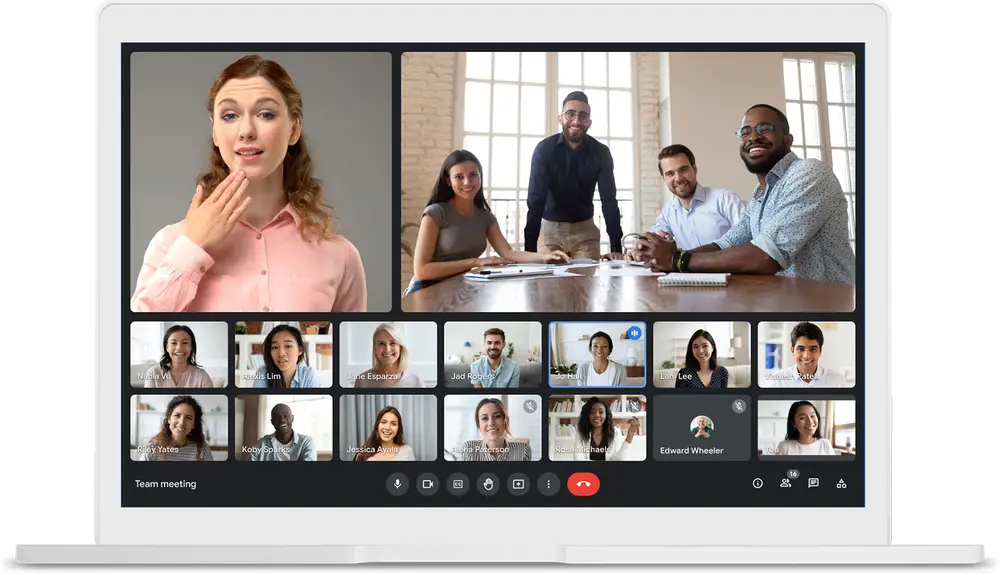
To kick things off, an updated visual refresh will add more space for sharing and viewing content with a group of people by allowing you to pin and unpin content in fresh, new ways. For example, you will be able to highlight a specific speaker or presentation, or even multiple at a time. In doing so, you won’t lose any clarity on who’s who because their names will remain visible despite the new layout.
Xremove ads

In addition to these changes, you’ll also be able to resize, reposition or even hide your own video feed. It’s much easier to focus on what you’re saying when you’re not looking at yourself, right? That extra free space can be used to display more of the other participants you’re addressing, making it feel much more personable.

A new automatic exposure feature will intelligently identify a user’s camera brightness and visibility and make changes to it on the fly. I just want to say that this is incredibly clever. Now, anyone without perfect lighting can still make due in a pinch and it’s all thanks to Google Meet!

Featured Videos

Xremove ads

Lastly, Google is adding fun new backgrounds for mobile and the web as an extension of its ‘background replace’, Q&A, and Polls features. Over the next few weeks, it’s adding the ability for you to replace your background with more than just a picture. Instead, you’ll be able to swap out what’s behind you for a live video! Some examples include a classroom and a forest. These two will be available at launch, with more to come.

SUBSCRIBE TO UPSTREAM

Get Chrome Unboxed delivered straight to your inbox

Upstream is our flagship, curated newsletter with the top stories, most click-worthy deals, giveaways, and trending articles from Chrome Unboxed sent directly to your inbox a few times a week. Join 31,000+ subscribers.

SUBSCRIBE HERE!

Filed Under: Apps, Education, Enterprise, New & Upcoming Features, News

About Michael Perrigo

Known as "Google Mike" to his customers, Michael worked at Best Buy as a Chromebook Expert who dedicated his time to understanding the user experience from a regular Chromebook owner's perspective. Having spent nearly 20 years meeting you face-to-face, he strives to help you understand your technology through carefully crafted guides and coverage, relentlessly seeking out the spark in what's new and exciting about ChromeOS.

Primary Sidebar

Xremove ads

Deals

The new Lenovo IdeaPad Slim 3 Chromebook gets a super-affordable $249 configuration

By Robby Payne
July 7, 2026

The best Chromebook deals today

By Robby Payne
July 7, 2026

Lenovo quietly updates the IdeaPad Slim 3 Chromebook in some pretty big ways

By Robby Payne
July 2, 2026

The impressive ASUS CM32 Detachable from CES 2026 just landed at Best Buy and is on sale

By Robby Payne
July 1, 2026

Deal alert: the best Chromebook ever made is a whopping $400 off right now

By Robby Payne
June 22, 2026

More Deals

Xremove ads

Reviews

Acer Chromebook Plus Spin 514 Review: the best convertible you can buy [VIDEO]

By Robby Payne
July 1, 2026

Lenovo Chromebook Plus 2-in-1 Review: pretty great in a vacuum

By Robby Payne
April 23, 2026

My review after 6 weeks with the Lenovo Chromebook Plus 14 [VIDEO]

By Robby Payne
August 11, 2025

One week with the best small Android tablet you can buy, and I’m sold

By Robby Payne
May 9, 2025

Best Chromebooks of 2024 [VIDEO]

By Robby Payne
November 28, 2024

More Reviews

Xremove ads

Guides

This Chromebook trackpad shortcut is definitely not new, but is blowing my mind

By Robby Payne
March 11, 2024

How to reduce broadcast delay on YouTube TV to stop live spoilers

By Robby Payne
December 8, 2023

Windows PC keyboard and Chromebook

How to use a Windows keyboard with a Chromebook

By Joseph Humphrey
December 8, 2023

How reset and revert your Chromebook to the previous version of Chrome OS

By Robby Payne
November 29, 2023

My Chromebook Plus features disappeared: here’s how I fixed it

By Robby Payne
November 24, 2023

More Guides

TWITTER · FACEBOOK · INSTAGRAM · YOUTUBE · EMAIL · ABOUT

Copyright © 2026 · Chrome Unboxed · Chrome is a registered trademark of Google Inc.
We are participants in various affiliate advertising programs designed to provide a means for us to earn fees by linking to affiliated sites.

PRIVACY POLICY