


Support our independent tech coverage. Chrome Unboxed is written by real people, for real people—not search algorithms. Join Chrome Unboxed Plus for just $2 a month to get an ad-free experience, access to our private Discord, and more. Learn more about membership here.
START FREE TRIAL (MONTHLY)START FREE TRIAL (ANNUAL)
Nearly six months ago, Google added video backgrounds to Google Meet on the web and mobile, providing users with a more fun way to conceal their actual meeting backdrop, but back then, they were fairly rudimentary. Then, something interesting happened. The product implemented AI and machine learning to automagically fix your camera’s brightness and visibility. This came shortly after the auto-exposure update that greatly helped with some of the issues that users have reported with inconsistent camera quality.

Together, all of these new features have coalesced into one incredible future for Google’s video meeting service. Ever since virtual conferences have replaced in-person gatherings, and since many could no longer sit with their colleagues over coffee, Meet has become one of the most popular go-to services for filling these voids. Add to that the fact that Google has come in strong with constant updates and innovations, and you can start to see why its Workspace tools are so popular.
No one likes seeing crappy video backgrounds improperly track your movement during a meeting, and such low-quality tools can actually distract from a meeting when they were originally intended to prevent distractions. Because of this, a new set of five immersive backgrounds for Meet on the web will be rolling out over the next two weeks starting today for Rapid Release domains, and over the next month for Scheduled Release domains.
These new backgrounds are more impressive than the ones you can get in-call right now because they apply all of the aforementioned tricks to your camera to give the appearance that your face and head are being lit appropriately by the background you’ve chosen. What I’m trying to say is that they light you in such a way that you appear to actually be there!
Aside from poor tracking, one of the issues with virtual backgrounds is that they are simply applied as a backdrop to your body and head, but whatever light you have in the room you’re truly sitting in is still visible. In the example below, you can see that the individuals who are demoing the new backgrounds have emulated hair lights behind their heads where appropriate for the environment of their choice! Some of them have a window behind them and Meet lights the back of their hair with the natural sunlight that’s filtering through it. That’s just wild.
We’re adding five new immersive backgrounds for Google Meet on the web. The backgrounds feature subtle animation that give your background life or change your lighting. Cafe and condo interiors will have various iterations, such as snowy or rainy weather, which will help dispersed teams better represent their current time zone and climate.
Google Workspace Updates
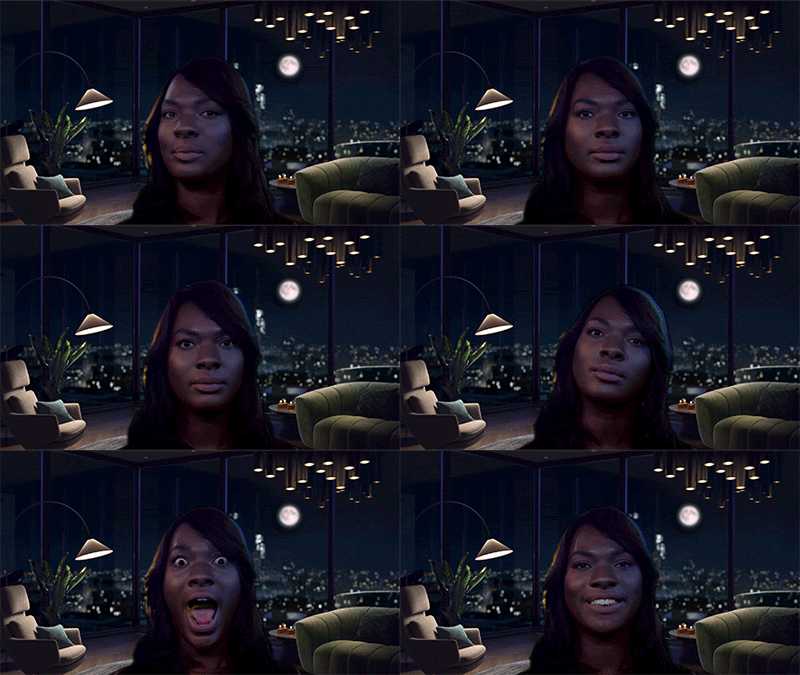



With this update, Google hopes to bring better diversity to the backgrounds you’ll be staring at as you speak with people. Aren’t you just as tired of seeing messy home office spaces as I am? The most impressive part is that these backgrounds will also be animated. The twinkle of city lights through the window of the high rise, the soft snowfall or rain of the small town outside of the cafe, and so on. Additionally, the time of day and season will dynamically change to accommodate for different time zones that participants may be in.
In most of the examples above, the same cafe can be seen with varying weather effects and lighting setups, but what’s really cool is that they also have different arrangements on the counter behind the individuals. To top it all off, a new lighting and color filters panel will allow you to tinker with exactly how you’re being lit during the call, and there are plenty of options right out of the gate.
I would love to see this all expanded to include hundreds of varying choices, and the fact that we can have fake lighting rendered on us in real-time is just a testament to the tech generation we find ourselves in now. It’s honestly just pretty mind-blowing, wouldn’t you agree?
Available to all Google Workspace tiers, but not to users with personal Google Accounts
Availabilty
SUBSCRIBE TO UPSTREAM
Get Chrome Unboxed delivered straight to your inbox
Upstream is our flagship, curated newsletter with the top stories, most click-worthy deals, giveaways, and trending articles from Chrome Unboxed sent directly to your inbox a few times a week. Join 31,000+ subscribers.

