


• Skip to main content
  • Skip to primary sidebar
  • Deals
  • Features
  • Guides
  • Chromebooks
  • Videos
  • Podcast
  • More +
    • Reviews
    • Unboxing
    • Upcoming Devices
    • Chromebook Plus
    • Chrome
    • ChromeOS
    • Chrome OS Flex
  • Search
  • Sign Up
  • Log In
Chrome Unboxed – The Latest Chrome OS News

Chrome Unboxed - The Latest Chrome OS News

A Space for All Things Chrome, Google, and More!

  • Deals
  • Features
  • Guides
  • Chromebooks
  • Videos
  • Podcast
  • More +
    • Reviews
    • Unboxing
    • Upcoming Devices
    • Chromebook Plus
    • Chrome
    • ChromeOS
    • Chrome OS Flex
  • Search
  • Sign Up
  • Log In

Google is taking on Anthropic’s expensive Mythos model with Gemini 3.5 Flash Cyber

July 22, 2026 By Joseph Humphrey View Comments

Support our independent tech coverage. Chrome Unboxed is written by real people, for real people—not search algorithms. Join Chrome Unboxed Plus for just $2 a month to get an ad-free experience, access to our private Discord, and more. Learn more about membership here.
START FREE TRIAL (MONTHLY)START FREE TRIAL (ANNUAL)

If you’ve ever spent hours hunting down a single bug or vulnerability in a sprawling codebase, you know how incredibly tedious and frustrating it can be. To help tackle this growing problem, Google just announced Gemini 3.5 Flash Cyber. It’s a new, lightweight AI model built specifically to find, validate, and patch software vulnerabilities quickly.

As AI agents get better at finding vulnerabilities, those with malicious intent are discovering flaws faster than defenders can patch them. Up until now, the industry has leaned heavily on massive, compute-heavy AI models—like Anthropic’s rather expensive Mythos 5—to do deep security checks. Think of Gemini 3.5 Flash Cyber as the leaner, faster alternative.

Xremove ads

By building on top of the already efficient 3.5 Flash model, Google is able to run it through its CodeMender security agent. Instead of relying on a single, expensive call to a giant model, CodeMender can ping 3.5 Flash Cyber multiple times at high speed and a much lower cost. This allows the AI to cast a wider net and scan vastly more code paths to find issues.
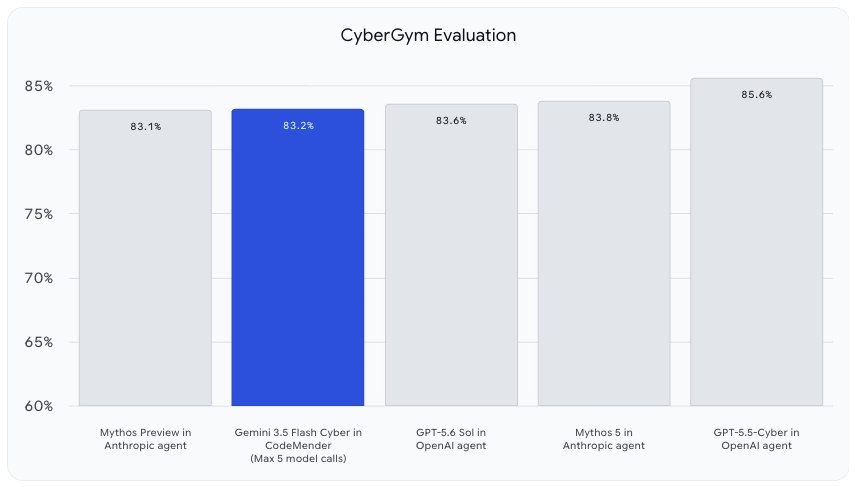
The proof is in the code

Google also has a huge advantage here, having trained this model on over 10 years of OSS-Fuzz results and its massive OSV.dev open-source vulnerability database. It is already actively working inside Google to secure Chrome, Android, YouTube, and Cloud.

Featured Videos

Xremove ads

When tested on the highly complex V8 JavaScript Engine, 3.5 Flash Cyber found 55 unique confirmed issues. That beats out both the mainline 3.5 Flash model and Anthropic’s Claude Opus 4.6. It even found 10 critical issues that the other models completely missed. In a real-world test, Google’s own Cloud Vulnerability Research team used it to uncover a remote code execution vulnerability in just two hours, saving them a ton of production time and resources.

Check out Today’s Best Chomebook Deals

Safety and availability

Because an AI that is exceptionally good at finding security flaws is inherently a dual-use technology (meaning the bad guys would love to use it, too), Google is playing it safe with the rollout. As part of a limited-access pilot, 3.5 Flash Cyber is launching exclusively to governments and trusted partners via CodeMender for now, with plans to expand over time.

The other big addition buried in this announcement is that Google is also rolling out Gemini 3.6 Flash, which brings improvements in coding and multimodal performance, alongside a new 3.5 Flash-Lite model designed to be the most cost-effective option in the 3.5 series.

Xremove ads

If you manage large software deployments, this lightweight approach to AI security looks like a big step forward in keeping things locked down without breaking the bank.

SUBSCRIBE TO UPSTREAM

Get Chrome Unboxed delivered straight to your inbox

Upstream is our flagship, curated newsletter with the top stories, most click-worthy deals, giveaways, and trending articles from Chrome Unboxed sent directly to your inbox a few times a week. Join 31,000+ subscribers.

SUBSCRIBE HERE!

Filed Under: Gemini, News

About Joseph Humphrey

Joe has been a part of Chrome Unboxed since 2016 when he started helping Robby produce YouTube videos. Although normally behind the scenes, Joe has spent countless hours editing reviews and unboxings of many, many Chromebooks. Now a Partner in Unboxed Media, Joe is constantly thinking strategically about the Chromebook industry and how Chrome Unboxed can continue to innovate in the space.

Primary Sidebar

Xremove ads

Deals

The updated Lenovo IdeaPad Slim 3 Chromebook drops to just $199 in massive new sale

By Robby Payne
July 21, 2026

The best Chromebook deals today

By Robby Payne
July 21, 2026

The Pixel 10 Pro is $300 off right now, and it’s still my favorite small phone

By Joseph Humphrey
July 12, 2026

The new Lenovo IdeaPad Slim 3 Chromebook gets a super-affordable $249 configuration

By Robby Payne
July 7, 2026

Lenovo quietly updates the IdeaPad Slim 3 Chromebook in some pretty big ways

By Robby Payne
July 2, 2026

More Deals

Xremove ads

Reviews

Acer Chromebook Plus Spin 514 Review: the best convertible you can buy [VIDEO]

By Robby Payne
July 1, 2026

Lenovo Chromebook Plus 2-in-1 Review: pretty great in a vacuum

By Robby Payne
April 23, 2026

My review after 6 weeks with the Lenovo Chromebook Plus 14 [VIDEO]

By Robby Payne
August 11, 2025

One week with the best small Android tablet you can buy, and I’m sold

By Robby Payne
May 9, 2025

Best Chromebooks of 2024 [VIDEO]

By Robby Payne
November 28, 2024

More Reviews

Xremove ads

Guides

This Chromebook trackpad shortcut is definitely not new, but is blowing my mind

By Robby Payne
March 11, 2024

How to reduce broadcast delay on YouTube TV to stop live spoilers

By Robby Payne
December 8, 2023

Windows PC keyboard and Chromebook

How to use a Windows keyboard with a Chromebook

By Joseph Humphrey
December 8, 2023

How reset and revert your Chromebook to the previous version of Chrome OS

By Robby Payne
November 29, 2023

My Chromebook Plus features disappeared: here’s how I fixed it

By Robby Payne
November 24, 2023

More Guides

TWITTER · FACEBOOK · INSTAGRAM · YOUTUBE · EMAIL · ABOUT

Copyright © 2026 · Chrome Unboxed · Chrome is a registered trademark of Google Inc.
We are participants in various affiliate advertising programs designed to provide a means for us to earn fees by linking to affiliated sites.

PRIVACY POLICY