

• Skip to main content
  • Skip to primary sidebar
  • Deals
  • Features
  • Guides
  • Chromebooks
  • Videos
  • Podcast
  • More +
    • Reviews
    • Unboxing
    • Upcoming Devices
    • Chromebook Plus
    • Chrome
    • ChromeOS
    • Chrome OS Flex
  • Search
  • Sign Up
  • Log In
Chrome Unboxed – The Latest Chrome OS News

Chrome Unboxed - The Latest Chrome OS News

A Space for All Things Chrome, Google, and More!

  • Deals
  • Features
  • Guides
  • Chromebooks
  • Videos
  • Podcast
  • More +
    • Reviews
    • Unboxing
    • Upcoming Devices
    • Chromebook Plus
    • Chrome
    • ChromeOS
    • Chrome OS Flex
  • Search
  • Sign Up
  • Log In

Google is bringing its excellent Workspace Calendar scheduling feature to One subscribers

June 27, 2023 By Michael Perrigo View Comments

Support our independent tech coverage. Chrome Unboxed is written by real people, for real people—not search algorithms. Join Chrome Unboxed Plus for just $2 a month to get an ad-free experience, access to our private Discord, and more. Learn more about membership here.
START FREE TRIAL (MONTHLY)START FREE TRIAL (ANNUAL)

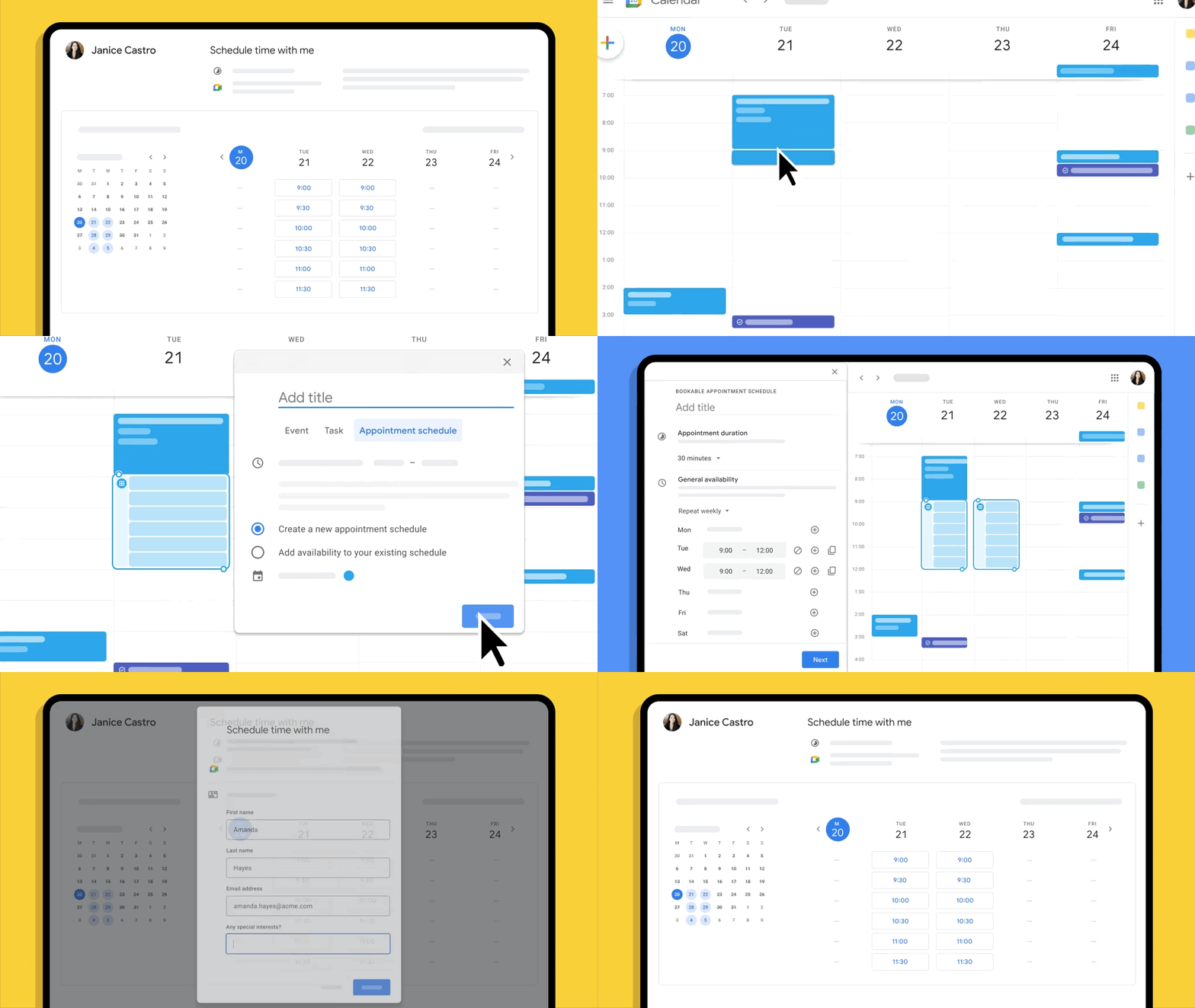
Google is now bringing its awesome Calendar Scheduling feature to everyone, making it easier than ever to set up one-off meetings or grab coffee with a friend. This update builds on the appointment scheduling functionality that was initially announced in 2021 for Google Workspace Individual subscribers.

Appointment Scheduling has let businesses create shareable booking pages integrated with their Google Calendar so that their customers or clients could book time with them while taking into account their existing schedule. Think ‘Calendly’, but from Google, basically. The feature automatically checks the availability of the business, letting people only book appointments on open schedule slots. It also offers options to add buffers or set a maximum number of appointments per day, helping to manage time effectively.
Xremove ads
Google Workspace

Now that this is expanding to personal Google account users as well, it means that you can create your own booking page (one per individual) so you can accept bookings for consultations, appointments, or meetings with customers, partners, friends, and even family, if you’re so inclined. I personally just think it’s pretty cool that it’s now a tool that goes beyond the workplace, letting make yourself available (or unavailable) in your personal or professional life.

You should see this roll out at some point in the next few weeks, but let me know in the comments how you’ll make use of it. If you run a small businesses and need a few extra features like unlimited booking pages, automated email reminders for bookers, checking multiple calendars for availability instead of just the one, and verifying booker emails, you should still look into paying for a Workspace license. Luckily, the aforementioned premium features will also be accessible through Google One Premium plans for personal use, starting today.
Featured Videos

Xremove ads
Google Workspace

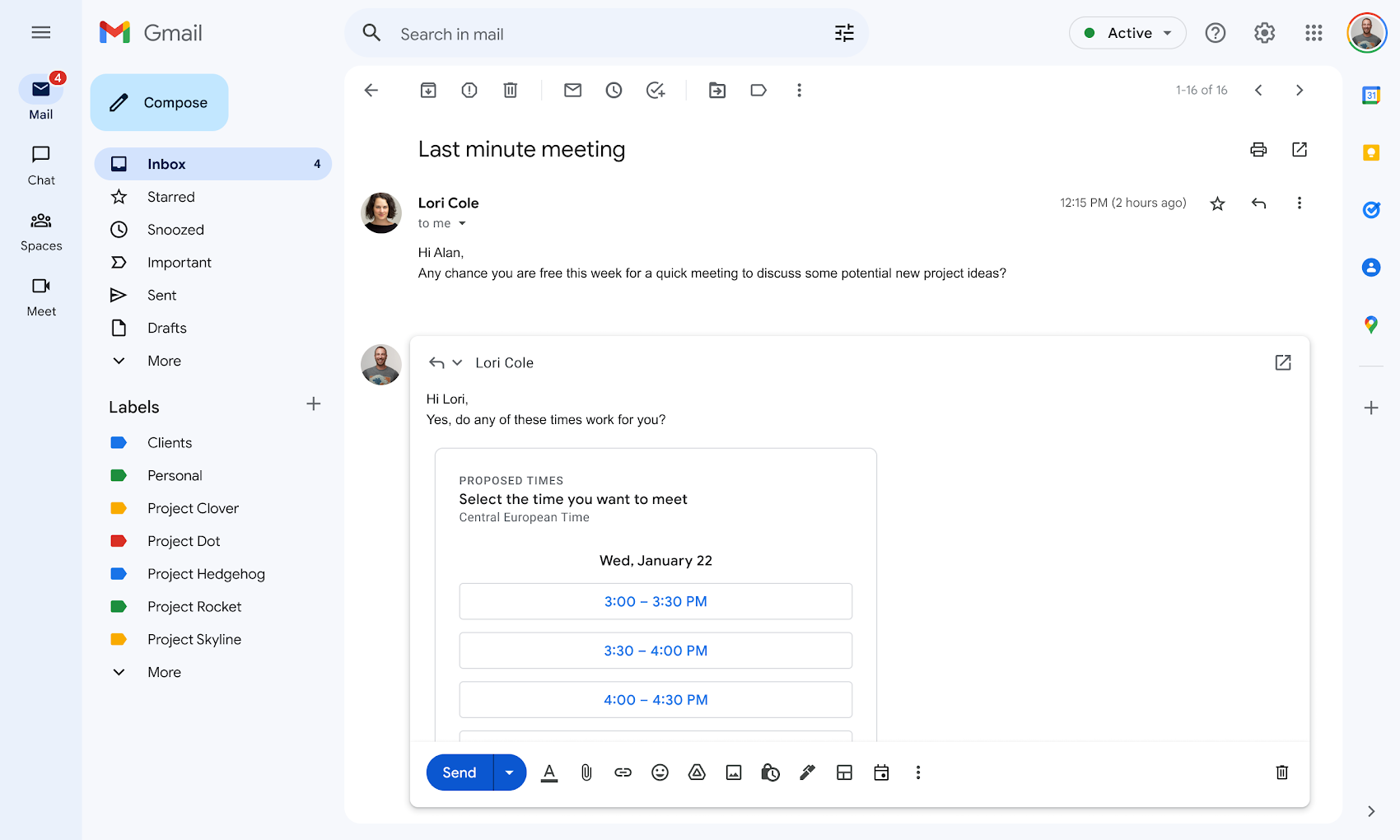
Lastly, and quite frankly, the best feature, in my opinion, is proposed meeting times from Calendar appearing right in Gmail via the compose menu. With this, you can click a single icon at the bottom of the composition and dynamically drop in available times without ever leaving your inbox. The recipient of the email can easily review the proposed times and select one directly from the email, receiving an automatic calendar invite – cool! Because I need to cross check my personal and business Calendars before confirming appointments, I’ll still need to stick to a Workspace payment, but that’s okay – I can still see how this could be super useful for the everyday user.

SUBSCRIBE TO UPSTREAM

Get Chrome Unboxed delivered straight to your inbox

Upstream is our flagship, curated newsletter with the top stories, most click-worthy deals, giveaways, and trending articles from Chrome Unboxed sent directly to your inbox a few times a week. Join 31,000+ subscribers.

SUBSCRIBE HERE!

Filed Under: New & Upcoming Features, Workspace

About Michael Perrigo

Known as "Google Mike" to his customers, Michael worked at Best Buy as a Chromebook Expert who dedicated his time to understanding the user experience from a regular Chromebook owner's perspective. Having spent nearly 20 years meeting you face-to-face, he strives to help you understand your technology through carefully crafted guides and coverage, relentlessly seeking out the spark in what's new and exciting about ChromeOS.

Primary Sidebar

Googlebook

How many years of updates Googlebook gets could make or break it on Day One

By Robby Payne
September 8, 2026

Your Android phone might soon double as a wireless mouse for Googlebook

By Robby Payne
September 5, 2026

Google’s John Solomon explains why Googlebook is Google’s next Chromebook moment

By Robby Payne
September 4, 2026

Googlebook is designed for AI, but that’s not why I’m excited for it

By Robby Payne
September 3, 2026

Leaked Googlebook ‘Look up’ app appears on the Play Store ahead of launch

By Robby Payne
September 2, 2026

More Googlebook

Xremove ads

Deals

The best Chromebook deals today

By Robby Payne
September 2, 2026

The best Chromebook ever made is $350 off at Best Buy right now

By Robby Payne
August 21, 2026

The excellent, powerful Acer Chromebook Plus Spin 514 is $150 off right now

By Robby Payne
August 12, 2026

Acer’s new Chromebook 315 is wildly affordable and points to the real future of Chromebooks

By Robby Payne
August 11, 2026

You can score the massively upgraded ASUS CX54 Chromebook Plus for just $599 right now

By Joseph Humphrey
July 28, 2026

More Deals

Xremove ads

Reviews

Acer Chromebook Plus Spin 514 Review: the best convertible you can buy [VIDEO]

By Robby Payne
July 1, 2026

Lenovo Chromebook Plus 2-in-1 Review: pretty great in a vacuum

By Robby Payne
April 23, 2026

My review after 6 weeks with the Lenovo Chromebook Plus 14 [VIDEO]

By Robby Payne
August 11, 2025

One week with the best small Android tablet you can buy, and I’m sold

By Robby Payne
May 9, 2025

Best Chromebooks of 2024 [VIDEO]

By Robby Payne
November 28, 2024

More Reviews

Xremove ads

TWITTER · FACEBOOK · INSTAGRAM · YOUTUBE · EMAIL · ABOUT

Copyright © 2026 · Chrome Unboxed · Chrome is a registered trademark of Google Inc.
We are participants in various affiliate advertising programs designed to provide a means for us to earn fees by linking to affiliated sites.

PRIVACY POLICY