
• Skip to main content
  • Skip to primary sidebar
  • Deals
  • Features
  • Guides
  • Chromebooks
  • Videos
  • Podcast
  • More +
    • Reviews
    • Unboxing
    • Upcoming Devices
    • Chromebook Plus
    • Chrome
    • ChromeOS
    • Chrome OS Flex
  • Search
  • Sign Up
  • Log In
Chrome Unboxed – The Latest Chrome OS News

Chrome Unboxed - The Latest Chrome OS News

A Space for All Things Chrome, Google, and More!

  • Deals
  • Features
  • Guides
  • Chromebooks
  • Videos
  • Podcast
  • More +
    • Reviews
    • Unboxing
    • Upcoming Devices
    • Chromebook Plus
    • Chrome
    • ChromeOS
    • Chrome OS Flex
  • Search
  • Sign Up
  • Log In

Try out Google’s strangely mesmerizing Blob Opera – and don’t say I never got you anything for Christmas

December 24, 2020 By Michael Perrigo View Comments

Google’s Chrome Experiments are among some of the best and most creative instances where we see the open web at its strongest. Particularly in the Google Arts and Culture scene, they’ve placed a lot into crafting unique experiences that you can enjoy just by clicking on a link. Their latest experiment is no different – it’s a blob opera. Wait, what?

Yep, a handful of blobs who sing opera in varying pitches and tones based on how you drag them around. Forward and backward gives you different vowels while up and down change their pitch. The purple blob on the right is your bass, the teal one is your tenor, the green one is your mezzo-soprano and lastly, the red one is your soprano. All of this is done with machine learning because that’s why these experiments exist in the first place – to test the limits of what can be done through the Chrome browser with code.

Xremove ads

Chrome Experiments is a showcase of work by coders who are pushing the boundaries of web technology, creating beautiful, unique web experiences. You’ll find helpful links throughout the site for creating your own experiments, and you can also explore resources like WebGL Globe and our workshop of tools.
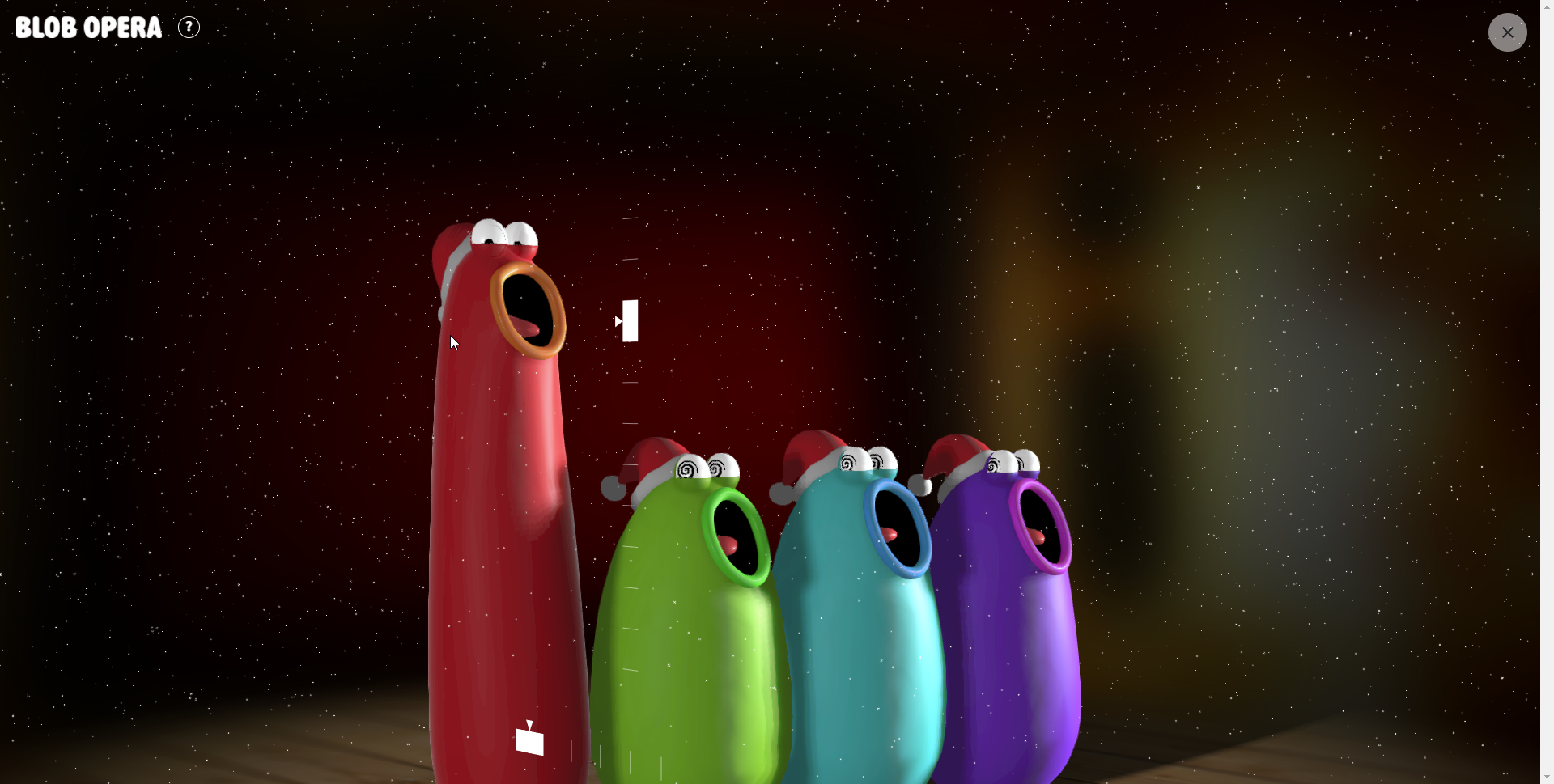
Blob Opera is oddly satisfying to listen to on repeat. You don’t have to know anything about music to make it sound good either because Google does it for you with that machine learning I mentioned. What’s particularly awesome and the reason I’m telling you about this little “game” today is that they’ve added a toggle on the bottom right of the screen that drops Christmas hats onto your blobs and makes snow begin to fall around them. Then, a music player appears to the left of that toggle that allows you to play pre-recorded Christmas carols for your blobs to sing on repeat.
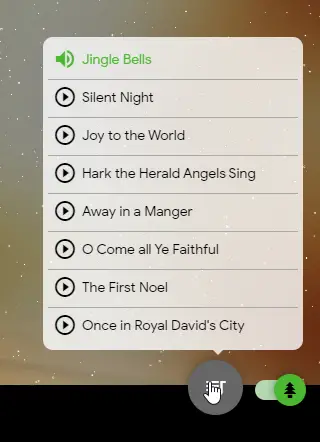
Most of them are good enough to become background noise – assuming Opera doesn’t hurt your ears. I personally kind of like it, especially Silent Night. Anyway, you can record your own little musical too if you want using the record button on the bottom left of the screen. You can then share it with your friends and family as a simple link. It’s a neat little bit of enjoyment for Christmas Eve, I think, and the kids may even love it while they try to pass the excruciatingly long day that they consider an obstacle to opening presents. Okay, go have fun with it or annoy someone who doesn’t like opera – just don’t say I never got you anything!

Featured Videos

Xremove ads

Try Blob Opera on Google Arts and Culture

Join Chrome Unboxed Plus

Introducing Chrome Unboxed Plus – our revamped membership community. Join today at just $2 / month to get access to our private Discord, exclusive giveaways, AMAs, an ad-free website, ad-free podcast experience and more.

Plus Monthly

$2/mo. after 7-day free trial

Xremove ads

Pay monthly to support our independent coverage and get access to exclusive benefits.

Start free trial

Plus Annual

$20/yr. after 7-day free trial

Pay yearly to support our independent coverage and get access to exclusive benefits.

Xremove ads
Start free trial

Our newsletters are also a great way to get connected. Subscribe here!

Click here to learn more and for membership FAQ

Filed Under: Gaming, News

About Michael Perrigo

Known as "Google Mike" to his customers, Michael worked at Best Buy as a Chromebook Expert who dedicated his time to understanding the user experience from a regular Chromebook owner's perspective. Having spent nearly 20 years meeting you face-to-face, he strives to help you understand your technology through carefully crafted guides and coverage, relentlessly seeking out the spark in what's new and exciting about ChromeOS.

Primary Sidebar

Xremove ads

Deals

The best Chromebook deals today

By Robby Payne
December 29, 2025

The Acer Chromebook Plus Spin 514 hits an all-time low price of $499

By Robby Payne
December 23, 2025

Save $220 on the powerful, versatile Acer Chromebook Plus Spin 714

By Robby Payne
December 10, 2025

The Google Pixel 9a just hit its lowest price ever at $150 off

By Joseph Humphrey
December 8, 2025

At $349, this Lenovo Chromebook Plus is one of the best value laptops you can buy

By Joseph Humphrey
December 3, 2025

More Deals

Xremove ads

Reviews

Acer Chromebook Plus Spin 514 Review: Kompanio Ultra power in a convertible

By Robby Payne
December 24, 2025

My review after 6 weeks with the Lenovo Chromebook Plus 14 [VIDEO]

By Robby Payne
August 11, 2025

One week with the best small Android tablet you can buy, and I’m sold

By Robby Payne
May 9, 2025

Best Chromebooks of 2024 [VIDEO]

By Robby Payne
November 28, 2024

Samsung Galaxy Chromebook Plus Review: Samsung is back! [VIDEO]

By Robby Payne
October 28, 2024

More Reviews

Xremove ads

Guides

This Chromebook trackpad shortcut is definitely not new, but is blowing my mind

By Robby Payne
March 11, 2024

How to reduce broadcast delay on YouTube TV to stop live spoilers

By Robby Payne
December 8, 2023

Windows PC keyboard and Chromebook

How to use a Windows keyboard with a Chromebook

By Joseph Humphrey
December 8, 2023

How reset and revert your Chromebook to the previous version of Chrome OS

By Robby Payne
November 29, 2023

My Chromebook Plus features disappeared: here’s how I fixed it

By Robby Payne
November 24, 2023

More Guides

TWITTER · FACEBOOK · INSTAGRAM · YOUTUBE · EMAIL · ABOUT

Copyright © 2026 · Chrome Unboxed · Chrome is a registered trademark of Google Inc.
We are participants in various affiliate advertising programs designed to provide a means for us to earn fees by linking to affiliated sites.

PRIVACY POLICY