Support our independent tech coverage. Chrome Unboxed is written by real people, for real people—not search algorithms. Join Chrome Unboxed Plus for just $2 a month to get an ad-free experience, access to our private Discord, and more. Learn more about membership here.
START FREE TRIAL (MONTHLY)START FREE TRIAL (ANNUAL)
Have I mentioned lately how frustrating it is that Google drops half-baked features into its services and then leaves them to go off on new adventures? Well, in today’s edition of ‘What Heck Were They Thinking?’, I visited my Google Calendar to plan my week only to find that toggling “Display this only” on any given Calendar is only half-implemented.
As someone who is trying his best to adapt Google’s services as a digital alternative to my analog Bullet Journal system in order to effectively stay on top of my goals, I keep separate calendars for each area of my life. I won’t show that off here today, and instead, I’ll use my Chrome Unboxed calendar as a visual example.
Yes, I’m one of those crazy productivity-oriented people who has separate, color-coded calendars (you should see my Google Drive!) I have one for everything pertaining to work, my business, my family, my son, the car, entertainment releases that are upcoming, health and wellness, intentional connection with friends, expenses, housework, meal planning, and so on and so forth.
So, when I went to sit down with all of this data and I wanted to segregate it in an attempt to gain some focus and clarity on a specific area, I hovered over the three dots next to one of them and clicked the “Display this only” button. Great! Clarity at last. Only things that had something to do with that specific aspect of my day-to-day life appeared. This is a fantastic way to tone down the noise and it works even better if you use Schedule view!
Alright, so I figured I would just toggle that Calendar view and head back over to the overview of everything before filtering out another aspect of my existence, but nope. Believe it or not, Google Calendar simply doesn’t have a “Display all calendars” button in place of “Display this only” when you’re already looking at just one! In its place, I had to manually toggle each and every calendar one at a time. That’s just absurd if you ask me.
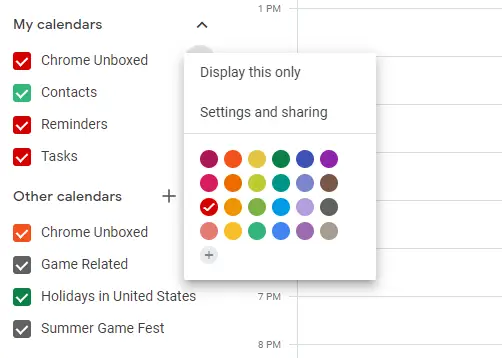
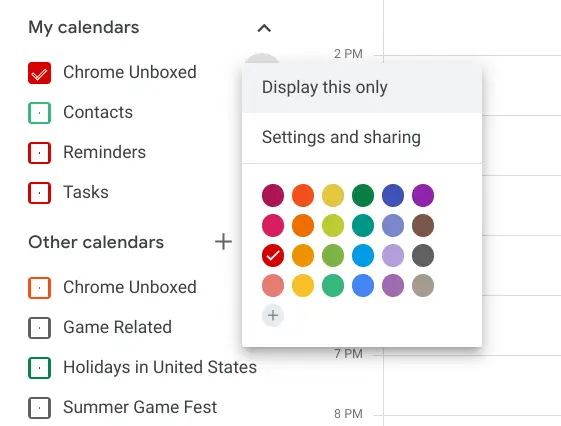
Maybe most people don’t use Calendar the way I do. Maybe I just have undiagnosed OCD. Maybe I just expect a feature to work backward and forwards as anyone would. The last time I checked, you don’t swim halfway across the English channel and turn back, right? Each time I attempt to replace my traditional means of productivity with Google services, I find myself running into roadblocks like this, but why?
What do you think? Should Calendars be treated as toggles or as filter views? I personally believe it ought to be the latter, but my propensity to shape Google’s services around my very specific use cases sometimes means that I think well outside their intended design – for better or worse. With that said, isn’t technology supposed to evolve with its users? I would be very happy to see this change implemented in the app and the web app, but I’m not holding my breath – I just thought I would share my thoughts and get your opinion on the matter! For now, I feel like Google Calendar is missing a very important second half of a very useful feature, and that just breaks my heart.
SUBSCRIBE TO UPSTREAM
Get Chrome Unboxed delivered straight to your inbox
Upstream is our flagship, curated newsletter with the top stories, most click-worthy deals, giveaways, and trending articles from Chrome Unboxed sent directly to your inbox a few times a week. Join 31,000+ subscribers.