

• Skip to main content
  • Skip to primary sidebar
  • Deals
  • Features
  • Guides
  • Chromebooks
  • Videos
  • Podcast
  • More +
    • Reviews
    • Unboxing
    • Upcoming Devices
    • Chromebook Plus
    • Chrome
    • ChromeOS
    • Chrome OS Flex
  • Search
  • Sign Up
  • Log In
Chrome Unboxed – The Latest Chrome OS News

Chrome Unboxed - The Latest Chrome OS News

A Space for All Things Chrome, Google, and More!

  • Deals
  • Features
  • Guides
  • Chromebooks
  • Videos
  • Podcast
  • More +
    • Reviews
    • Unboxing
    • Upcoming Devices
    • Chromebook Plus
    • Chrome
    • ChromeOS
    • Chrome OS Flex
  • Search
  • Sign Up
  • Log In

Google Calendar adds categorization and color labels to Time Insights

August 17, 2022 By Johanna Romero View Comments

Support our independent tech coverage. Chrome Unboxed is written by real people, for real people—not search algorithms. Join Chrome Unboxed Plus for just $2 a month to get an ad-free experience, access to our private Discord, and more. Learn more about membership here.
START FREE TRIAL (MONTHLY)START FREE TRIAL (ANNUAL)

As a follow-up to the Time Insights launched last year, Google is now expanding it by adding event categorization and colored labels. Time Insights is a feature on Workspace accounts that provide you with a breakdown of you’ve been spending your valuable time, including how long you’ve spent in meetings, how often you are in meetings, and who you’ve spent the most time meeting with.

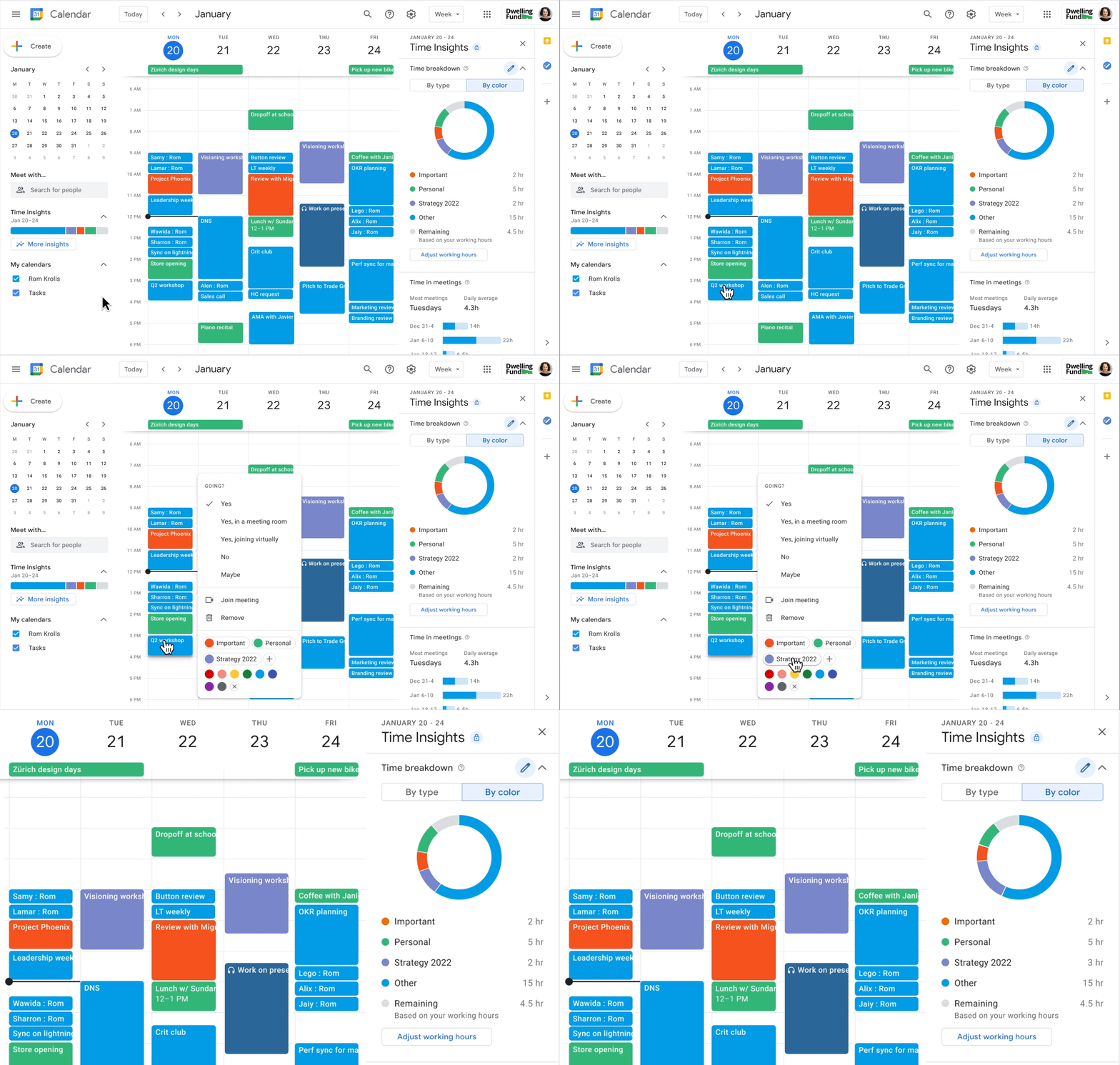
This new update expands on that by providing a way to categorize these events and assign a color label, so it’s easier for you to discern how your schedule is spread out. For example, you can categorize certain events as “Personal” or name them after a specific project, and Time Insights will break that down for you on a chart that can be displayed by type or color.
Xremove ads

Since this is specific to the Time Insights panel, which is only available for the below Google Workspace tiers, it isn’t a productivity feature we can all take advantage of. However, those that have it available can create color labels by navigating to the Time Insights panel, then clicking on “Time breakdown” > select “By color” > click on “Add a label.” Similarly, to add a color label to an existing event, right-click on it and select the label you’d like, or click on Edit > change the event color.

AVAILABILITY

• AVAILABLE: Business Standard, Business Plus, Enterprise Standard, Enterprise Plus, Education Plus and Nonprofits.

• NOT AVAILABLE: Google Workspace Essentials, Business Starter, Enterprise Essentials, Education Fundamentals, Education Standard, the Teaching and Learning Upgrade, and Frontline, legacy G Suite Basic and Business customers, users with personal Google Accounts

This began rolling out yesterday to accounts in Rapid Release domains and will start showing up for Scheduled release domains on August 30th. Both release tracks will undergo an extended rollout of potentially longer than two weeks for full feature visibility.

Featured Videos

Xremove ads

ADMIN INFO

This feature will be ON by default and can be disabled at the domain/OU level

SUBSCRIBE TO UPSTREAM

Get Chrome Unboxed delivered straight to your inbox

Upstream is our flagship, curated newsletter with the top stories, most click-worthy deals, giveaways, and trending articles from Chrome Unboxed sent directly to your inbox a few times a week. Join 31,000+ subscribers.

SUBSCRIBE HERE!

Filed Under: New & Upcoming Features Tagged With: calendar, google calendar, google workspace, time insights, workspace

Primary Sidebar

Googlebook

Googlebook is designed for AI, but that’s not why I’m excited for it

By Robby Payne
September 3, 2026

Leaked Googlebook ‘Look up’ app appears on the Play Store ahead of launch

By Robby Payne
September 2, 2026

Acer teases its first Googlebook at IFA ahead of Google’s press event

By Robby Payne
September 2, 2026

Adobe just released a Premiere beta for Android, but Googlebook will need much more

By Joseph Humphrey
September 1, 2026

Lenovo’s ‘Pen Pro for Googlebook’ hits Bluetooth SIG with wireless charging and gestures

By Robby Payne
September 1, 2026

More Googlebook

Xremove ads

Deals

The best Chromebook deals today

By Robby Payne
September 2, 2026

The best Chromebook ever made is $350 off at Best Buy right now

By Robby Payne
August 21, 2026

The excellent, powerful Acer Chromebook Plus Spin 514 is $150 off right now

By Robby Payne
August 12, 2026

Acer’s new Chromebook 315 is wildly affordable and points to the real future of Chromebooks

By Robby Payne
August 11, 2026

You can score the massively upgraded ASUS CX54 Chromebook Plus for just $599 right now

By Joseph Humphrey
July 28, 2026

More Deals

Xremove ads

Reviews

Acer Chromebook Plus Spin 514 Review: the best convertible you can buy [VIDEO]

By Robby Payne
July 1, 2026

Lenovo Chromebook Plus 2-in-1 Review: pretty great in a vacuum

By Robby Payne
April 23, 2026

My review after 6 weeks with the Lenovo Chromebook Plus 14 [VIDEO]

By Robby Payne
August 11, 2025

One week with the best small Android tablet you can buy, and I’m sold

By Robby Payne
May 9, 2025

Best Chromebooks of 2024 [VIDEO]

By Robby Payne
November 28, 2024

More Reviews

Xremove ads

TWITTER · FACEBOOK · INSTAGRAM · YOUTUBE · EMAIL · ABOUT

Copyright © 2026 · Chrome Unboxed · Chrome is a registered trademark of Google Inc.
We are participants in various affiliate advertising programs designed to provide a means for us to earn fees by linking to affiliated sites.

PRIVACY POLICY