

Support our independent tech coverage. Chrome Unboxed is written by real people, for real people—not search algorithms. Join Chrome Unboxed Plus for just $2 a month to get an ad-free experience, access to our private Discord, and more. Learn more about membership here.
START FREE TRIAL (MONTHLY)START FREE TRIAL (ANNUAL)
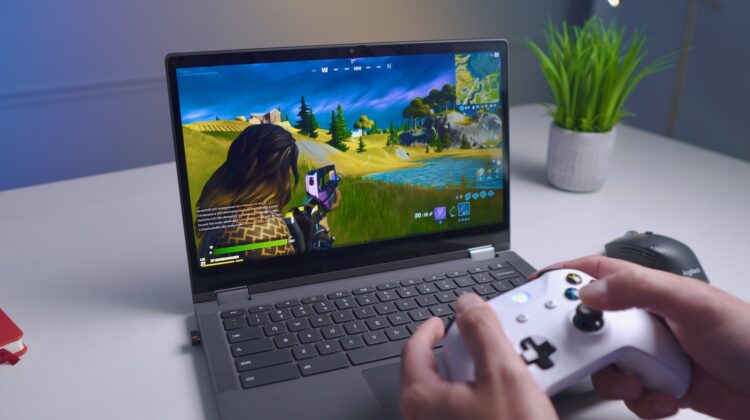
In a bombshell announcement following a cryptic tweet, Nvidia has added full blown support for Chrome OS via their web based launcher. Definitely a strong flex against Google’s Stadia. This week, we go hands on and give you a first look at the experience Nvidia is offering. Geforce Now supports over 650 titles which includes 75 of the most played free-to-play games. I’ll let you take a look below before I give you some additional thoughts on the service after a day of testing. Enjoy!
Free Membership
As you can see, the service shows some real promise out of the gate. Seriously impressive. There are currently three pricing tiers and while it was tempting to title this article with a focus on the fact that you can play 75 free high quality PC games at zero cost on your Chromebook starting today, the free service is not worthwhile, in my opinion. After spending a little time with significant lag spikes, tons of screen artifacting, waiting between 10 and 30 minutes for my session to start and a one hour session limit, I quickly upgraded to the Founders membership at $4.99/mo. and already feel that the service is revolutionary.
Founders Membership
Founders membership lets you start playing immediately with no wait times and gives you six hour sessions with the ability to simply start a new session when your previous on ends. However, I truly believe that the real value you get for your five bucks is RTX support. I can’t even begin to describe the difference in EVE Online’s graphics before and after I upgraded my membership for Geforce Now. The difference was so drastic that I don’t really feel that the free membership has any right to exist. Sure, free is good as it gives people access to try before they buy, but it’s abysmal. It was nearly impossible to make out what was happening in space around my ship before upgrading as it was a blurry, pixelated mess. What good is a free service if it doesn’t give the customer an accurate depiction of what they experience if they dish out the cash?
I don’t have the best internet connection, so perhaps that makes me the perfect candidate to give my thoughts on the performance here as my connection speed is closer to the average user. After bumping up my membership, the game looked and played identical to the copy I have installed locally on my Windows machine. You really do forget that you’re in a virtual environment aside from the occasional jitter. That being said, I would take that any day over having to cram every game I’ve ever cared about into a hard drive and feel the stress of having to manage the available space over time. Cloud gaming for the win!
Special Offer
Lastly, there’s a special offer going right now that allows you to grab Geforce Now for $24.99 for six months. That’s a five dollar savings as opposed to paying for it on a month to month basis. Not only do you get all of the Founders membership benefits, but you also get a Hyper Scape Season One Battle Pass Token and an exclusive Hyper Scape in-game content pack. I haven’t really played Hyper Scape, but it looks really good! For those who aren’t yet sure of the service and want to test it out before fully committing though, we recommend upgrading just to the Founders membership.
Don’t get caught up in the numbers game
I can only imagine what the service would have been like had a few major publishers not removed their games earlier this year, but even with that glum news, Geforce Now’s selection of available games already blows Stadia out of the water, but let’s talk about that for a second.
One thing I’ve realized while having a smaller selection of games to play on Stadia since launch compared to other consoles is that finding quality titles and really digging in and committing to completing them calls me back hard to my youth when I could only afford a few games and spent months at a time on them before moving on. This approach really cemented a place for them in my heart and mind and to this day, still gives me the deepest sense of nostalgia. Nowadays though, I have so many games across my Nintendo Switch, PS4, Steam and Epic Libraries, my phone and Chromebooks and whatever other devices I’m forgetting, that I sift through them like water and hardly give them a second look. When so many games are given to us for free every month as the big companies battle for our loyalty, it’s easy to undervalue them. Now, I’m not complaining. I just thought it would be a good idea to point this out here because while “more games!” is the reason people will be drawn to Geforce Now, it’s not the main reason you should use it!
Changing what it means to game on a Chromebook
The service, though in its infancy, already proves a very important point: Chromebooks can be used for high quality gaming. Before last year, this is a statement could never truly be said without people laughing. That is, until Stadia arrived on the scene. However, there’s another very important point and one that I think Geforce Now is the first to drive home – high quality gaming is desirable on a Chromebook. That’s right, the fact that I was able to go through my Steam and Epic Games libraries from my Windows PC and add most of the games that I’ve already purchased and committed countless hours to made me want to use it. Not only that, but my saved games were intact as well! This made me want to play even more! Some of these games had been collecting dust in my library for years, so the fact that I wanted to dive back in and re-explore what was lost to time made the service all the more appealing.
While I feel that Geforce Now has a less clean and streamlined process to jump into games compared to Stadia as it emulates Steam and Epic’s launchers on their virtual servers, I will say that the fact that you can now play so many popular games from anywhere without installing them makes this worth checking out. We live in an era where we’ve gone beyond providing all the world’s information at the blink of an eye to having the resources to provide our entertainment, a non-necessity, the same way. You’ve got to admit that that’s a bit mind blowing. Nvidia’s commitment to Chromebooks and the love and attention given to this service on day one is a win for everyone and a clear and definitive leap towards the future of gaming.

