

• Skip to main content
  • Skip to primary sidebar
  • Deals
  • Features
  • Guides
  • Chromebooks
  • Videos
  • Podcast
  • More +
    • Reviews
    • Unboxing
    • Upcoming Devices
    • Chromebook Plus
    • Chrome
    • ChromeOS
    • Chrome OS Flex
  • Search
  • Sign Up
  • Log In
Chrome Unboxed – The Latest Chrome OS News

Chrome Unboxed - The Latest Chrome OS News

A Space for All Things Chrome, Google, and More!

  • Deals
  • Features
  • Guides
  • Chromebooks
  • Videos
  • Podcast
  • More +
    • Reviews
    • Unboxing
    • Upcoming Devices
    • Chromebook Plus
    • Chrome
    • ChromeOS
    • Chrome OS Flex
  • Search
  • Sign Up
  • Log In

Chrome’s upcoming high-efficiency and battery saver mode will have visual indicators

September 6, 2022 By Johanna Romero View Comments

featured image with chrome browser logo and a battery in the middle

Support our independent tech coverage. Chrome Unboxed is written by real people, for real people—not search algorithms. Join Chrome Unboxed Plus for just $2 a month to get an ad-free experience, access to our private Discord, and more. Learn more about membership here.
START FREE TRIAL (MONTHLY)START FREE TRIAL (ANNUAL)

We have been discussing and following the development of a few Chrome and ChromeOS features to improve battery and performance. We have been documenting all that here based on the diligent work that u/Leopeva64-2 on Reddit has done. Just a couple of weeks ago, we reported on the introduction of a new “Performance” page, which will have toggles to turn on “High-Efficiency Mode” and “Battery Saver Mode.” 

As stated then, “High-Efficiency mode,” or “Snooze tabs,” will discard tabs after they have been in the background for a specified time, while “Battery Saver mode” will throttle the frame rate to lower power consumption. At the time, we mentioned how there were no obvious toggles or a UI to control when either of these modes were turned on, except for navigating to the chrome://discards page.

Xremove ads

However, according to u/Leopeva64-2’s latest findings, both “Battery Saver” and “Snooze Tabs” have received visual indicators. Battery saver, for example, will have its own Chrome toolbar indicator when engaged, which will also serve as a toggle to turn it off and on.
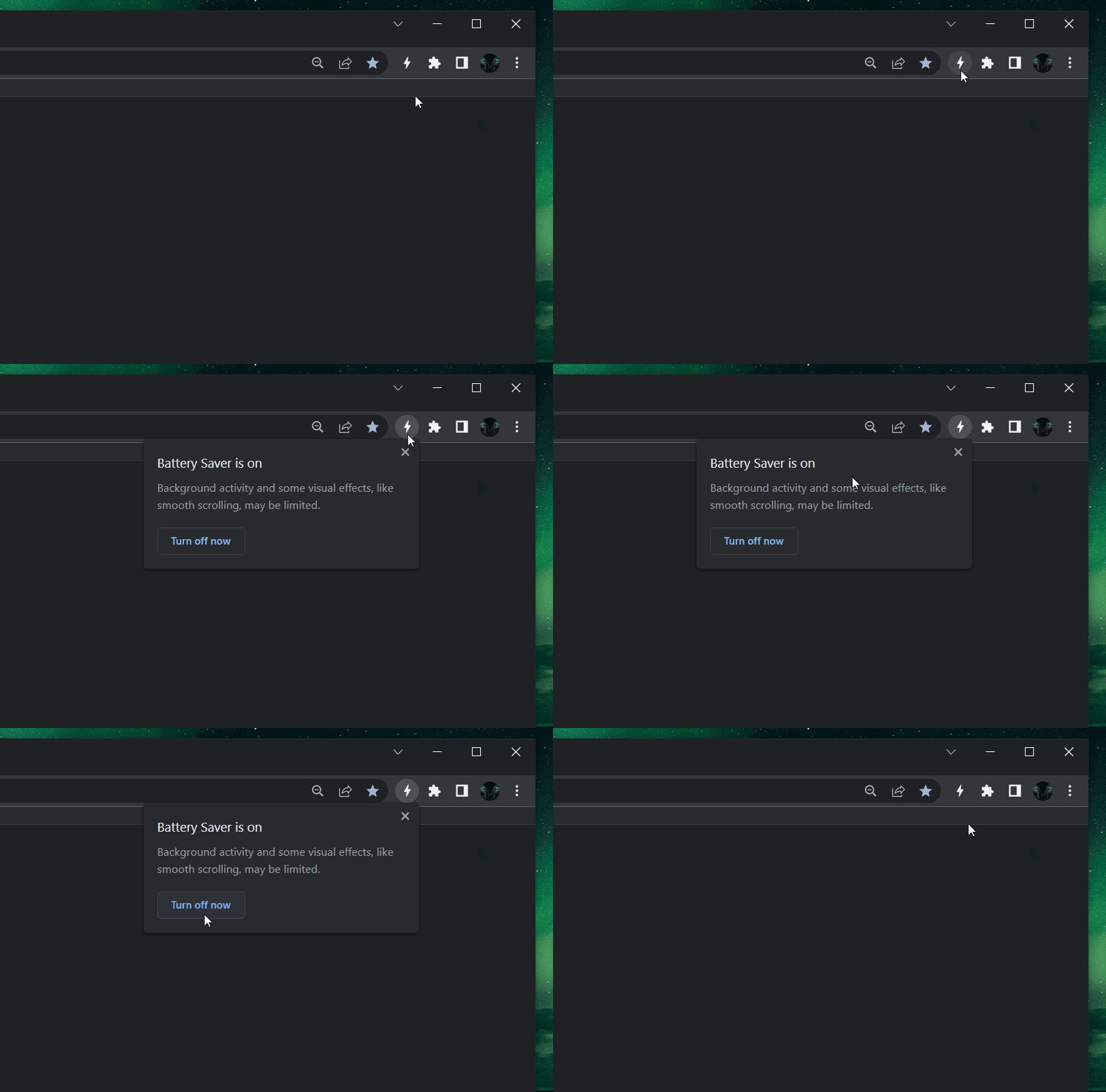
Battery Saver Mode indicator and toggle
Image Source: u/Leopeva64-2

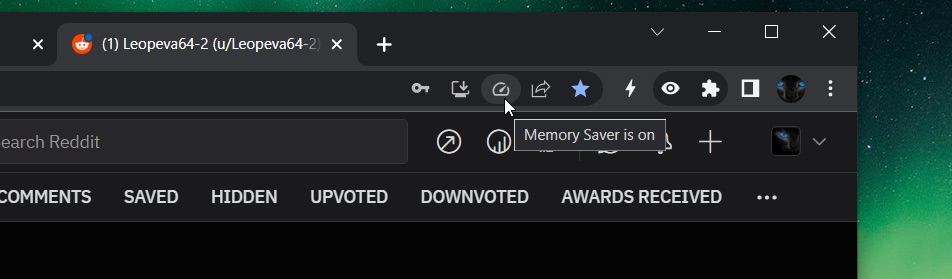
“High efficiency mode,” which was the original name for “Snooze tabs,” which could yet again be renamed to “Memory Saver,” will also have an indicator. This indicator will be a “page action chip,” which will appear momentarily in the address bar when reloading a tab that has been previously “snoozed,” letting you know that the tab has been brought back. This same indicator will pop up an option to turn the feature off altogether.
Featured Videos

Xremove ads
chrome high efficiency mode indicator
Memory Saver Mode indicator
Image Source: u/Leopeva64-2

Of course, none of these features are available in the Stable channel yet and are instead only available through a flag in Canary. This means that both of them still have a ways to go before they are ready for prime time, particularly when we are talking about features that disable other features which are important to the Chrome user experience, such as smooth scrolling and being able to bring back tabs that the system sheds. We will continue to follow updates on this front and report them here as the features get fleshed out and ready for everyone to use safely.

SUBSCRIBE TO UPSTREAM

Get Chrome Unboxed delivered straight to your inbox

Upstream is our flagship, curated newsletter with the top stories, most click-worthy deals, giveaways, and trending articles from Chrome Unboxed sent directly to your inbox a few times a week. Join 31,000+ subscribers.

SUBSCRIBE HERE!

Filed Under: Chrome Tagged With: battery saver, chrome, high efficiency, memory saver, snooze tabs

Primary Sidebar

Googlebook

New ‘Aneto’ Googlebook development board points to a 14-inch Snapdragon X convertible

By Robby Payne
August 26, 2026

Google is prepping your phone apps for Googlebook with a new Play Services update

By Robby Payne
August 26, 2026

Googlebook is launching with a hardware lineup unlike anything in laptop history

By Robby Payne
August 24, 2026

ASUS Googlebook CX9406 leak reveals early pricing, Core Ultra 5 and a 16GB RAM model

By Robby Payne
August 20, 2026

Googlebook leak reveals ‘Continue On’, Google’s built-in answer to Apple Handoff

By Robby Payne
August 19, 2026

More Googlebook

Xremove ads

Deals

The best Chromebook deals today

By Robby Payne
August 27, 2026

The best Chromebook ever made is $350 off at Best Buy right now

By Robby Payne
August 21, 2026

The excellent, powerful Acer Chromebook Plus Spin 514 is $150 off right now

By Robby Payne
August 12, 2026

Acer’s new Chromebook 315 is wildly affordable and points to the real future of Chromebooks

By Robby Payne
August 11, 2026

You can score the massively upgraded ASUS CX54 Chromebook Plus for just $599 right now

By Joseph Humphrey
July 28, 2026

More Deals

Xremove ads

Reviews

Acer Chromebook Plus Spin 514 Review: the best convertible you can buy [VIDEO]

By Robby Payne
July 1, 2026

Lenovo Chromebook Plus 2-in-1 Review: pretty great in a vacuum

By Robby Payne
April 23, 2026

My review after 6 weeks with the Lenovo Chromebook Plus 14 [VIDEO]

By Robby Payne
August 11, 2025

One week with the best small Android tablet you can buy, and I’m sold

By Robby Payne
May 9, 2025

Best Chromebooks of 2024 [VIDEO]

By Robby Payne
November 28, 2024

More Reviews

Xremove ads

TWITTER · FACEBOOK · INSTAGRAM · YOUTUBE · EMAIL · ABOUT

Copyright © 2026 · Chrome Unboxed · Chrome is a registered trademark of Google Inc.
We are participants in various affiliate advertising programs designed to provide a means for us to earn fees by linking to affiliated sites.

PRIVACY POLICY