

• Skip to main content
  • Skip to primary sidebar
  • Deals
  • Features
  • Guides
  • Chromebooks
  • Videos
  • Podcast
  • More +
    • Reviews
    • Unboxing
    • Upcoming Devices
    • Chromebook Plus
    • Chrome
    • ChromeOS
    • Chrome OS Flex
  • Search
  • Sign Up
  • Log In
Chrome Unboxed – The Latest Chrome OS News

Chrome Unboxed - The Latest Chrome OS News

A Space for All Things Chrome, Google, and More!

  • Deals
  • Features
  • Guides
  • Chromebooks
  • Videos
  • Podcast
  • More +
    • Reviews
    • Unboxing
    • Upcoming Devices
    • Chromebook Plus
    • Chrome
    • ChromeOS
    • Chrome OS Flex
  • Search
  • Sign Up
  • Log In

Chrome’s new Side Panel is receiving a much-needed visual redesign

October 18, 2021 By Michael Perrigo View Comments

Reading list featured image

Support our independent tech coverage. Chrome Unboxed is written by real people, for real people—not search algorithms. Join Chrome Unboxed Plus for just $2 a month to get an ad-free experience, access to our private Discord, and more. Learn more about membership here.
START FREE TRIAL (MONTHLY)START FREE TRIAL (ANNUAL)

The new Side Panel experiment that Google has rolled out to the Chrome browser is fast evolving into a useful tool. Not only does it house your bookmarks and Reading list items, but Google Lens integration recently joined in the mix when using it on desktop.

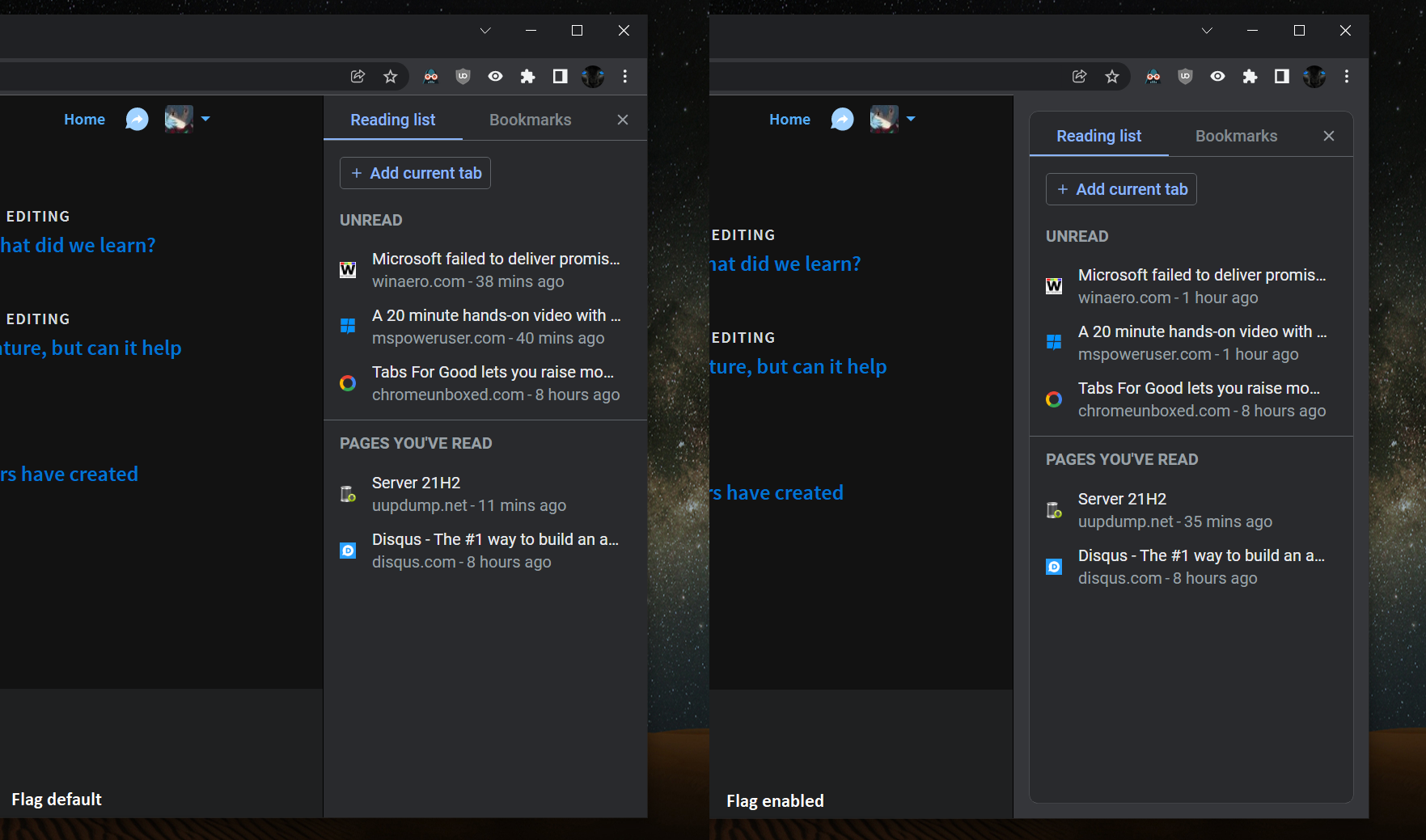
One thing I’ve always felt though is that it’s all been implemented so plainly. Of course, it’s still in its early stages, but a new Chrome developer flag will give the side panel some style. The “Side panel border” will separate your contents out from the background and pad them a bit more, making them pop.

Xremove ads
Side Panel before and after for Lens, Reading list, and Bookmarks

Side panel border

Enables a border around the side panel. – Mac, Windows, Linux, Chrome OS

#side-panel-border

First discovered by our favorite Redditor Leopeva64-2, the new flag will only appear on Chrome Canary at this time, but will surely expand outward and toward Stable before long. The developers have also done some work around connecting the Side Panel to the bookmarks bar above it so that it looks more natural. The color and divider separation between the panel and the rest of the browser wrapper has been dissolved to provide a more consistent experience.

Whether or not you use the Side Panel, you have to admit that this simple border makes everything more legible and easier to visually scan. My biggest gripe now is that you can’t resize the sidebar, and hovering over a saved Reading list item doesn’t provide a tooltip to show the rest of the title for an item. The problem with this is that as it stands, the contents in the panel are not always easy to read or gain context around.

Featured Videos

Xremove ads

SUBSCRIBE TO UPSTREAM

Get Chrome Unboxed delivered straight to your inbox

Upstream is our flagship, curated newsletter with the top stories, most click-worthy deals, giveaways, and trending articles from Chrome Unboxed sent directly to your inbox a few times a week. Join 31,000+ subscribers.

SUBSCRIBE HERE!

Filed Under: Chrome, New & Upcoming Features, News, Updates

About Michael Perrigo

Known as "Google Mike" to his customers, Michael worked at Best Buy as a Chromebook Expert who dedicated his time to understanding the user experience from a regular Chromebook owner's perspective. Having spent nearly 20 years meeting you face-to-face, he strives to help you understand your technology through carefully crafted guides and coverage, relentlessly seeking out the spark in what's new and exciting about ChromeOS.

Primary Sidebar

Googlebook

If your Googlebook ‘Better Together’ features stopped working, you need to check this

By Robby Payne
October 16, 2026

One of the best Pixel-exclusive apps is quietly available on your new Googlebook

By Robby Payne
October 16, 2026

One of the biggest missing features in Googlebook’s Chrome browser is getting fixed

By Robby Payne
October 15, 2026

A new affordable wave of Snapdragon-powered Googlebooks is in the works

By Robby Payne
October 15, 2026

Googlebooks just solved one of the most annoying parts of using a laptop for work

By Robby Payne
October 14, 2026

More Googlebook

Xremove ads

Deals

My favorite convertible Chromebook is $150 off right now and primed for Googlebook OS

By Robby Payne
September 29, 2026

Google Pixel Buds 2a in Hazel bundled with a new Googlebook laptop at Best Buy

Score a free $129 pair of Pixel Buds 2a with any Googlebook pre-order at Best Buy

By Robby Payne
September 28, 2026

The best Chromebook deals today

By Robby Payne
September 2, 2026

The best Chromebook ever made is $350 off at Best Buy right now

By Robby Payne
August 21, 2026

The excellent, powerful Acer Chromebook Plus Spin 514 is $150 off right now

By Robby Payne
August 12, 2026

More Deals

Xremove ads

Reviews

Acer Chromebook Plus Spin 514 Review: the best convertible you can buy [VIDEO]

By Robby Payne
July 1, 2026

Lenovo Chromebook Plus 2-in-1 Review: pretty great in a vacuum

By Robby Payne
April 23, 2026

My review after 6 weeks with the Lenovo Chromebook Plus 14 [VIDEO]

By Robby Payne
August 11, 2025

One week with the best small Android tablet you can buy, and I’m sold

By Robby Payne
May 9, 2025

Best Chromebooks of 2024 [VIDEO]

By Robby Payne
November 28, 2024

More Reviews

Xremove ads

TWITTER · FACEBOOK · INSTAGRAM · YOUTUBE · EMAIL · ABOUT

Copyright © 2026 · Chrome Unboxed · Chrome is a registered trademark of Google Inc.
We are participants in various affiliate advertising programs designed to provide a means for us to earn fees by linking to affiliated sites.

PRIVACY POLICY