


Support our independent tech coverage. Chrome Unboxed is written by real people, for real people—not search algorithms. Join Chrome Unboxed Plus for just $2 a month to get an ad-free experience, access to our private Discord, and more. Learn more about membership here.
START FREE TRIAL (MONTHLY)START FREE TRIAL (ANNUAL)
It’s a brand new month, and a new ChromeOS release awaits. Yesterday, Google officially announced the release of ChromeOS version 104, which should be generally available to eligible devices by now. The changes available with this release were mostly covered last week in a post based on an announcement Google made on The Keyword — and we even included them in a video! However, now that the update is here, we wanted to go back and review the features that did make it.
Light and Dark Mode (FINALLY!)
We have extensively covered the “Personalization Hub” on this site since it first popped up in Canary. We have also covered dark mode on Chromebooks and the fact that it’s been hidden behind a flag for what feels like an eternity. ChromeOS 104 changes that with Light and Dark mode finally making their debut in the Stable channel with no flag necessary.


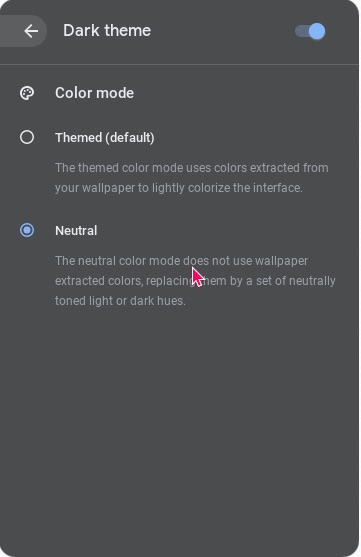
Light/Dark mode is now part of “Personalization” and can be manually set to either one or “auto,” so it changes at sunset and sunrise. One difference I noticed between this implementation of the dark mode is that there is no longer an option for neutral color mode. Instead, by default, it will use the themed color mode, which uses colors extracted from your wallpaper. However, the option to choose a color mode was available when “dark mode” was only a flag, as seen in the screenshot below.
Google Photos and Themed Wallpapers
The Personalization section also includes a wallpaper picker with brand-new wallpaper options. One of which is the option to choose from your Google Photos gallery, so you can now use your favorite family photo as your wallpaper without having to download it first.


In addition, some of the other wallpaper galleries, such as Radiance and Element, include wallpapers that will take on a light or dark theme to match what you have chosen on your device. My favorite so far is the Radiance collection, as seen below.


Screensaver
Wrapping up the personalization features is the ability to set a screensaver as a slide show from any of your Google Photos albums, similar to how it currently works on the Nest Hub. Additionally, you can choose that same album in one of the new “Feel the breeze” or “Float on by” photo frames, which will display your family photos in a fun animation.

Other notable additions
Google is also cleaning up the Calendar integration by showing a pop-up calendar whenever you tap on the date on the Chromebook shelf. This pop-up calendar is a live calendar. The dots on the dates where you’ve added events show you more information about that event when you tap on them.

Last but not least, the Gallery app, now ChromeOS’s default media app, can now open PDFs. Also, when you open a PDF, you can switch to annotation mode, fill out forms, highlight text, and even sign documents.

I am very excited about these new ChromeOS 104 features, especially since everyone can now use dark mode. I am also a fan of the new wallpapers and the Google Photos integration sprinkled throughout the Personalization Hub. I am also excited for the next release, which will bring improvements to Virtual Desks.
