
• Skip to main content
  • Skip to primary sidebar
  • Deals
  • Features
  • Guides
  • Chromebooks
  • Videos
  • Podcast
  • More +
    • Reviews
    • Unboxing
    • Upcoming Devices
    • Chromebook Plus
    • Chrome
    • ChromeOS
    • Chrome OS Flex
  • Search
  • Sign Up
  • Log In
Chrome Unboxed – The Latest Chrome OS News

Chrome Unboxed - The Latest Chrome OS News

A Space for All Things Chrome, Google, and More!

  • Deals
  • Features
  • Guides
  • Chromebooks
  • Videos
  • Podcast
  • More +
    • Reviews
    • Unboxing
    • Upcoming Devices
    • Chromebook Plus
    • Chrome
    • ChromeOS
    • Chrome OS Flex
  • Search
  • Sign Up
  • Log In

Chrome OS receiving gorgeous auto light and dark switching “Radiance” wallpaper collection

March 15, 2022 By Michael Perrigo View Comments

Support our independent tech coverage. Chrome Unboxed is written by real people, for real people—not search algorithms. Join Chrome Unboxed Plus for just $2 a month to get an ad-free experience, access to our private Discord, and more. Learn more about membership here.
START FREE TRIAL (MONTHLY)START FREE TRIAL (ANNUAL)

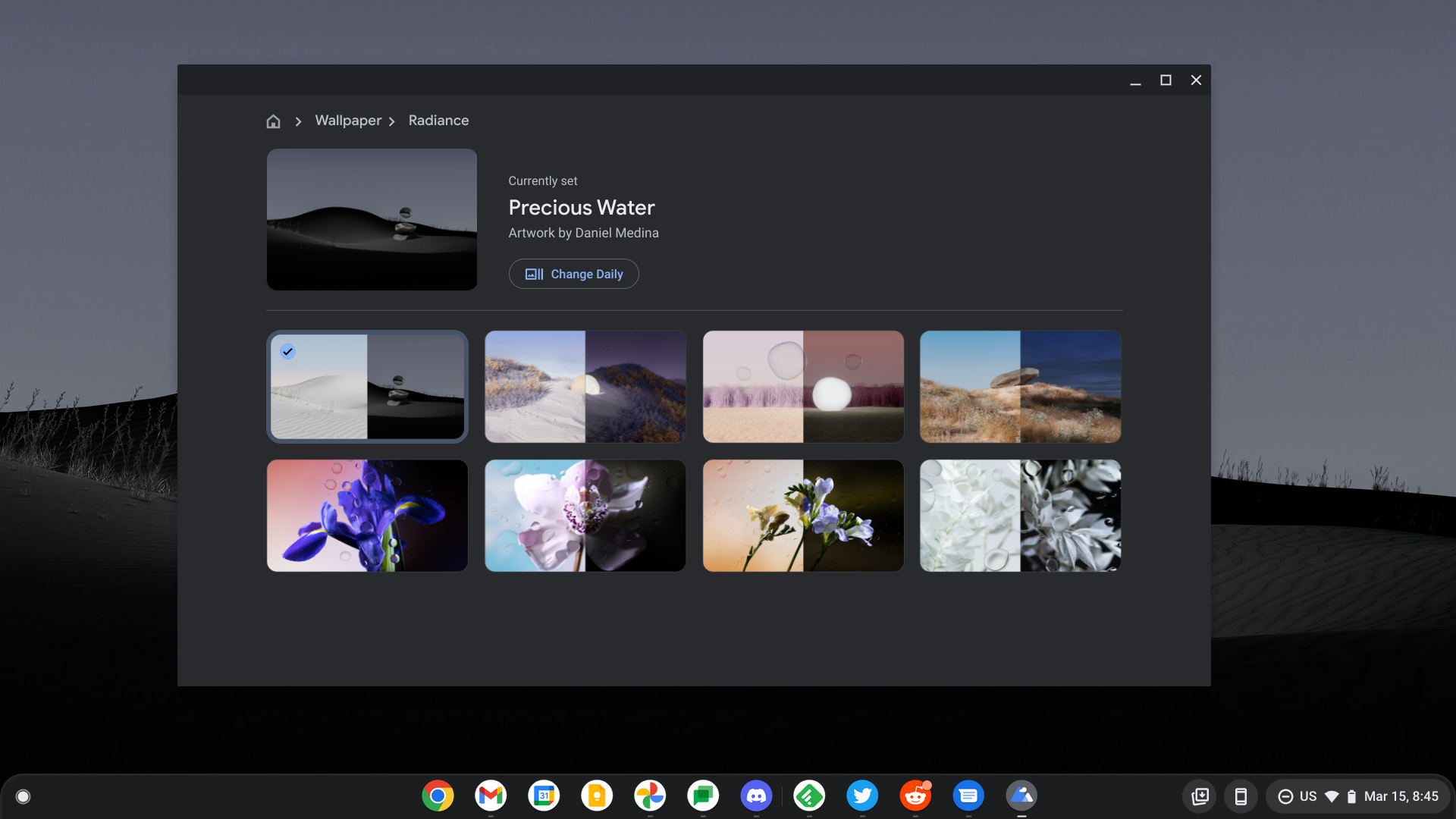
Google recently surprised me by adding a really neat feature to Chrome OS Canary – wallpapers that automagically swap between a light and dark mode version of themselves depending on the user’s system theme. While this still isn’t available in Stable, it has appeared on the developer channel for some, and today, it’s adding a whole new wallpaper collection that takes advantage of this neat trick.

Coming to us from C2 Productions on Twitter, the wallpaper picker is beginning to show a gorgeous Radiance Collection of wallpapers that show off stunning artistic expressions that are literally day and night when you compare them to one another – no really.

Xremove ads

Check it out below – eight new nature-centric images shot at high resolution in both day and night settings take Chrome OS to new heights with professional photography for its maturing operating system. These remind me of the amazingly Mac-esque wallpapers we used to get during the first generation of Chrome OS before all of these odd collections Google began adding to serve different purposes.
You can grab the new wallpapers on our Google Photos album where we house all of the latest images Google releases, but I want to take a moment below to let you compare and contrast this incredible “moon shot”. While we still don’t know the artist names or who to credit, Google has hired one or several talented artists to bring you these wild expressions.

Featured Videos

Xremove ads

Here, we have an unlit moon nestled in the sand, and when the sun goes down, the eerie glow of the moon lights up the beach. Yes, the moon is much larger than this and would canvas an entire portion of the planet if it truly came down and sat on the ground, but keeping it the size it is gives the impression that it’s simultaneously near and far – insanely clever.

Other scenes in the Radiance Collection include stacked rocks in a desert with a haunting orb of water floating above them, strange, bubbles floating around a smooth rock near some tall, purple grass, a rock in a tundra that has incredible lighting coming from the right side of it at night, and four intensely gorgeous flowers with water drops flying around them. Seriously, these wallpapers are my new favorites on Chrome OS!

Again, this is new, so we don’t know when you can expect it on Chrome OS Stable, but be sure to grab them for yourself in our album. The only downside to grabbing them early is that they won’t automatically swap between the day and night scene wallpapers when you toggle light and dark mode on your Chromebook.

Xremove ads

SUBSCRIBE TO UPSTREAM

Get Chrome Unboxed delivered straight to your inbox

Upstream is our flagship, curated newsletter with the top stories, most click-worthy deals, giveaways, and trending articles from Chrome Unboxed sent directly to your inbox a few times a week. Join 31,000+ subscribers.

SUBSCRIBE HERE!

Filed Under: ChromeOS, New & Upcoming Features, News, Updates

About Michael Perrigo

Known as "Google Mike" to his customers, Michael worked at Best Buy as a Chromebook Expert who dedicated his time to understanding the user experience from a regular Chromebook owner's perspective. Having spent nearly 20 years meeting you face-to-face, he strives to help you understand your technology through carefully crafted guides and coverage, relentlessly seeking out the spark in what's new and exciting about ChromeOS.

Primary Sidebar

Xremove ads

Deals

The best Chromebook deals today

By Robby Payne
March 30, 2026

The Acer Chromebook Plus Spin 714 hits a new all-time low at $270 off

By Robby Payne
March 25, 2026

You can score $40 off Google’s battery-powered Nest Doorbell right now

By Joseph Humphrey
March 20, 2026

The touchscreen Lenovo Chromebook Slim 3 is a steal at under $200

By Robby Payne
March 16, 2026

Google TV Streamer and Remote held in front of a wall-mounted TV

The premium Google TV Streamer 4K is back down to $80

By Joseph Humphrey
March 16, 2026

More Deals

Xremove ads

Reviews

Acer Chromebook Plus Spin 514 Review: Kompanio Ultra power in a convertible

By Robby Payne
December 24, 2025

My review after 6 weeks with the Lenovo Chromebook Plus 14 [VIDEO]

By Robby Payne
August 11, 2025

One week with the best small Android tablet you can buy, and I’m sold

By Robby Payne
May 9, 2025

Best Chromebooks of 2024 [VIDEO]

By Robby Payne
November 28, 2024

Samsung Galaxy Chromebook Plus Review: Samsung is back! [VIDEO]

By Robby Payne
October 28, 2024

More Reviews

Xremove ads

Guides

This Chromebook trackpad shortcut is definitely not new, but is blowing my mind

By Robby Payne
March 11, 2024

How to reduce broadcast delay on YouTube TV to stop live spoilers

By Robby Payne
December 8, 2023

Windows PC keyboard and Chromebook

How to use a Windows keyboard with a Chromebook

By Joseph Humphrey
December 8, 2023

How reset and revert your Chromebook to the previous version of Chrome OS

By Robby Payne
November 29, 2023

My Chromebook Plus features disappeared: here’s how I fixed it

By Robby Payne
November 24, 2023

More Guides

TWITTER · FACEBOOK · INSTAGRAM · YOUTUBE · EMAIL · ABOUT

Copyright © 2026 · Chrome Unboxed · Chrome is a registered trademark of Google Inc.
We are participants in various affiliate advertising programs designed to provide a means for us to earn fees by linking to affiliated sites.

PRIVACY POLICY