


Support our independent tech coverage. Chrome Unboxed is written by real people, for real people—not search algorithms. Join Chrome Unboxed Plus for just $2 a month to get an ad-free experience, access to our private Discord, and more. Learn more about membership here.
START FREE TRIAL (MONTHLY)START FREE TRIAL (ANNUAL)
It’s been four months since the Chromium Repositories displayed a new commit for adding a developer flag that would “refresh” notifications on Chromebooks. The description was “Enables new notifications UI and grouped notifications.” Since then, I’ve attempted to activate this flag, only to have it either do nothing or crash my device.
Notifications Revamp
Enable notification UI revamp and grouped web notifications. – Chrome OS
#enable-notifications-revamp
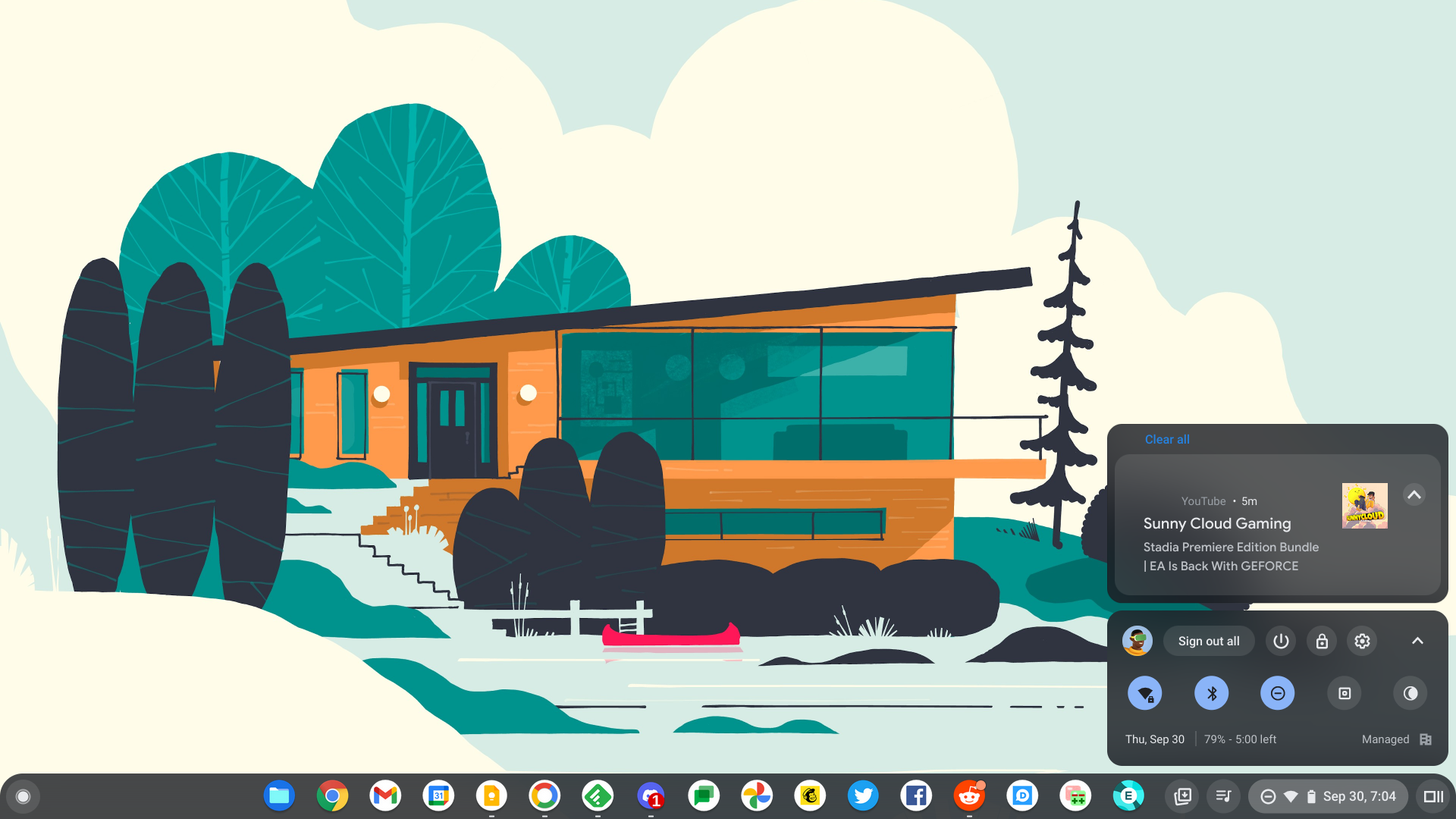
Today, however, I got a different result. As you can see in the image below, a new interface has overtaken the notifications section of the shelf, and it’s quite honestly beautiful. It features a semi-transparent, frosted glass card design with a new and previously absent darker backdrop. The ‘Clear all’ button appears on the top-left instead of the top-right, and any notifications that can’t fit in the given area collapse into the space to the left of it – the same way that Android handles things.
Additionally, the notification source appears as an icon on the right of the cards, and a big drop-down arrow lets you expand or collapse it. The reason for the arrow is for the notification grouping that occurs when you have multiple pings from the same app or web app. Currently, Chrome OS does not group notifications, and this revamp implements it nicely.
There are still some issues with this, though. The notification app source – Youtube in this case – is busted and invisible, hovering over a card and clicking the gear icon to bring up the notification settings for that specific app reveals a half-baked design, and the entire system crashes and burns at this stage with the flag enabled. While this is the worst part, it’s important to keep in mind that this entire thing is in the earliest stages of development.
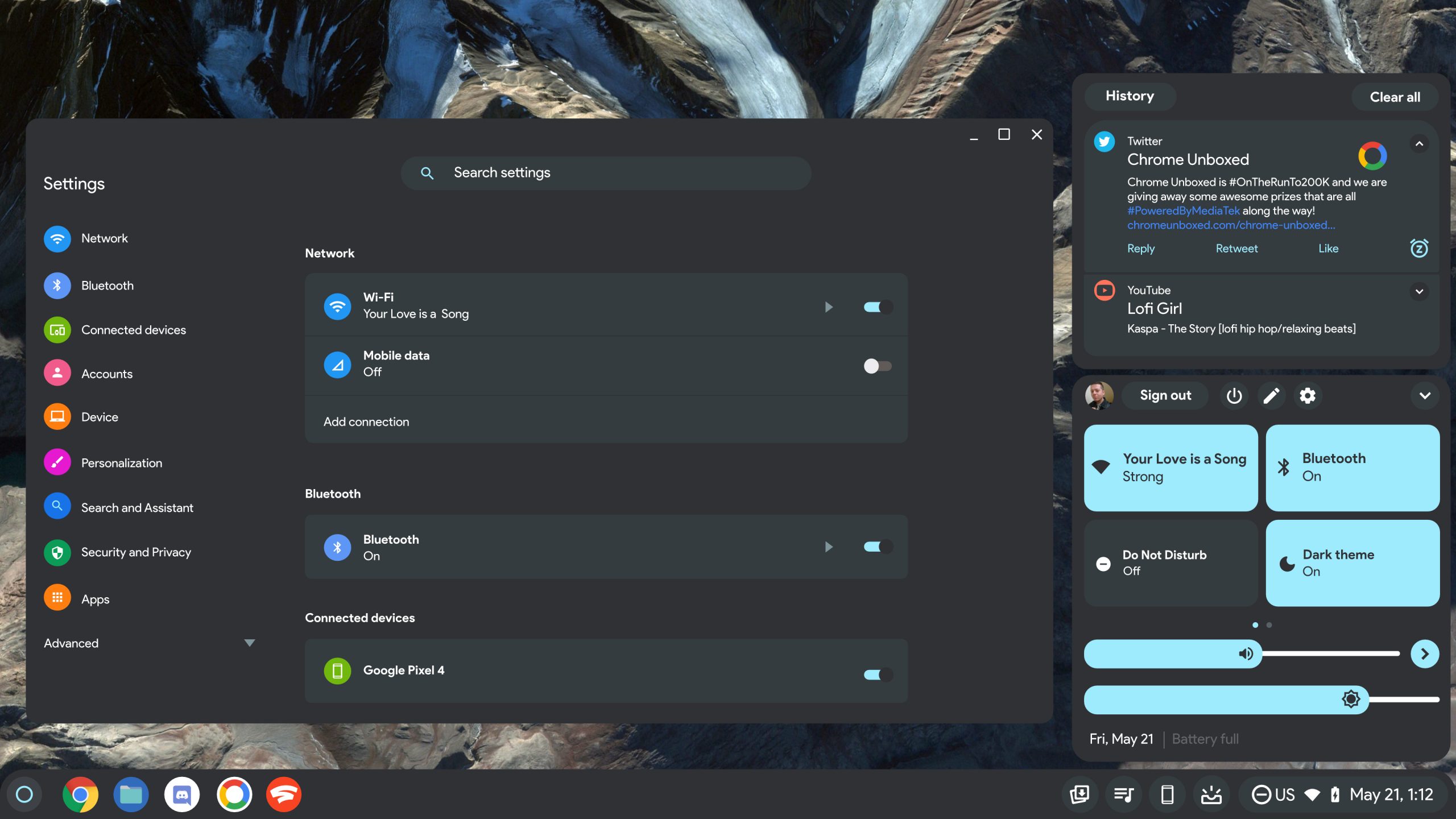
It’s exciting, nonetheless, to see that the development team has gone for this card on backdrop design with all of the exact elements they’ve chosen. For those of you who recall, I designed a Material You mock-up for Chrome OS a while back, and while it doesn’t look exactly what I designed yet, the similarities are incredibly spot on.
I can’t help but think that I inspired the devs with my creation, but the simple truth is the opposite. My design was originally inspired by Android 12, and I knew from my time in the industry that Google’s plans were to move in this exact direction, merging the visual and functional design of both its laptop and phone operating systems to form a unified experience.
If you recall, Google’s Project Andromeda and Fuchsia efforts in the past have been rumored to merge the two systems, but ultimately, nothing really came of it from a code perspective. Andromeda is dead in the water (supposedly), and Fuchsia is maintained as a separate code base with a different focus.
However, if you take a close look at the unity we’re seeing across the style and implementation of many elements Android and Chrome OS have synched up on over the past few years, it’s not hard to believe that while slowed and secret, Google’s plans remain intact. After creating one universal visual style across the board, what’s to say that Chrome OS and Android couldn’t just be swapped out for Fuchsia in a few years? I know, I know, wishful thinking, right? We’ll see.
Chromebooks already have the option to theme their shelf and UI based on the color of the wallpaper, and we’re increasingly seeing more system apps gain rounded corners. From where the OS was a few months ago when I created the mock-ups to now, it sure looks like we’re a few changes away from it taking on the life I predicted it would. I’m still hoping we get the quick settings redesigned as tiles as seen above, and colorful Settings icons, but only time will tell. Let me know in the comments if you like the new notifications revamp. I’ll let you know when I have more luck with it and it stops crashing my device. Until then, this is all very exciting stuff, don’t you think?
SUBSCRIBE TO UPSTREAM
Get Chrome Unboxed delivered straight to your inbox
Upstream is our flagship, curated newsletter with the top stories, most click-worthy deals, giveaways, and trending articles from Chrome Unboxed sent directly to your inbox a few times a week. Join 31,000+ subscribers.


