
• Skip to main content
  • Skip to primary sidebar
  • Deals
  • Features
  • Guides
  • Chromebooks
  • Videos
  • Podcast
  • More +
    • Reviews
    • Unboxing
    • Upcoming Devices
    • Chromebook Plus
    • Chrome
    • ChromeOS
    • Chrome OS Flex
  • Search
  • Sign Up
  • Log In
Chrome Unboxed – The Latest Chrome OS News

Chrome Unboxed - The Latest Chrome OS News

A Space for All Things Chrome, Google, and More!

  • Deals
  • Features
  • Guides
  • Chromebooks
  • Videos
  • Podcast
  • More +
    • Reviews
    • Unboxing
    • Upcoming Devices
    • Chromebook Plus
    • Chrome
    • ChromeOS
    • Chrome OS Flex
  • Search
  • Sign Up
  • Log In

Chromebook launcher app sorting may actually be on its way, and it’s about time

July 9, 2021 By Michael Perrigo View Comments

Support our independent tech coverage. Chrome Unboxed is written by real people, for real people—not search algorithms. Join Chrome Unboxed Plus for just $2 a month to get an ad-free experience, access to our private Discord, and more. Learn more about membership here.
START FREE TRIAL (MONTHLY)START FREE TRIAL (ANNUAL)

We’ve written several articles about the need for Google’s Chromebook launcher to evolve with the times. With the introduction of the Google Play Store to devices years ago and the new hotness of Progressive Web Apps (PWA), the ‘app drawer’ on our laptops has become a cluttered mess. Yes, you can place apps and web apps into folders, and you can even move folders around. Yes, searching is also the most efficient way to locate something and open it with ease. However, the ability to alphabetize or sort apps in the launcher to make better sense of what one has collected is a long-overdue feature that the company seems to have decided to ignore, despite our cries.

Interestingly, 9to5Google has discovered a new Chromium Repository commit that seeks to introduce a developer flag for the long-sought-after launcher sorting. There’s currently little information on exactly what sorting methods the new feature will bring about with it, but the fact that it will finally officially exist is a Godsend. I recently took time to mock up what app sorting would look like using my Material You designs for Chrome OS, and before that, I mocked it up once again using the current launcher design. It’s rudimentary but makes the most sense.

Xremove ads

Enable sorting apps on the launcher

Enable sorting the app icons shown on the launcher.

#launcher-apps-sort
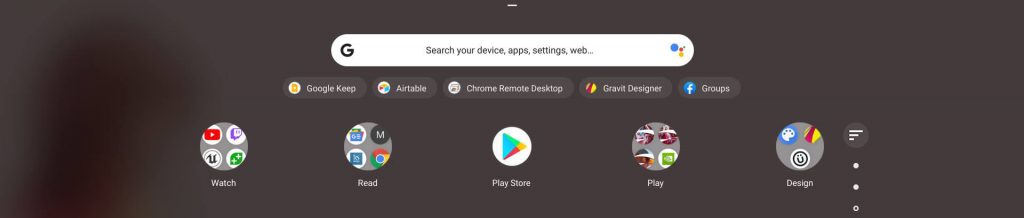
My initial app launcher sorting mockup

The company also recently introduced launcher categories to help clear the clutter, but while we’re incredibly excited to be receiving app sorting as an additional improvement, we aren’t expecting it any time soon, though we hope to be surprised. While digging into the commit, we discovered that the expiry milestone for this feature flag is Chrome OS 105, which is obviously quite a ways off as we’re only on Chrome OS 91 right now (well, most of us, anyway). This means that the dev team will have to either implement it before then or nix it entirely if it doesn’t work out the way they hope.

{
“name”:”launcher-apps-sort”,
“owners”:[“andrewxu”, “cros-system-ui-eng@google.com” ],
“expiry_milestone”: 105
}

Despite this, this will be one major item that we can check off of our wishlist for launcher updates. Next, if Google can fix the server-side pacing, we’d be in a good spot. Currently, moving around apps and deleting them doesn’t stick – a simple reboot will revert any progress you made to clean things up or manually organize them, and it’s extremely frustrating! Are you interested in simply having alphabetical sorting for your launcher, or would you want to have more options available? If so, what options would those be? Let me know in the comments!

Featured Videos

Xremove ads

SUBSCRIBE TO UPSTREAM

Get Chrome Unboxed delivered straight to your inbox

Upstream is our flagship, curated newsletter with the top stories, most click-worthy deals, giveaways, and trending articles from Chrome Unboxed sent directly to your inbox a few times a week. Join 31,000+ subscribers.

SUBSCRIBE HERE!

Filed Under: ChromeOS, New & Upcoming Features, News

About Michael Perrigo

Known as "Google Mike" to his customers, Michael worked at Best Buy as a Chromebook Expert who dedicated his time to understanding the user experience from a regular Chromebook owner's perspective. Having spent nearly 20 years meeting you face-to-face, he strives to help you understand your technology through carefully crafted guides and coverage, relentlessly seeking out the spark in what's new and exciting about ChromeOS.

Primary Sidebar

Xremove ads

Deals

The Lenovo Chromebook Slim 3 is the one to get, starting at just $139 right now

By Robby Payne
March 6, 2026

The best Chromebook deals today

By Robby Payne
March 6, 2026

The fantastic $599 deal on the Samsung Galaxy Chromebook Plus has returned

By Robby Payne
February 25, 2026

There are some great Pixel 10a pre-order offers right now: Here are my 2 favorite deals

By Joseph Humphrey
February 25, 2026

Save up to 25% off the Gemini-powered Nest Cam Indoor

By Joseph Humphrey
February 19, 2026

More Deals

Xremove ads

Reviews

Acer Chromebook Plus Spin 514 Review: Kompanio Ultra power in a convertible

By Robby Payne
December 24, 2025

My review after 6 weeks with the Lenovo Chromebook Plus 14 [VIDEO]

By Robby Payne
August 11, 2025

One week with the best small Android tablet you can buy, and I’m sold

By Robby Payne
May 9, 2025

Best Chromebooks of 2024 [VIDEO]

By Robby Payne
November 28, 2024

Samsung Galaxy Chromebook Plus Review: Samsung is back! [VIDEO]

By Robby Payne
October 28, 2024

More Reviews

Xremove ads

Guides

This Chromebook trackpad shortcut is definitely not new, but is blowing my mind

By Robby Payne
March 11, 2024

How to reduce broadcast delay on YouTube TV to stop live spoilers

By Robby Payne
December 8, 2023

Windows PC keyboard and Chromebook

How to use a Windows keyboard with a Chromebook

By Joseph Humphrey
December 8, 2023

How reset and revert your Chromebook to the previous version of Chrome OS

By Robby Payne
November 29, 2023

My Chromebook Plus features disappeared: here’s how I fixed it

By Robby Payne
November 24, 2023

More Guides

TWITTER · FACEBOOK · INSTAGRAM · YOUTUBE · EMAIL · ABOUT

Copyright © 2026 · Chrome Unboxed · Chrome is a registered trademark of Google Inc.
We are participants in various affiliate advertising programs designed to provide a means for us to earn fees by linking to affiliated sites.

PRIVACY POLICY