


Support our independent tech coverage. Chrome Unboxed is written by real people, for real people—not search algorithms. Join Chrome Unboxed Plus for just $2 a month to get an ad-free experience, access to our private Discord, and more. Learn more about membership here.
START FREE TRIAL (MONTHLY)START FREE TRIAL (ANNUAL)
It’s that time of the week again – I’m going to pick a feature in Chrome OS and complain about how I wish it were slightly different. No, in all honesty though, I’m constantly thinking about the user experience on my Chromebook and how it can be improved. I truly want Google’s operating system to reach new levels and attract new users, and cranking out my thoughts on these sorts of things is done in hopes that it both draws the attention of Chromium developers, and gets your gears turning on the future possibilities of this exciting platform we all discuss daily.
Today, I wanted to discuss something that’s been quite frustrating to me over the past year – the placement and functionality of the sign-out button. It’s placed too close to the user profile image in the quick settings area of the shelf, and it works with just one click. This may immediately cause you to think about how anyone who clicks ‘sign out’ is doing so intentionally, and how this is doing its job just fine, right? Not always. The problem comes in when users like myself are utilizing the baked-in feature which allows you to sign into multiple user accounts simultaneously and quickly swap between them.
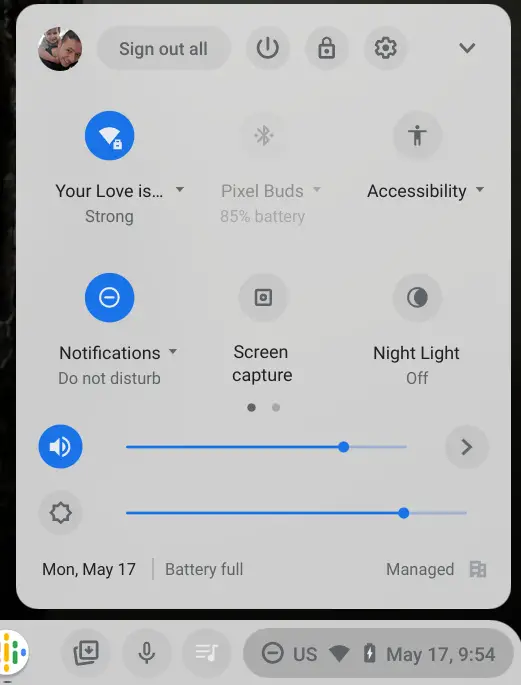
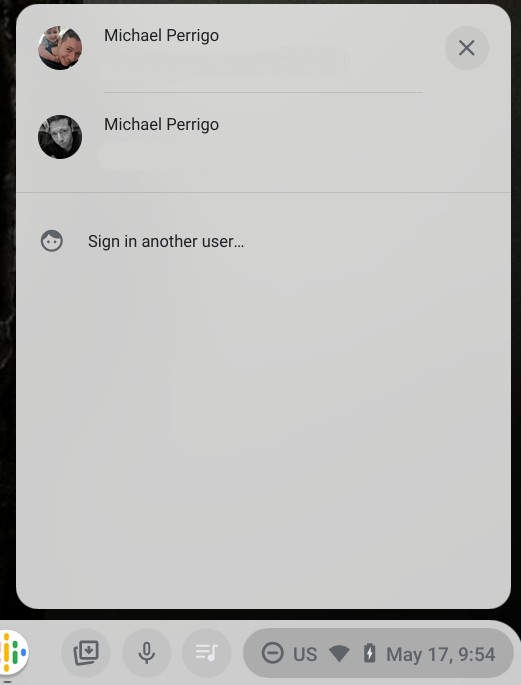
While I normally swap between accounts using the keyboard shortcut Ctrl + Alt + < or >, there’s something to be said about jumping back and forth via the user interface elements, especially if I’m not doing so often. Juggling too many shortcuts at any given time can be detrimental to the experience, and once you have 3-4 accounts signed in, it’s simply quicker to get to the one you want by using the on-screen elements rather than cycling through them using the keyboard.
The issue I’ve had as of late is that many times after I’ve signed in all of my accounts and have many web apps opened and a strong workflow going for each, I’ll open the quick settings menu and attempt to jump to the user switching section above, only to accidentally click ‘Sign out all’ instead! While you’re moving at a standard speed during your usage of the Chromebook, it’s easier than you may realize to click this instead of your profile image.
As a result, all of my progress thus far is logged out for every Google account and the processes I was running are terminated. Yes, they are cloud synchronized and resume after I sign back in again, thanks to Google’s new restore feature, but it’s extremely annoying and inconvenient. I could simply be more careful, and I won’t argue that, but if it continues to happen, then the fault isn’t simply with my usage of the device.
Perhaps, it would be more beneficial for Google to add a confirm logout button to the process of signing out. Windows has had this forever, and until now, I’ve loved that Chrome OS has excluded it as it makes the OS seem more streamlined and less antiquated. However, if I could toggle this on in the settings, or if it would only double-check with me prior to logging out of everything that I did mean to do so while multiple accounts are signed in, then this would be much appreciated. A simple dialog box asking “Are you sure?” would be wonderful! Alternatively, the developers could move the placement of the button to somewhere further to the right, but my former suggestion seems more viable.
While this entire thing will seem small and insignificant to most, this one feature acting as it does has caused me more headaches than I care to admit, and I’m willing to bet I’m not alone. It could be that I’m simply too haphazardous with the way I use my mouse and touchpad, but taking such an issue into consideration would be worthwhile for the Chromium team, I think. Have you ever signed out accidentally and wished that you were asked if you were sure? Let me know in the comments, and be sure to tell me if there is anything about your Chromebook user experience that frustrates you or could use improvement!
SUBSCRIBE TO UPSTREAM
Get Chrome Unboxed delivered straight to your inbox
Upstream is our flagship, curated newsletter with the top stories, most click-worthy deals, giveaways, and trending articles from Chrome Unboxed sent directly to your inbox a few times a week. Join 31,000+ subscribers.


