


Support our independent tech coverage. Chrome Unboxed is written by real people, for real people—not search algorithms. Join Chrome Unboxed Plus for just $2 a month to get an ad-free experience, access to our private Discord, and more. Learn more about membership here.
START FREE TRIAL (MONTHLY)START FREE TRIAL (ANNUAL)
I said it and I meant it – Virtual Desks on a Chromebook have felt incomplete without this one important feature. The one vital feature for accessibility that existed way back in 2013 but was needlessly ripped from the operating system to make room for others – the ‘Overview’ button! After making my case for the return of the quick access shelf icon for seeing what windows are open without needing to reach up to the top of my keyboard, it seems that the Chrome OS development team has found my argument sound.
Discovered by Chrome Story, a new Chromium Repository commit shows that a feature flag will soon be introduced which will enable the long-lost ‘Overview’ button and place on your Chromebook’s shelf near the status area. Many may not realize this, but it used to sit to the right of the clock back before the Peeking launcher was introduced to Chrome OS before Google decided it would only appear in tablet mode. Not long afterward, they got rid of it entirely.
overview_button: Adding the chrome flag
Adding the flag for experiment of the overview button.
Bug: 1142045
“…I think that the company needs to bring back the long-forgotten overview button that used to sit on the Chromebook shelf! Check out the image below of the Pixel Slate – you’ll see that prior to its gesture-based navigation update, a rectangle with two vertical lines to the right of it appeared at the bottom-right side of the shelf. This would pull up overview mode and show your open windows. Now, you’re forced to swipe up from the shelf and hold in order to pull these up in tablet mode.
Though this button no longer makes much sense to have for tablet mode Chrome OS, I believe that it should make a comeback for laptops and desktops running Google’s operating system. Being able to navigate my mouse down to the shelf and click in order to pull up my desks would be great, and it would mean that I wouldn’t need to reach up to the top row of the keyboard or use my right hand to activate them with a gesture on the touchpad before moving my hand back to the mouse all of the time.
– Me peering into the future, apparently
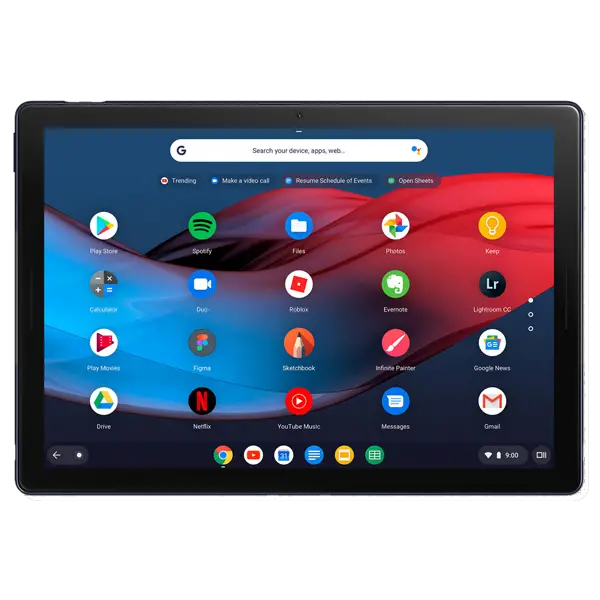
Now obviously, the shelf is getting pretty crowded with all of the icons that Google is adding down there, but I have a few solutions. There’s no reason why the ‘Overview’ button couldn’t be introduced as a part of the accessibility settings so that users who desire it could toggle it on and those who don’t could simply turn it off! Additionally, with the introduction of the new and exciting (depending on who you ask) Productivity launcher, the dev team could simply add a way for users to choose between left-aligned or center-aligned shelf icons to clear the congestion. It’s not for everyone, but I demonstrated how this would look in my mock-ups of what Material You would look like on a Chromebook.
Either way, there are options, and I hope that Google explores them all. The reintroduction of a vital shelf shortcut for open windows is proof that they are, and I’m grateful. There’s currently no indication on when this flag will appear in the Canary channel, so it’s a ways off for the average user on Chrome OS Stable, but we’ll keep you up to date as development on this feature progresses!
SUBSCRIBE TO UPSTREAM
Get Chrome Unboxed delivered straight to your inbox
Upstream is our flagship, curated newsletter with the top stories, most click-worthy deals, giveaways, and trending articles from Chrome Unboxed sent directly to your inbox a few times a week. Join 31,000+ subscribers.


