

• Skip to main content
  • Skip to primary sidebar
  • Deals
  • Features
  • Guides
  • Chromebooks
  • Videos
  • Podcast
  • More +
    • Reviews
    • Unboxing
    • Upcoming Devices
    • Chromebook Plus
    • Chrome
    • ChromeOS
    • Chrome OS Flex
  • Search
  • Sign Up
  • Log In
Chrome Unboxed – The Latest Chrome OS News

Chrome Unboxed - The Latest Chrome OS News

A Space for All Things Chrome, Google, and More!

  • Deals
  • Features
  • Guides
  • Chromebooks
  • Videos
  • Podcast
  • More +
    • Reviews
    • Unboxing
    • Upcoming Devices
    • Chromebook Plus
    • Chrome
    • ChromeOS
    • Chrome OS Flex
  • Search
  • Sign Up
  • Log In

Chrome extension buttons to gain hover cards detailing their permissions

September 12, 2022 By Johanna Romero View Comments

Support our independent tech coverage. Chrome Unboxed is written by real people, for real people—not search algorithms. Join Chrome Unboxed Plus for just $2 a month to get an ad-free experience, access to our private Discord, and more. Learn more about membership here.
START FREE TRIAL (MONTHLY)START FREE TRIAL (ANNUAL)

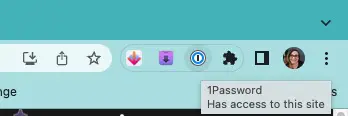
Chrome is preparing to add hover cards to extensions that are pinned to your browser tool bar. These hover cards will let you know what types of permissions this extension requests and which permissions it has been granted for the URL you are currently in. Additionally, there will be a hover button beside it asking whether to grant permissions to any other installed extensions.

For comparison, below we’re including a screenshot of how the browser tool bar looks now and the tooltip that appears when you hover on the icon of a pinned extension. Below that is an animated GIF of what is currently available in Chrome Canary. As you can see, the tooltip has been replaced with a hover card. This new feature was spotted and reported on by u/Leopeva64-2 on Reddit, who constantly tracks these changes and shares them with the community.
Xremove ads
GIF source: u/Leopeva64-2

However, the question that remains, at least for me, is what the usefulness of such a feature is. Sure, it will probably save you a click or two to investigate if a questionable browser extension has permissions over something it shouldn’t, but is that really worth sacrificing so much toolbar space? I am of the opinion that it’s getting pretty crowded up there.

As a feature that for now only appears in Canary, I’m hoping that if the plan is to bring this all the way to the Stable version, it gets significantly refined to the point where the hover card is not so large and prominent. Let us know in the comments if you think this is a necessary feature, or if you think that the Chrome toolbar is getting too busy.

Featured Videos

Xremove ads

SUBSCRIBE TO UPSTREAM

Get Chrome Unboxed delivered straight to your inbox

Upstream is our flagship, curated newsletter with the top stories, most click-worthy deals, giveaways, and trending articles from Chrome Unboxed sent directly to your inbox a few times a week. Join 31,000+ subscribers.

SUBSCRIBE HERE!

Filed Under: New & Upcoming Features Tagged With: chrome, extensions, hover cards

Primary Sidebar

Googlebook

Google confirms Googlebook pre-orders start on September 21

By Robby Payne
September 14, 2026

I completely overlooked a massive Googlebook feature from the latest Lenovo leak

By Robby Payne
September 14, 2026

What we know about Lenovo’s mysterious third Googlebook ahead of tomorrow’s NYC media event

By Robby Payne
September 14, 2026

Lenovo Googlebook leak reveals the name of Google’s new laptop operating system

By Robby Payne
September 11, 2026

Googlebook will automatically organize your files using on-device AI ‘Collections’

By Robby Payne
September 11, 2026

More Googlebook

Xremove ads

Deals

The best Chromebook deals today

By Robby Payne
September 2, 2026

The best Chromebook ever made is $350 off at Best Buy right now

By Robby Payne
August 21, 2026

The excellent, powerful Acer Chromebook Plus Spin 514 is $150 off right now

By Robby Payne
August 12, 2026

Acer’s new Chromebook 315 is wildly affordable and points to the real future of Chromebooks

By Robby Payne
August 11, 2026

You can score the massively upgraded ASUS CX54 Chromebook Plus for just $599 right now

By Joseph Humphrey
July 28, 2026

More Deals

Xremove ads

Reviews

Acer Chromebook Plus Spin 514 Review: the best convertible you can buy [VIDEO]

By Robby Payne
July 1, 2026

Lenovo Chromebook Plus 2-in-1 Review: pretty great in a vacuum

By Robby Payne
April 23, 2026

My review after 6 weeks with the Lenovo Chromebook Plus 14 [VIDEO]

By Robby Payne
August 11, 2025

One week with the best small Android tablet you can buy, and I’m sold

By Robby Payne
May 9, 2025

Best Chromebooks of 2024 [VIDEO]

By Robby Payne
November 28, 2024

More Reviews

Xremove ads

TWITTER · FACEBOOK · INSTAGRAM · YOUTUBE · EMAIL · ABOUT

Copyright © 2026 · Chrome Unboxed · Chrome is a registered trademark of Google Inc.
We are participants in various affiliate advertising programs designed to provide a means for us to earn fees by linking to affiliated sites.

PRIVACY POLICY