

Support our independent tech coverage. Chrome Unboxed is written by real people, for real people—not search algorithms. Join Chrome Unboxed Plus for just $2 a month to get an ad-free experience, access to our private Discord, and more. Learn more about membership here.
START FREE TRIAL (MONTHLY)START FREE TRIAL (ANNUAL)
Online scams move fast, and bad actors are continually looking for ways to bypass traditional browser filters. According to a new post from Google, Chrome’s Safe Browsing is getting a substantial suite of upgrades aimed squarely at modern social engineering tactics – from deceptive sites to deceptive clipboard commands.
Enhanced Protection has been around since 2020, and Google notes it now protects users at a rate roughly ten times more effective against phishing, notification abuse, and social engineering compared to Standard Protection. With today’s update, Google is rolling out smarter visual warnings, expanding server-side Gemini threat analysis, and introducing targeted defenses against the rising threat of “ClickFix” terminal exploits.
Tiered site warnings and server-side Gemini intelligence
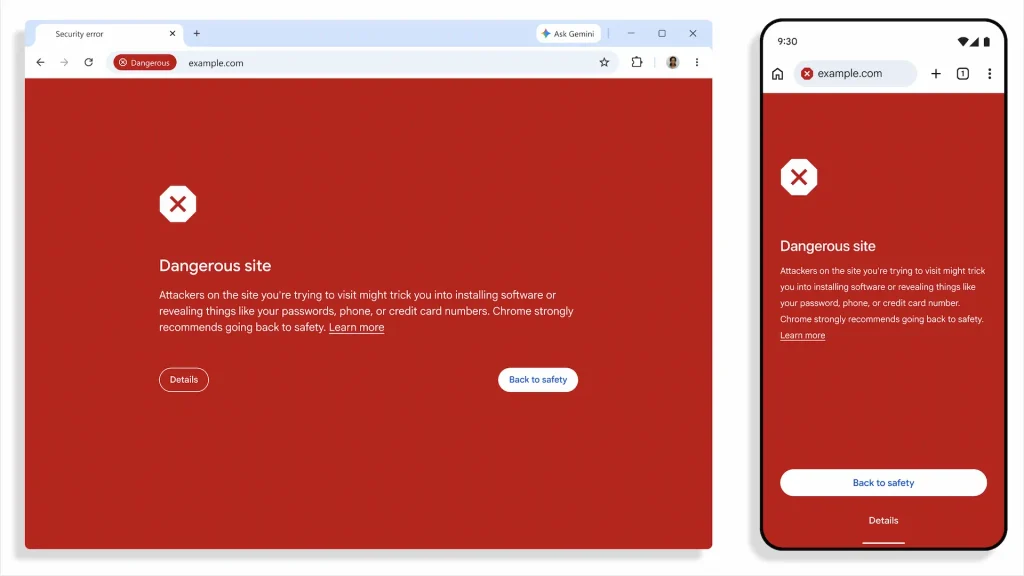
Borrowing from the two-tier classification system previously rolled out for Chrome downloads, Google is now separating web warnings into two distinct categories: Suspicious sites and Dangerous sites.
Dangerous sites will still trigger the familiar full-page red interstitial screen when a high-risk malicious threat is confirmed. Suspicious sites, however, represent a lower-confidence verdict where deceptive patterns are detected, but total harm isn’t definitively proven. Chrome will flag these pages with distinct iconography, colors, and contextual messaging, allowing the browser to issue protective alerts far more frequently without locking down the tab entirely.
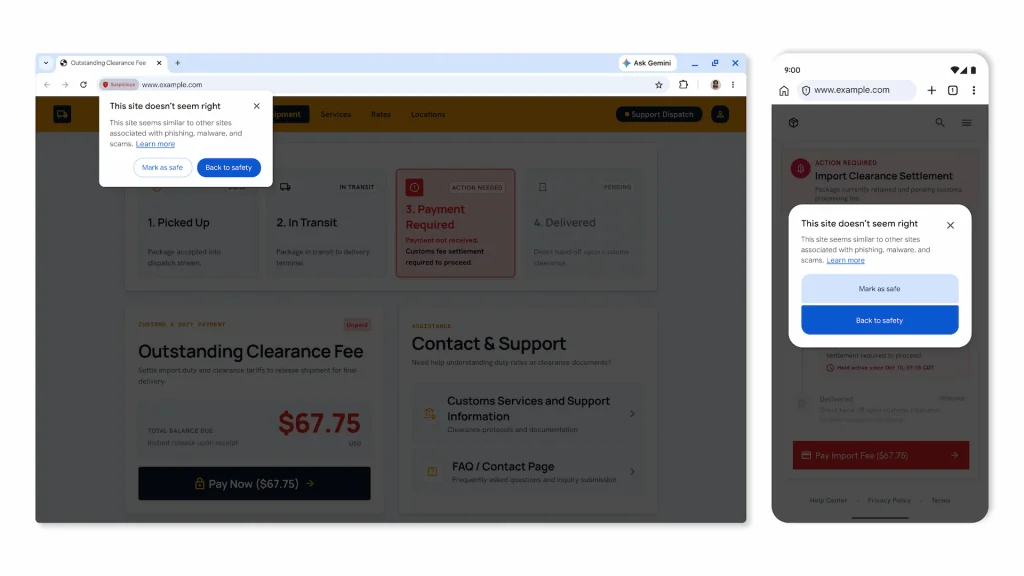
Powering a big chunk of this detection is an upgrade to Google’s AI backend. While Chrome initially tested on-device Gemini models to catch tech support scams on supported machines, the browser is now shifting to a more capable server-side Gemini model for all Enhanced Protection users.
This cloud model evaluates page intent, brand impersonation, and overall scam probability to catch fake antivirus portals and fake browser update prompts. To preserve privacy, Google states that page content is only sent when strong scam signals exist, and the data is never logged, retained, or used to train models.
Shutting down ClickFix and clipboard hijack attacks
The most intriguing technical addition here takes aim at “ClickFix” attacks. If you haven’t run across this social engineering tactic yet, it’s particularly nasty: a fake error prompt instructs the user to copy a code snippet and paste it directly into their terminal (like PowerShell or cmd.exe) to “resolve” an issue.
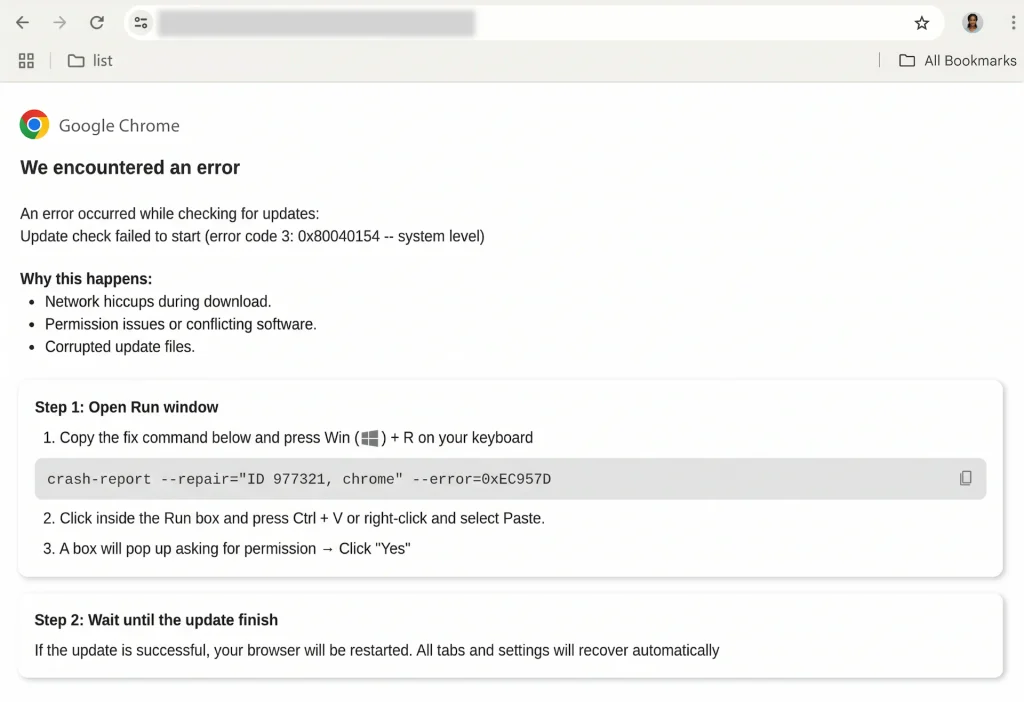
Because these commands leverage native operating system tools, they execute outside the browser environment and dodge standard download inspectors. To stop this vector, Chrome Enhanced Protection now inspects clipboard activity when a user is tricked into copying suspicious command strings. The copied script is scrubbed of any personal identifiable information (PII) and evaluated by Safe Browsing in real time, serving a direct warning before you paste malicious code into your terminal.
These updates illustrate how Chrome is leaning harder into real-time threat intelligence rather than static URL blocklists. If you haven’t flipped the toggle already, you can turn on Enhanced Protection directly inside Chrome’s Security settings to get these protections as they roll out.
SUBSCRIBE TO UPSTREAM
Get Chrome Unboxed delivered straight to your inbox
Upstream is our flagship, curated newsletter with the top stories, most click-worthy deals, giveaways, and trending articles from Chrome Unboxed sent directly to your inbox a few times a week. Join 31,000+ subscribers.

