• Skip to main content
  • Skip to primary sidebar
  • Deals
  • Features
  • Guides
  • Chromebooks
  • Videos
  • Podcast
  • More +
    • Reviews
    • Unboxing
    • Upcoming Devices
    • Chromebook Plus
    • Chrome
    • ChromeOS
    • Chrome OS Flex
  • Search
  • Sign Up
  • Log In
Chrome Unboxed – The Latest Chrome OS News

Chrome Unboxed - The Latest Chrome OS News

A Space for All Things Chrome, Google, and More!

  • Deals
  • Features
  • Guides
  • Chromebooks
  • Videos
  • Podcast
  • More +
    • Reviews
    • Unboxing
    • Upcoming Devices
    • Chromebook Plus
    • Chrome
    • ChromeOS
    • Chrome OS Flex
  • Search
  • Sign Up
  • Log In

How to quickly identify your Chrome browser windows by giving them unique names

April 20, 2021 By Michael Perrigo View Comments

Organizing your Chrome browser tabs into tab groups, collapsing and freezing them, and even searching or quickly jumping to them are all fantastic ways to identify and switch rapidly between them, but a new feature in Chrome is going to make this even easier. Rolling out now is a feature that allows you to name Chrome windows using your own unique string of text. This means that every window you have

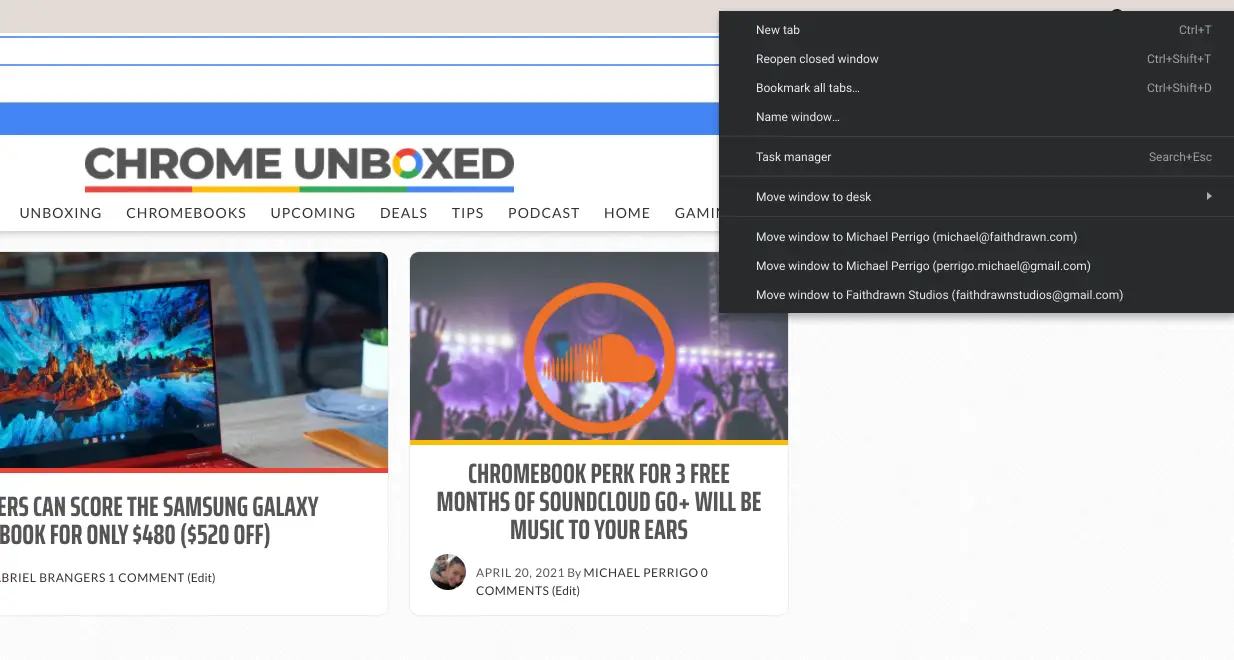
If you’d like to try out the new window naming feature, simply right-click an empty space of a tab strip and choose ‘Name window…’. It should be the fourth option down before the first divider in the context menu. Alternatively, you can click the three dots ‘more’ menu on the Chrome browser, go to ‘more tools’, and then click ‘Name window…’. It’s housed in the same location as the ‘Create a shortcut’ option.
Xremove ads

Once you have a few windows that have unique names, each one can contain its own set of tab groups that can be collapsed and frozen. Then, you can press alt+tab to switch between them or right-click on a tab and select ‘Move to another window’ in order to shift tabs around. With window naming, each item in the ‘move to’ list will be easy to identify. The same goes for viewing windows in overview mode – easy! The level of productivity coming to Chrome is just insane! This all works on Chrome OS in Canary and Beta as well, but you’re guaranteed to receive it sooner if you’re using Chrome for desktop for the time being.

Naming windows doesn’t work for progressive web apps or even standard web apps if you ‘Create a shortcut’ and make it ‘standalone’. Well, technically, you give each PWA a name when you create the shortcut initially, but frustratingly, you can’t change them afterward via the web app’s settings. Instead, you have to delete and re-create that app via the browser in order to give it a new name. I hope to see window naming come to PWAs in the future as well. I’m getting a bit tired of deleting web apps just to give them a slightly different name.

Featured Videos

Xremove ads

Join Chrome Unboxed Plus

Introducing Chrome Unboxed Plus – our revamped membership community. Join today at just $2 / month to get access to our private Discord, exclusive giveaways, AMAs, an ad-free website, ad-free podcast experience and more.

Plus Monthly

$2/mo. after 7-day free trial

Pay monthly to support our independent coverage and get access to exclusive benefits.

Xremove ads
Start free trial

Plus Annual

$20/yr. after 7-day free trial

Pay yearly to support our independent coverage and get access to exclusive benefits.

Start free trial

Our newsletters are also a great way to get connected. Subscribe here!

Click here to learn more and for membership FAQ

Xremove ads

Filed Under: Chrome, ChromeOS, Guides and How-To's, New & Upcoming Features, News

About Michael Perrigo

Known as "Google Mike" to his customers, Michael worked at Best Buy as a Chromebook Expert who dedicated his time to understanding the user experience from a regular Chromebook owner's perspective. Having spent nearly 20 years meeting you face-to-face, he strives to help you understand your technology through carefully crafted guides and coverage, relentlessly seeking out the spark in what's new and exciting about ChromeOS.

Primary Sidebar

Xremove ads

Deals

The best Chromebook deals today

By Robby Payne
December 26, 2025

The Acer Chromebook Plus Spin 514 hits an all-time low price of $499

By Robby Payne
December 23, 2025

Save $220 on the powerful, versatile Acer Chromebook Plus Spin 714

By Robby Payne
December 10, 2025

The Google Pixel 9a just hit its lowest price ever at $150 off

By Joseph Humphrey
December 8, 2025

At $349, this Lenovo Chromebook Plus is one of the best value laptops you can buy

By Joseph Humphrey
December 3, 2025

More Deals

Xremove ads

Reviews

Acer Chromebook Plus Spin 514 Review: Kompanio Ultra power in a convertible

By Robby Payne
December 24, 2025

My review after 6 weeks with the Lenovo Chromebook Plus 14 [VIDEO]

By Robby Payne
August 11, 2025

One week with the best small Android tablet you can buy, and I’m sold

By Robby Payne
May 9, 2025

Best Chromebooks of 2024 [VIDEO]

By Robby Payne
November 28, 2024

Samsung Galaxy Chromebook Plus Review: Samsung is back! [VIDEO]

By Robby Payne
October 28, 2024

More Reviews

Xremove ads

Guides

This Chromebook trackpad shortcut is definitely not new, but is blowing my mind

By Robby Payne
March 11, 2024

How to reduce broadcast delay on YouTube TV to stop live spoilers

By Robby Payne
December 8, 2023

Windows PC keyboard and Chromebook

How to use a Windows keyboard with a Chromebook

By Joseph Humphrey
December 8, 2023

How reset and revert your Chromebook to the previous version of Chrome OS

By Robby Payne
November 29, 2023

My Chromebook Plus features disappeared: here’s how I fixed it

By Robby Payne
November 24, 2023

More Guides

TWITTER · FACEBOOK · INSTAGRAM · YOUTUBE · EMAIL · ABOUT

Copyright © 2025 · Chrome Unboxed · Chrome is a registered trademark of Google Inc.
We are participants in various affiliate advertising programs designed to provide a means for us to earn fees by linking to affiliated sites.

PRIVACY POLICY